
The Pip Counter indicator for MT4 is a practical market-monitoring tool that brings several important pieces of price information together on the chart.
It displays the current price, daily high and low, live spread, candle countdown and, when enabled, the pip result of an active position.
It does not attempt to predict the next market move or generate conventional buy and sell signals.
Its purpose is to make real-time market information easier to monitor while you trade.
This is particularly useful during active sessions when price, spread and candle timing can change rapidly.
Why traders use the Pip Counter Indicator
For short-term trading, execution conditions matter.
A setup may look attractive, but an unusually wide spread can make a small target less appealing.
The Pip Counter keeps the current spread visible so you can check the trading cost before entering a position.
The daily high and low also provide useful context.
Price approaching the daily high may be entering a resistance area, while a move toward the daily low can indicate increased selling pressure or a potential reaction zone.
These levels can be combined with support, resistance, breakouts and price-action strategies.
The candle countdown is another practical feature.
Knowing how much time remains before the current M1, M5, M15 or H1 candle closes can help with entry timing, particularly when a strategy requires confirmation from a completed candle.
Download This MT4 Indicator for Free
Indicator Chart Setup
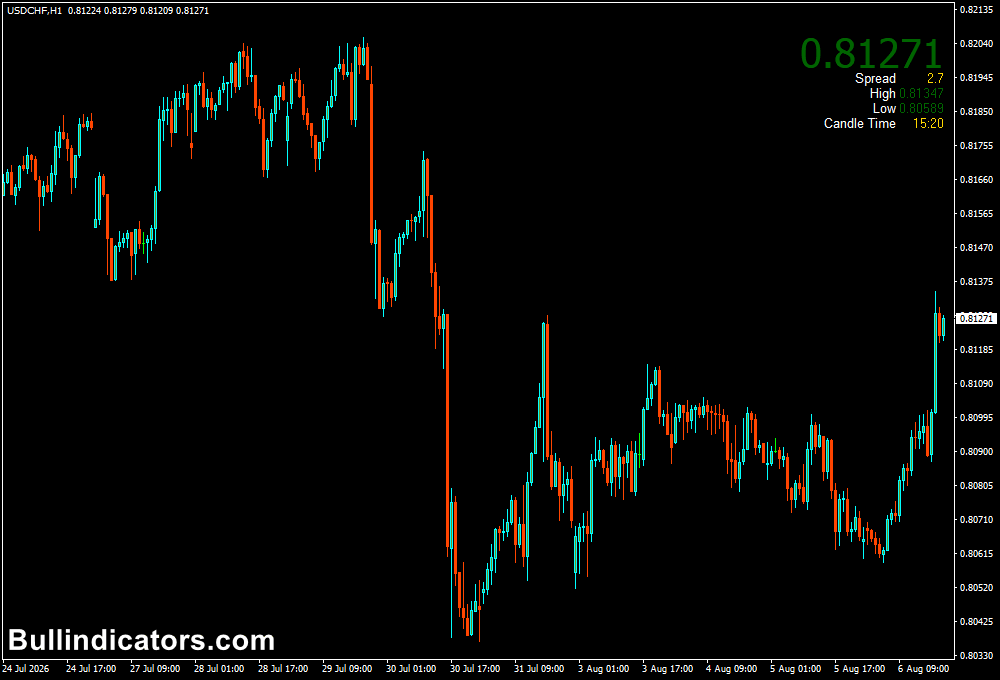
The Pip Counter displays its information in a compact window at the top-right of the MT4 chart.
The current price is presented prominently, making live price changes easy to monitor.
Additional information includes the daily high, daily low, current spread and remaining candle time.
When the trade-pip option is enabled, the display can also show the current gain or loss in pips for an open position.
The layout can be moved vertically or horizontally to keep it away from other chart objects.
Core Features
- Displays the current live market price.
- Shows the daily high and daily low.
- Provides the current bid/ask spread information.
- Displays the remaining time of the current candle.
- Can show the pip result of an active trade.
- Compact chart-based information panel.
- Customizable display position and colors.
- Suitable for all MT4 trading timeframes.
Best for
- Monitoring live price during active trading sessions.
- Checking spreads before entering short-term positions.
- Tracking daily highs and lows.
- Timing entries around candle closes.
- Scalping and intraday trade management.
Best Markets
- EUR/USD – useful for monitoring tight spreads during London and New York sessions.
- GBP/USD – helpful when volatility increases around major UK or US market events.
- USD/JPY – suitable for tracking price movement across Asian and US sessions.
- EUR/GBP – useful for lower-volatility setups where spread costs can have a noticeable effect on short targets.
- AUD/USD – practical for monitoring moves during the Asian session and later London trading.
- GBP/JPY – valuable for active scalpers who need to monitor rapid price and spread changes.
- USD/CAD – useful for intraday traders watching the relationship between price movement and spread conditions.
- Gold (XAU/USD) and major stock indices can also be monitored, provided the broker’s instrument is supported by MT4.
Trading Styles
- Forex scalping on M1 and M5.
- Intraday breakout trading.
- Day trading around daily highs and lows.
- News-session price monitoring.
- Short-term momentum trading.
- Manual trade management across higher timeframes.
How traders use it
The Pip Counter works best as a supporting tool rather than an entry system.
Before opening a trade, you can check the live spread, current price and position of price relative to the daily high and low.
Example: M5 Scalping
- Open an EUR/USD M5 chart and identify a potential breakout or pullback setup.
- Check the current spread before entering.
- Compare the current price with the daily high and low to understand its position within the day’s range.
- Wait for the M5 candle to provide the required confirmation.
- Use the candle countdown to avoid entering prematurely while the signal candle is still developing.
- After entering, enable Show Trade Pips to monitor the position’s live pip result.
- For a small scalping target, make sure the spread does not consume an excessive portion of the expected profit.
For example, if EUR/USD is trading only a few pips below the daily high and a breakout strategy is being considered, the Pip Counter makes it easy to monitor the live price and remaining candle time.
If the M5 candle closes above the daily high while the spread remains acceptable, the trader can evaluate the breakout according to their normal strategy.
The same principle can be applied to GBP/JPY, although its larger intraday movements mean that the spread and volatility can change more quickly.
During fast markets, checking the live spread before entering becomes particularly important.
Get Instant Free Access
Indicator Settings
- Show Smaller Size: Switches between a larger and smaller presentation of the price information.
- Show Trade Pips: Enables the display of the current pip gain or loss on an active trade.
- Shift UP DN: Adjusts the vertical position of the information panel.
- Adjust Side to Side: Moves the display horizontally across the chart.
- Comment Label Color: Changes the color used for the information labels.
- Spread Color: Controls the color of the spread display.
- Price Up & Price Dn Color: Sets the colors used when the displayed price is rising or falling.
Important Notes
- The Pip Counter does not generate independent buy or sell signals.
- Spread conditions can change considerably during news releases, market openings and periods of low liquidity.
- Daily highs and lows should be treated as reference levels rather than guaranteed reversal points.
- When targeting a small number of pips, always account for the spread and other trading costs.
- The candle countdown shows the remaining time for the current candle, but a signal should still be confirmed according to your trading strategy.
- Use the display alongside your existing technical analysis rather than relying on the price information alone.









