
The Time Zone indicator for MT4 helps you keep track of the major Forex trading sessions directly from your chart.
It displays Sydney, Tokyo, London, and New York, while also identifying the session currently active in the market.
Session timing is particularly important for short-term trading because liquidity, volatility, and price behavior can change significantly as different financial centers open.
This makes the tool useful for scalpers and day traders who want to concentrate their activity around the most active periods of the trading day.
Why traders use the Time Zone Indicator
Not every hour of the forex market offers the same trading conditions.
The Asian session can be relatively quiet for many currency pairs, while London often brings a substantial increase in liquidity.
The London-New York overlap can produce particularly strong price movement as two major financial centers are active at the same time.
Having the active session displayed on the chart helps traders decide when to look for setups and when to reduce their exposure.
It can also be useful when a strategy performs better during a particular session, such as trading JPY pairs during Tokyo or EUR and GBP pairs during London.
Download This MT4 Indicator for Free
Indicator Chart Setup
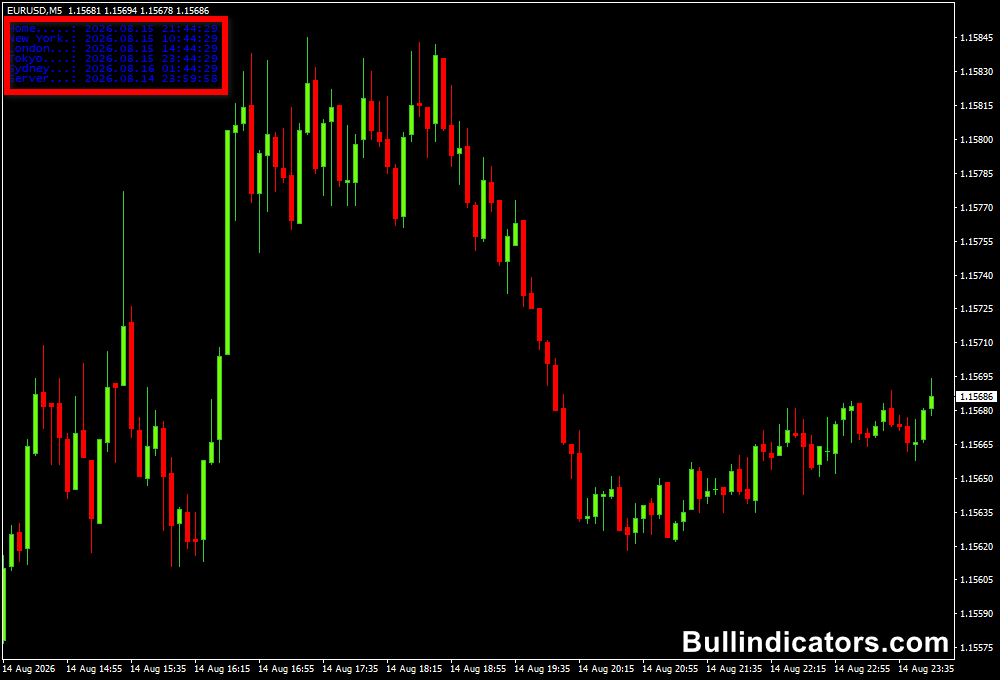
The current trading session is displayed on the chart together with the relevant session name and time information.
As the market moves from one session to another, the displayed session updates automatically.
New York, London, Sydney, and Tokyo are covered, allowing you to identify the current market period without manually checking a clock or calculating session times from your broker’s server time.
Core Features
- Displays the four major forex trading sessions.
- Identifies the currently active session.
- Shows session timing directly on the MT4 chart.
- Automatically updates as sessions change.
- Customizable font and text appearance.
- Useful for timing short-term and intraday strategies.
Best for
- Scalpers looking for periods of increased market activity.
- Day traders planning entries around session openings.
- Monitoring the London-New York overlap.
- Matching currency pairs with their most active trading sessions.
- Avoiding periods of low liquidity when a strategy requires stronger movement.
Best Markets
- EURUSD and GBPUSD during the London session and London-New York overlap.
- USDJPY during Tokyo and the early Asian session.
- AUDUSD and NZDUSD around Sydney and Tokyo activity.
- EURJPY and GBPJPY when European and Asian liquidity transitions.
- XAUUSD during London and New York, particularly when volatility expands.
Trading Styles
- Scalping on M1, M5, and M15 charts.
- Day trading on M15 and H1.
- Session breakout strategies.
- Intraday momentum trading around major market opens.
- Range trading during quieter Asian periods.
How traders use it
The simplest approach is to match the trading strategy with the characteristics of the active session.
Scalpers can focus on London or the London-New York overlap when liquidity and volatility increase, while day traders can use the session boundaries to plan entries, exits, and exposure.
Example: London Session Breakout
- Use the Time Zone Indicator to identify the start of the London session.
- Mark the Asian session high and low before London opens.
- Wait for London trading to become active.
- For a buy, look for price to break above the Asian-session high with strong bullish momentum.
- For a sell, look for price to break below the Asian-session low with strong bearish momentum.
- Confirm the direction with price action and the broader trend.
- Place the stop beyond the opposite side of the recent trading structure.
- Target the next support or resistance level, or use a predefined risk-to-reward ratio.
This approach can be particularly effective on EURUSD and GBPUSD because European market activity often brings greater movement to these pairs.
The same principle can be adapted to other sessions and currency pairs according to their liquidity patterns.
Get Instant Free Access
Indicator Settings
- Font: Sets the font style used for the session information.
- Font Size: Controls the size of the displayed session text.
- Font Color: Determines the color of the session information shown on the chart.
- Corner: Sets which chart corner is used to position the session display.
Important Notes
- The indicator is particularly useful for scalpers and day traders who depend on precise session timing.
- Session activity varies between currency pairs, so choose markets that are suitable for the active trading period.
- The London-New York overlap is generally one of the most active periods for major currency pairs.
- Asian sessions can provide useful range conditions, particularly for strategies designed around consolidation.
- Check your broker’s chart time when comparing session times with external market schedules.
- Daylight-saving changes can alter the relationship between local session times and broker server time.
- Session timing identifies market activity but does not predict the direction of the next price movement.









