The Volume Profile All In One indicator for MT5 is a flexible volume analysis tool designed to show how trading activity is distributed across selected price areas.
It provides several profile modes, adjustable calculation zones, and visual controls for adapting the display to different market conditions.
The indicator can be used to study areas where significant activity has taken place and to identify price levels that may become relevant during future moves.
Why traders use the Volume Profile All In One Indicator
The main advantage of this indicator is its flexibility.
You can define the calculation area by using a selected number of bars or by manually choosing a specific zone on the chart.
This makes it possible to examine recent intraday activity as well as a clearly defined trend, consolidation range, or previous market move.
The available profile styles provide different perspectives on the same price area.
Volume Aging Mode emphasizes the age of volume, while POC, VAH, and VAL levels highlight important areas within the profile.
The buyer and seller volume view can also help assess whether buying or selling activity is dominating a selected zone.
Download This MT5 Indicator for Free
Indicator Chart Setup
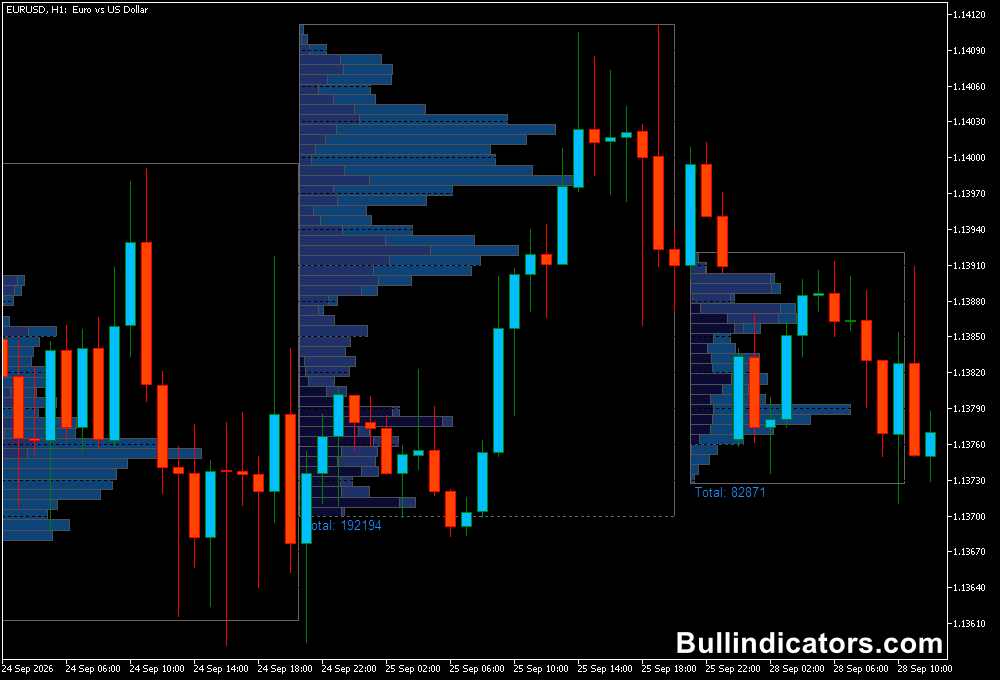
The indicator displays a volume profile across the selected price range.
Depending on the chosen histogram type, the profile can show volume aging, important POC and value-area levels, or a buyer-versus-seller breakdown.
The calculation can be based on a defined number of bars or a manually selected zone.
For example, a profile can be created from a specific intraday range on EURUSD M30.
The POC line can then mark the price level containing the highest concentration of activity, providing a useful reference when price returns to that area.
Core Features
- Multiple volume profile visualization modes.
- Bar-count and manual-zone calculation methods.
- Volume Aging Mode with visual emphasis on recent activity.
- POC, VAH, and VAL reference levels.
- Buyer versus seller volume display.
- Adjustable histogram size, height, width, and fill.
- Optional POC line with customizable length, width, and style.
- Customizable color schemes.
Best for
- Locating high-activity price areas within an intraday range.
- Studying acceptance and rejection around important volume levels.
- Analyzing consolidation zones before potential breakouts.
- Evaluating previous trends and identifying areas where price may react.
- Using POC and value-area levels as additional entry and exit references.
Best Markets
- EURUSD for detailed London and New York session analysis.
- GBPJPY when examining fast directional moves and retracements.
- GBPUSD for intraday volume analysis around major price levels.
- Gold for studying high-activity zones during periods of increased volatility.
- Major indices where concentrated trading activity can create significant reference levels.
Trading Styles
- Intraday trading on M15 and M30 using POC and value-area levels.
- Scalping on M5 around established high-volume price zones.
- Breakout trading after price leaves a well-defined consolidation profile.
- Pullback trading on H1 after a strong move returns to a previous high-volume area.
- Session-based analysis during London and New York trading hours.
How traders use it
The indicator can be incorporated into both breakout and reversal-based approaches.
A useful method is to first identify a clearly defined profile, then monitor how price behaves around the POC, VAH, and VAL.
Holding above a significant value area can support a bullish scenario, while rejection from the upper area may indicate that buyers are losing control.
An example:
BUY
For a buy setup, consider EURUSD on M30 during the London session.
Suppose a profile is created from the previous several hours and the POC is located around 1.1750, with the value area extending from 1.1735 to 1.1765.
Price initially trades below the value area, then breaks above 1.1765 and holds there.
A subsequent pullback toward 1.1765 that finds buying pressure can provide a potential long entry.
A stop could be placed below the recent swing low, while the next resistance or a new volume zone can be considered for the target.
SELL
For a sell setup, consider GBPJPY on M15 after a strong upward move.
If the profile shows a high-activity area around 203.20 and price moves above the value area before returning below it, the loss of support can provide a bearish signal.
A rejection near 203.20 followed by a move below the recent intraday low could be used as confirmation for a short position.
The stop can be positioned above the rejection high, with a lower volume zone or previous support considered as a potential target.
These examples show how the profile can be used as a framework for locating important price areas.
The POC or value-area levels should be combined with market structure and price behavior rather than treated as automatic buy or sell signals.
Get Instant Free Access
Indicator Settings
- Histogram type: Select the profile style, including aging, POC-based, or buyer/seller volume.
- Type of calculation zones: Choose between bar-count calculation and manual zone selection.
- Period: Selects the timeframe used for histogram grouping.
- Number of periods: Determines how many separate histograms are displayed.
- Current Period Calculation: Enables or disables live data for the current histogram.
- Histogram fill %: Controls how much of the available histogram area is filled relative to maximum volume.
- Histogram height: Sets the profile height using pixels or bars, depending on the selected option.
- Histogram width: Controls the visual width and spacing of the profile bars.
- POC line: Enables or disables the Point of Control line.
- POC line length: Determines how many bars the POC line extends across.
- POC line width: Controls the thickness of the POC line.
- POC line style: Selects a solid, dashed, or dotted POC line.
- Color scheme: Selects a default template or allows the individual colors to be customized.
Important Notes
- Volume Profile is most useful when the calculation area represents a meaningful market range or trading session.
- The POC identifies the highest-volume price within the selected profile and does not by itself indicate future direction.
- Manual zone selection is useful when analyzing a specific trend, consolidation range, breakout, or reversal.
- Including the current period allows the profile to update with live market activity.
- Combining volume levels with price structure, support, resistance, and momentum can provide stronger trade context.