
The ZigZag Channel indicator for MT5 combines the classic ZigZag indicator with channel lines to help analyse market swings and price direction.
It connects significant highs and lows while displaying a channel around the resulting movements, giving a clearer view of how price fluctuates between turning points.
This makes it useful for identifying potential trend changes, retracement areas, and possible entry or exit levels.
The indicator also measures the pip distance of individual ZigZag movements, helping assess the size of recent price swings.
Whether analysing AUDUSD on H4 or monitoring EURUSD during an active trading session, the channel provides a visual framework for studying market structure.
Its adjustable parameters allow the swing-detection process to be adapted to different instruments and timeframes.
Why traders use the ZigZag Channel Indicator
Price rarely moves in a perfectly straight line.
Even during a strong trend, temporary pullbacks and counter-movements create opportunities to assess the relationship between direction and short-term fluctuations.
The ZigZag Channel Indicator brings these movements into focus by combining swing points with channel boundaries.
An ascending ZigZag can help identify a bullish market structure, while a descending line highlights a bearish sequence.
The channel adds another reference for evaluating pullbacks, allowing potential entries to be considered at more favourable prices when supported by the broader trend.
Pip measurements also make it easier to compare swing sizes and estimate the distance between recent turning points.
Download This MT5 Indicator for Free
Indicator Chart Setup
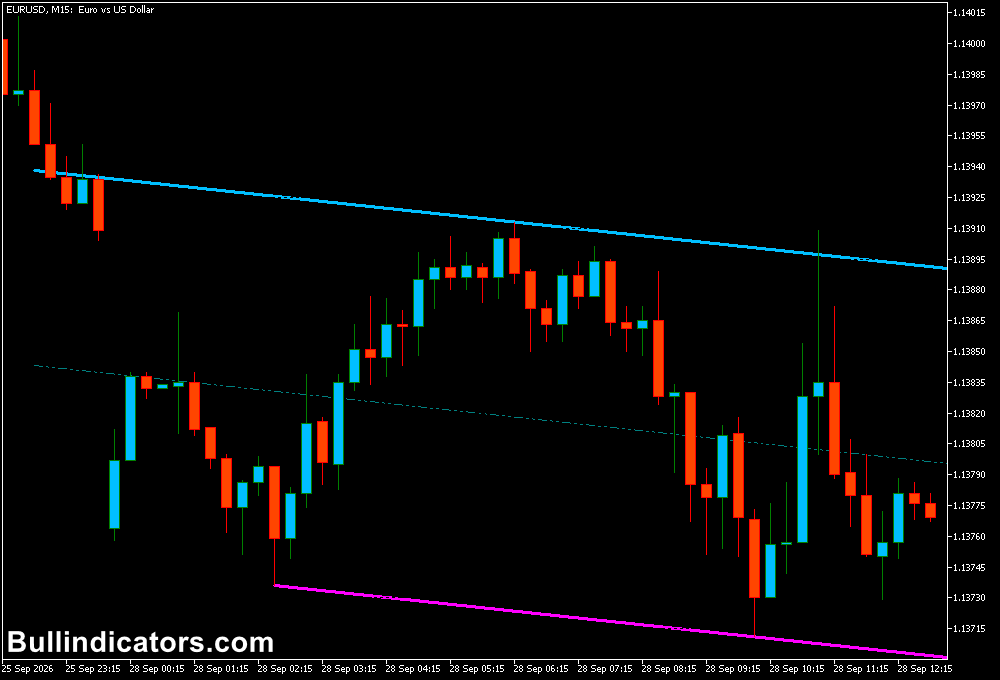
The indicator displays a ZigZag line in purple, accompanied by channel boundaries in blue and pink.
The lines connect selected price swings and outline the movement between successive turning points.
The resulting chart makes it easier to distinguish rising and falling structures and observe where price is trading relative to the channel.
On a rising swing, the lower channel boundary can serve as an area to monitor for a potential bullish reaction.
During a decline, the upper boundary may become relevant when looking for a possible selling opportunity.
The EURUSD M15 chart below is one example of how the indicator can be used to study these movements.
Channel touches should be assessed alongside current market direction and price confirmation.
Core Features
- Automatic identification of significant price highs and lows.
- ZigZag line displaying successive market swings.
- Channel boundaries surrounding the detected ZigZag movement.
- Pip-distance measurements for individual ZigZag swings.
- Adjustable parameters for controlling swing detection and reversal points.
- Support for intraday and longer-term chart analysis.
Best for
- Identifying sequences of higher highs and higher lows or lower highs and lower lows.
- Monitoring potential pullback entries within an established trend.
- Assessing swing distances when planning stop-loss and take-profit levels.
- Studying possible changes in market direction around recent turning points.
Best Markets
- AUDCHF: Suitable for examining swing structure and channel reactions on M30 and H1 charts.
- EURUSD: Useful for intraday channel analysis during the London and US sessions.
- GBPJPY: Worth testing for larger price swings and retracements on M15 and H1.
- Gold (XAUUSD): Can help visualise directional moves and pullbacks, although its volatility requires careful risk management.
Trading Styles
- Scalping: Use M1 and M5 charts on liquid pairs such as EURUSD to monitor short-term swings and channel reactions.
- Intraday trading: Apply M15 and M30 charts to identify pullbacks that align with the session trend.
- Swing trading: Use H4 and daily charts to study larger price movements and potential retracement areas.
- Position trading: Analyse weekly charts for broader market structure and longer-term directional changes.
How traders use it
Begin by checking the direction of the ZigZag line and the sequence of recent swing points.
When the line rises and price forms higher highs and higher lows, focus on potential buying opportunities.
A pullback toward the lower channel boundary may provide an area to watch for bullish confirmation.
A stop-loss can be considered below the relevant swing low, depending on volatility and the trading setup.
When the ZigZag slopes downward and the market forms lower highs and lower lows, the upper channel boundary may help identify potential selling areas.
Look for bearish confirmation before entering and assess the latest swing high when determining an appropriate stop-loss location.
Pip measurements can help estimate the size of previous moves, but they do not predict the distance of the next movement.
For additional confirmation, combine the channel with support and resistance, candlestick patterns, or a momentum indicator.
Avoid treating every channel touch as a signal, particularly in sideways markets where price can cross the boundaries repeatedly.
Get Instant Free Access
Indicator Settings
- ExtDepth: Sets the number of bars considered when identifying potential new price highs and lows. Higher values can produce fewer, broader swings.
- ExtDeviation: Controls the deviation threshold used when identifying new highs and lows. Adjusting this value affects which price movements qualify as significant.
- ExtBackup: Sets the number of bars checked when identifying potential trend reversal points.
- First peak index number (0,1,2,3…): Selects the starting peak index used by the indicator when calculating and displaying the ZigZag sequence.
- Colors: Controls the visual colours of the ZigZag line and channel boundaries, where supported by the indicator inputs.
Important Notes
- ZigZag indicators can redraw recent swing points as new price data arrives. Recent turning points should not be treated as confirmed until sufficient price action has developed.
- Channel boundaries are analytical references, not guaranteed support or resistance levels.
- Adjust ExtDepth, ExtDeviation, and ExtBackup to suit the instrument and timeframe being analysed.
- Use appropriate position sizing and a predefined stop-loss, especially on volatile pairs and gold.
- Test the settings on historical charts and in a demo account before using the indicator in live trading.
Bottom Line
The ZigZag Channel Indicator for MT5 combines swing analysis, channel boundaries, and pip-distance measurements in one chart tool.
It can support scalping, intraday analysis, and longer-term trend assessment by highlighting price structure and potential retracement areas.
For more reliable decisions, use the channel alongside confirmed price action and a consistent risk-management approach.









