
The Trend Magic indicator for MT4 is a trend-following tool designed to identify changes in market direction while providing a dynamic level that can help define support and resistance.
It uses a single colored trendline across the price chart, making it possible to monitor the current market bias without relying on several separate indicators.
Trend Magic combines Commodity Channel Index (CCI) and Average True Range (ATR) calculations.
CCI evaluates the relationship between current price and its historical average, while ATR accounts for market volatility when positioning the trendline.
The result is a dynamic line that changes color as the market moves from bullish to bearish conditions.
The Trend Magic indicator is also available for the MT5 platform. Download here.
Why traders use the Trend Magic Indicator
The main attraction of Trend Magic is the combination of trend direction and a dynamic price level in one chart tool.
When price moves above the Trend Magic line and the line is blue, the market has a bullish bias.
When price moves below the line and it turns red, bearish conditions are developing.
This makes the tool useful for trend-following strategies, pullback entries and trade management.
A long position can be maintained while price remains above the blue line, while a red line can warn that the bullish move is losing its trend support.
The same principle applies to short positions during bearish conditions.
Trend Magic can also be used across multiple timeframes.
A higher timeframe can establish the dominant direction, while a lower timeframe provides more precise entry opportunities.
This approach is particularly useful for scalping and intraday trading.
Download This MT4 Indicator for Free
Indicator Chart Setup
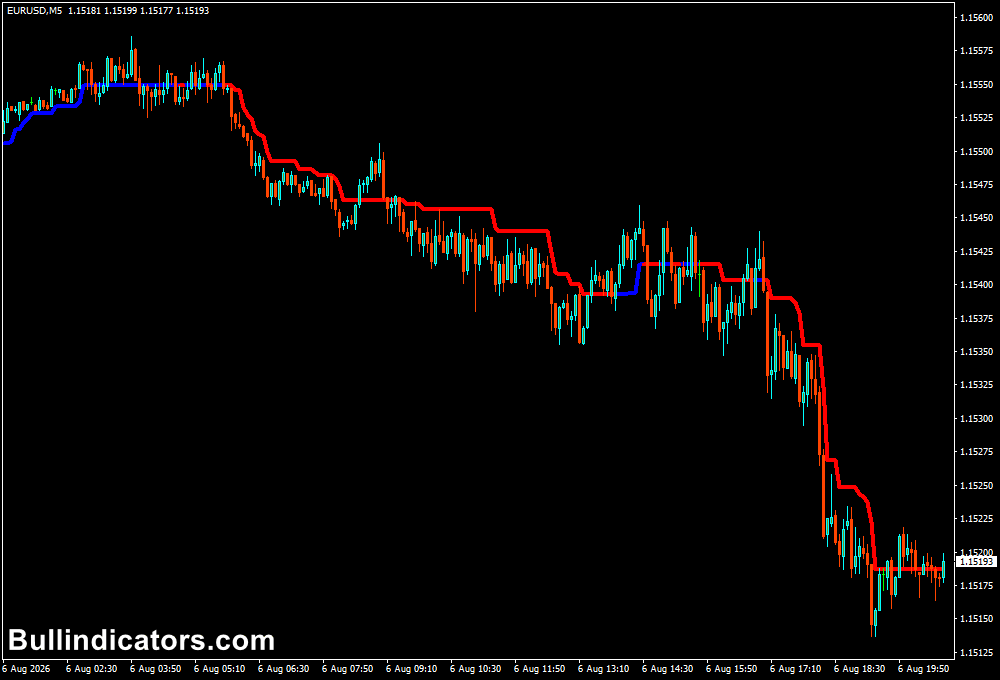
Trend Magic appears as a colored line running through the price chart.
A blue line represents bullish conditions, while a red line represents bearish conditions.
The line also acts as a dynamic reference level that can help identify areas where price may find support or resistance during an ongoing move.
For example, when EUR/USD is trading above a blue Trend Magic line, the focus can remain on long setups.
If price breaks below the line and it changes to red, the market bias has shifted and short opportunities can be considered.
Core Features
- Identifies bullish and bearish trend conditions.
- Uses CCI and ATR calculations to determine the trendline.
- Blue line indicates bullish market conditions.
- Red line indicates bearish market conditions.
- Provides a dynamic support and resistance reference.
- Suitable for multiple MT4 timeframes.
Best for
- Trend-reversal identification.
- Trend-following entries and exits.
- Dynamic support and resistance analysis.
- Intraday and scalping strategies.
- Confirming the directional bias before entering a trade.
Best Markets
- EUR/USD and GBP/USD for liquid intraday setups.
- USD/JPY for cleaner directional moves during active sessions.
- GBP/JPY for higher-volatility scalping opportunities.
- Gold (XAU/USD) when strong momentum develops.
- Major stock indices can also be tested for short-term trend moves.
Trading Styles
- Forex scalping on M1 and M5.
- Intraday trend following on M15 and H1.
- Pullback trading in established trends.
- Short-term momentum strategies.
- Multi-timeframe trend confirmation.
How traders use it
A basic long setup develops when price moves above the Trend Magic level and the line turns blue.
The trader can then look for confirmation from price action before entering.
The position can remain open while price respects the blue line, with an exit considered when the line changes red or the original trade setup is invalidated.
A short setup follows the opposite process.
When price moves below Trend Magic and the line turns red, the bearish bias is confirmed.
A short position can then be considered, with the red line used as a dynamic reference for managing the trade.
A change back to blue can signal that the bearish setup is no longer valid.
Scalping Strategy
For scalping, the Trend Magic Indicator can be combined with the Scalper Signal Indicator for MT4.
Trend Magic determines the market direction, while the green and red arrows provide the short-term entry trigger.
Buy Rules – M1 or M5
- Trend Magic must be blue.
- Price should remain above the Trend Magic line.
- Wait for a green arrow from the Scalper Signal Indicator.
- Enter a long position after the green arrow confirms the bullish setup.
- Aim for a 5-10 pip profit target, depending on volatility and the currency pair.
- Place the stop below the latest M1 or M5 swing low, or follow your predefined risk level.
Example: EUR/USD M5 Buy Setup
- Trend Magic turns blue following a bullish reversal.
- EUR/USD pulls back toward the Trend Magic line but remains above it.
- A green arrow appears below a candle.
- The green arrow provides the short-term buy trigger.
- The trade can target approximately 5-10 pips when market conditions support a quick move.
Sell Rules – M1 or M5
- Trend Magic must be red.
- Price should remain below the Trend Magic line.
- Wait for a red arrow from the Scalper Signal Indicator.
- Enter a short position after the red arrow confirms the bearish setup.
- Aim for a 5-10 pip profit target, adjusted to current volatility.
- Place the stop above the latest M1 or M5 swing high, or according to your predefined risk.
Example: EUR/USD M5 Sell Setup
- Trend Magic turns red following a bearish reversal.
- Price remains below the red Trend Magic line.
- A red arrow appears above a candle.
- The red arrow provides the short-term sell trigger.
- The trade can target approximately 5-10 pips if downside momentum remains strong.
The key filter is direction: avoid buying while Trend Magic is red and avoid selling while it remains blue.
A temporary opposite-colored arrow should not automatically override the broader Trend Magic signal.
Get Instant Free Access
Indicator Settings
- CCI Period: Determines the period used to calculate the historical price average for assessing the current trend condition.
- ATR Period: Controls the monitoring period used to measure market volatility and position the Trend Magic level.
- Colors: Controls the colors used for bullish and bearish Trend Magic conditions.
- Line Style: Adjusts the visual style of the Trend Magic line on the chart.
Important Notes
- Use the higher timeframe trend to confirm the direction of lower timeframe trades.
- For M1 and M5 scalping, avoid entering solely because an arrow appears; Trend Magic should support the same direction.
- A 5-10 pip target is most appropriate when market volatility and spread allow sufficient room for the trade to develop.
- Adjust the CCI and ATR periods carefully because changing them can alter the responsiveness of the trendline.
- Test the combination on a demo account before applying it to live trading conditions.









