
The FXSSI Trading Sessions indicator for MT4 is a professional Forex session analysis tool designed for scalpers, day traders, and breakout traders who need accurate market timing.
The indicator displays the opening and closing periods of the four major Forex sessions: Sydney, Tokyo, London, and New York.
Forex market behavior changes throughout the day as different financial centers become active.
The London and New York sessions often provide stronger volatility, while Asian sessions can create important price ranges for breakout strategies.
It helps traders recognize these periods directly on their MetaTrader 4 charts.
By automatically drawing session boxes, this tool removes the need to manually track market hours.
Traders can quickly identify active sessions, analyze previous ranges, and prepare for potential trading opportunities based on market timing.
Why traders use FXSSI Trading Sessions Indicator
Scalpers and intraday traders rely heavily on timing because short-term price movements are strongly influenced by liquidity and volatility.
The FXSSI Trading Sessions indicator helps traders focus on the periods when the market is most active.
It is widely used with session breakout strategies, price action setups, and volatility-based trading methods.
By showing session boundaries and overlaps, traders can understand where important market movements may develop.
A major advantage of this tool is the ability to view previous, current, and upcoming sessions.
This makes it useful for both live trading and historical chart analysis.
Users can study how price reacted during earlier sessions and plan upcoming trades with better market awareness.
Download This MT4 Indicator for Free
Indicator Chart Setup
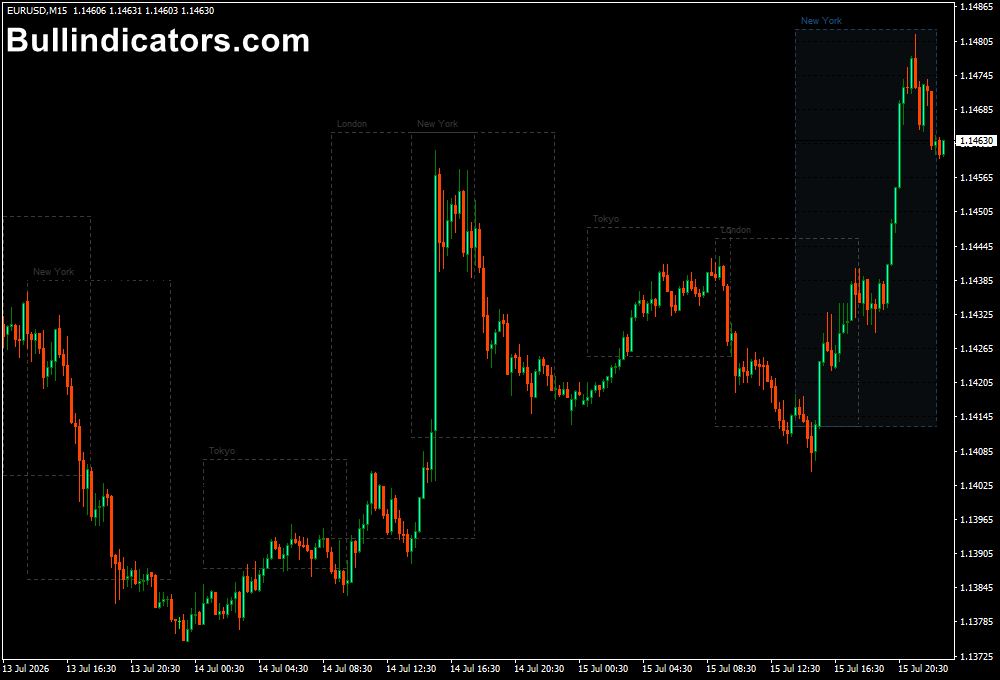
When the FXSSI Trading Sessions indicator is added to a MetaTrader 4 chart, it creates visual session boxes that represent the active periods of the Sydney, Tokyo, London, and New York markets.
Each session is displayed with its own time range and label, allowing traders to quickly see which global market is currently open.
The indicator can display historical sessions, the active session, and future sessions, making it useful for planning intraday trades.
The appearance can be adjusted through the settings, including session visibility, timezone adjustments, label length, and background filling options.
Core Features
- Displays the four major Forex sessions: Sydney, Tokyo, London, and New York.
- Shows previous, current, and upcoming trading sessions.
- Highlights important session overlaps with increased market activity.
- Supports manual timezone adjustments for different brokers.
- Provides customizable session boxes and labels.
- Works on all MT4 timeframes.
Best for
- Forex scalping.
- Intraday trading.
- Session breakout strategies.
- Price action analysis.
- Volatility and liquidity analysis.
Best Markets
- EUR/USD and GBP/USD during London session activity.
- USD/JPY, AUD/USD, and NZD/USD during Asian sessions.
- XAU/USD, EUR/USD, USD/CAD, and other active pairs during New York hours.
- Major Forex pairs and highly liquid markets.
Trading Styles
- Scalping.
- Day trading.
- Breakout trading.
- Price action trading.
- Short-term momentum trading.
How traders use it
Traders use the FXSSI Trading Sessions indicator to adjust their trading decisions according to market activity.
The most common application is identifying session ranges and looking for breakouts when a new major session begins.
For example, many traders use the London Breakout strategy by measuring the high and low of the Asian session.
When London opens, they monitor whether price breaks outside this range.
A breakout above the Asian high may indicate bullish momentum, while a move below the Asian low may suggest bearish pressure.
Stop loss placement is usually based on the previous session range, while take profit targets can be selected using risk-to-reward calculations, support and resistance levels, or volatility measurements.
This sessions tool can also be combined with other trading tools such as the Average Daily Range Indicator to measure available price movement and improve risk management decisions.
Get Instant Free Access
Indicator Settings
- Session Options On/Off: Enables or disables individual sessions. Traders can display all market sessions or keep only one selected session visible.
- Session Options Time: Allows manual adjustment of session opening times to match different market schedules and Daylight Saving Time changes.
- Short Name Length: Controls the number of characters used for session labels above the boxes. Traders can choose between 2 or 3 letter abbreviations.
- Server Time Offset: Adjusts the broker terminal timezone and moves all sessions together when the broker server time differs from the indicator settings.
- Fill Sessions Background: Allows traders to enable or disable the session box background fill for a cleaner chart appearance.
Important Notes
- Check your broker server timezone before configuring the indicator.
- Session times may require manual updates when Daylight Saving Time changes occur.
- The indicator is designed for market timing analysis and does not provide automatic trading signals.
- London and New York session overlaps often create the highest volatility periods.
- Use the indicator together with proper risk management and a complete trading strategy.









