The Day of Week Labels indicator for MT5 displays weekday labels and separators directly on your trading chart, marking the beginning and end of each trading day.
This chart organization tool does not generate buy or sell signals or predict price direction.
It makes chart analysis easier by separating trading days with visible labels, separator lines, and customizable colors.
For scalping and day trading, it helps identify when price movements occurred, compare daily ranges, and review historical setups without manually locating each day’s boundaries.
Why Traders Use the Day of Week Labels Indicator
Price behavior can vary throughout the trading week. Breakouts, volatility, and liquidity may differ between Monday and Friday, making weekday comparisons useful when reviewing a strategy.
The indicator labels each trading day, helping you distinguish individual days on charts containing several sessions of M5 or M15 candles.
It is also useful for backtesting.
You can identify the weekday of past winning and losing trades and investigate whether your strategy performs differently under specific market conditions.
Download This MT5 Indicator for Free
Indicator Chart Setup
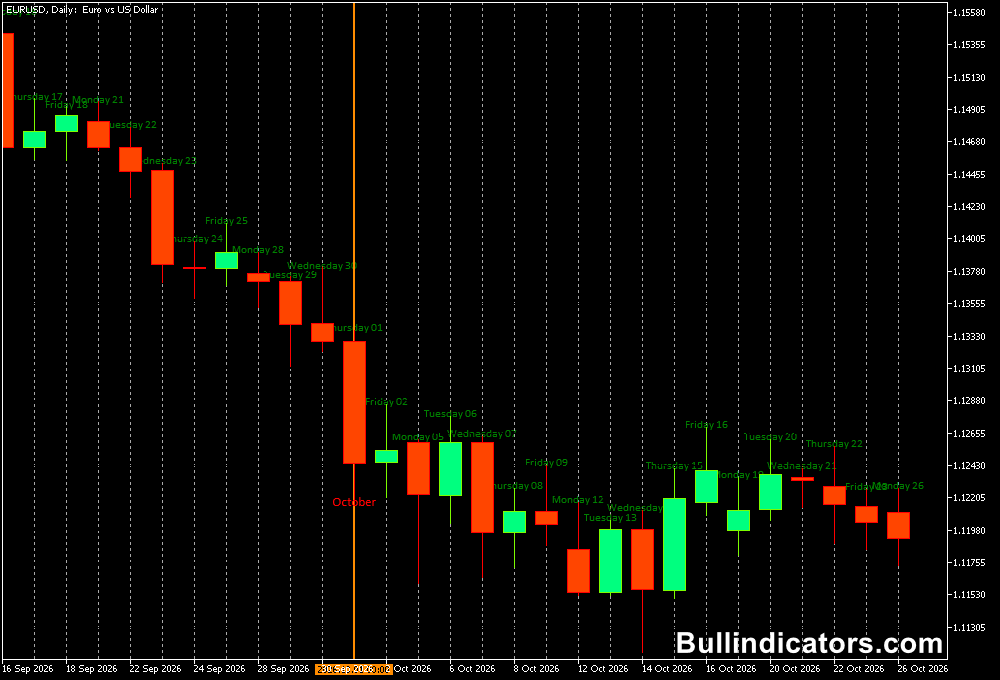
The indicator displays weekday labels and separator lines on the main price chart.
Five different colors distinguish the days, while optional day numbers can appear beside the labels.
These boundaries help you compare daily opening prices, highs, lows, and breakouts.
On M5 and M15 charts, they provide useful reference points for intraday analysis and historical price reviews.
Core Features
- Displays weekday labels on the MT5 price chart.
- Marks the beginning and end of each trading day.
- Uses five colors to distinguish individual days.
- Offers customizable separator lines and label text.
- Supports optional day numbers beside weekday labels.
- Helps organize charts for backtesting and price action analysis.
Best For
- Identifying the weekday associated with a trading setup.
- Comparing daily ranges and breakout behavior.
- Reviewing historical entries and exits.
- Studying recurring weekday price patterns.
- Organizing lower-timeframe charts.
Best Markets
- EURUSD and GBPUSD: Compare weekday price behavior during London and New York sessions.
- USDJPY: Review movements across Asian and European trading hours.
- XAUUSD (Gold): Examine daily ranges, volatility, and breakouts.
- US stock indices: Review opening moves and intraday ranges.
- Major cryptocurrencies: Organize continuous seven-day charts, including weekends.
Trading Styles
- Scalping: Use M1 and M5 charts to identify when short-term movements occurred.
- Day trading: Use M5 and M15 charts to compare daily openings, breakouts, and ranges.
- Price action trading: Review daily highs, lows, and candle formations by weekday.
- Strategy backtesting: Compare performance across trading days on M15, H1, or other historical timeframes.
How Traders Use the Day of Week Labels Indicator
The indicator provides a visual reference alongside your existing trading tools.
Combine it with support and resistance, moving averages, trend indicators, or candlestick patterns to assess potential entries.
For example, a day trader can mark Monday’s high and low, then monitor whether Tuesday’s price breaks either level.
A scalper can check whether a breakout occurred near the start of a trading day or later in the session.
The labels simplify these comparisons but do not confirm a breakout on their own.
Scalping Example
- Chart setup: Apply the indicator to EURUSD on M5.
- Identify the day: Locate the current weekday and mark the recent high and low.
- Wait for a setup: Use price action or a trend indicator to identify a potential breakout or pullback.
- Confirm the entry: Wait for directional and price confirmation.
- Manage risk: Set a stop-loss at a suitable invalidation level and choose a target based on market conditions.
Day Trading Example
- Chart setup: Apply the indicator to EURUSD on M15.
- Review the previous day: Identify its high, low, and closing price.
- Monitor the new day: Check whether price breaks the previous range or remains within it.
- Confirm the direction: Use support and resistance or trend analysis to evaluate the move.
- Plan the trade: Define entry, stop-loss, and take-profit levels before placing an order.
Get Instant Free Access
Indicator Settings
- Hours offset: Adjusts the hourly offset used to position day boundaries. Check the display against your broker’s chart time.
- Show days numbers: Enables or disables day numbers beside weekday labels.
- Colors: Customize the colors used for trading days to improve chart visibility.
Important Notes
- This is a chart-labeling tool, not a directional indicator, and it does not generate buy or sell signals.
- Broker server time may differ from local time and affect daily boundaries.
- Forex trading typically runs from Monday to Friday, but displayed boundaries depend on available price data and broker time.
- Use additional technical analysis to evaluate entries; weekday labels do not indicate whether a trade will succeed.
- When backtesting, consider differences in market conditions, economic announcements, spreads, and volatility across trading days.