
The Trend Line Price Alert indicator for Metatrader 4 helps you monitor important price levels without constantly watching your charts.
Once you place an alert line, the tool automatically notifies you when price reaches or crosses that level.
Whether you are waiting for a breakout, pullback, or reversal, it allows you to focus on other tasks while remaining ready to act when the market reaches your planned entry zone.
The tool supports both horizontal levels and trendlines, making it suitable for virtually any technical trading strategy.
Notifications can be delivered through platform alerts, email, or a connected mobile device, ensuring you never miss an important market movement.
It performs equally well on short-term scalping charts and higher timeframes used for swing trading.
Why traders use the Trend Line Price Alert tool
Successful trading often requires patience.
High-quality setups may take hours before price finally reaches an important support level, resistance zone, or trendline.
Rather than continuously monitoring the market, this tool watches those levels for you and immediately sends a notification when the price arrives.
It is particularly useful for breakout traders, price action traders, and anyone who plans trades around predefined technical levels.
Many Forex traders also use it together with higher-timeframe analysis, waiting for price to reach an important area before looking for confirmation on a lower timeframe.
Trading in the direction of the higher timeframe trend generally produces stronger and more reliable opportunities.
Download This MT4 Indicator for Free
Download Trendline-Price-Alert-Forex-Indicator.ex4 Indicator
Indicator Chart Setup
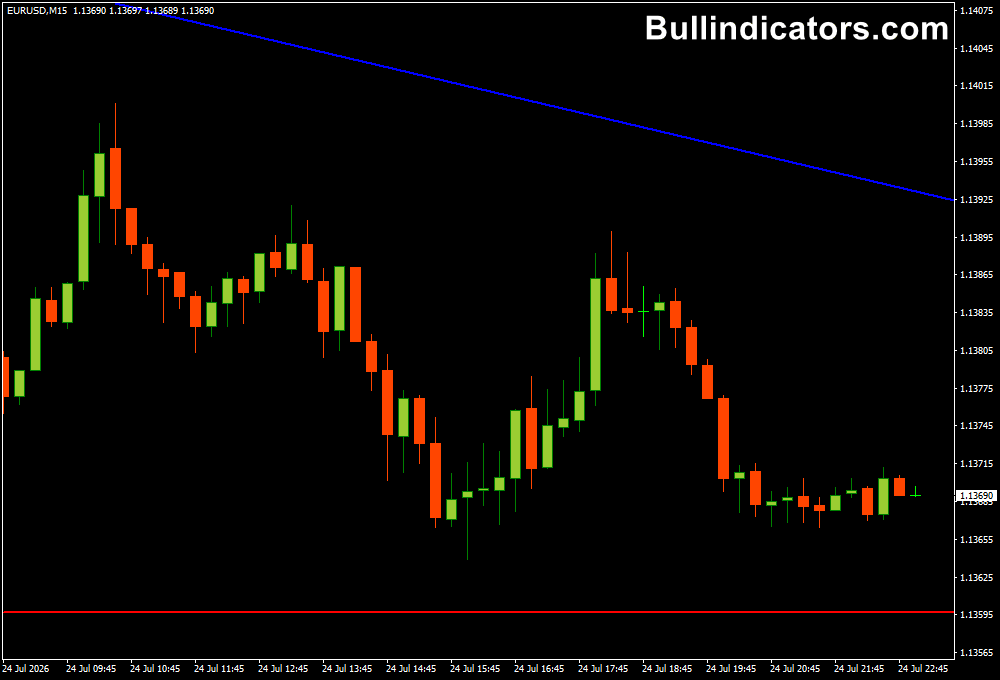
After attaching the tool to a Metatrader 4 chart, two adjustable alert lines appear.
One represents the upper alert level, while the other marks the lower alert level.
These lines can be moved anywhere on the chart to match support, resistance, trendlines, or breakout zones. A
s soon as price crosses one of the selected levels, the configured notification is triggered.
The flexibility to switch between horizontal lines and trendlines makes it suitable for a wide variety of trading approaches, from simple support and resistance strategies to more advanced trendline analysis.
Core Features
- Creates customizable upper and lower alert levels.
- Supports both horizontal lines and trendlines.
- Provides sound and email notifications.
- Allows mobile notifications when properly configured.
- Easy to reposition alert lines directly on the chart.
- Suitable for breakout and reversal strategies.
- Works on every financial instrument supported by MT4.
Best for
- Price alert notifications.
- Support and resistance trading.
- Trendline breakout strategies.
- Waiting for pullback entries.
- Monitoring key technical levels.
- Trading with higher-timeframe confirmation.
Best Markets
- EUR/USD during London trading hours.
- GBP/USD around major support and resistance zones.
- USD/CAD during New York session volatility.
- Gold (XAUUSD) before breakout opportunities.
- US30 and NASDAQ around market opens.
- Trending Forex pairs approaching key technical levels.
Trading Styles
- M5 breakout scalping with price alerts.
- M15 support and resistance trading.
- H1 trendline breakout confirmation.
- H4 swing trading using major trendlines.
- Position trading with long-term technical levels.
- Multi-timeframe trading aligned with the higher timeframe trend.
How traders use it
A common approach is to place the upper alert near resistance and the lower alert near support before the trading session begins.
Once price reaches either level, the notification allows you to return to the chart and evaluate the setup.
Depending on market conditions, the move may develop into a breakout or produce a rejection that creates a reversal opportunity.
Another effective method is combining alerts with trendline analysis.
Draw a rising or falling trendline and wait for price to test it.
Once the notification is received, examine price action before entering the trade.
For higher-probability setups, many professionals only take signals that align with the dominant trend visible on the H1, H4, or Daily chart, while using lower timeframes for precise entries.
Get Instant Free Access
Indicator Settings
- NoteDraw Trendline: Selects whether the alert uses a trendline (True) or a horizontal line (False).
- Draw Trendline: Enables drawing and displaying the selected trendline.
- Send Email: Sends an email notification whenever an alert is triggered.
- Note Single Alert: Limits alerts to one high or low notification per candle.
- Single Alert Mode: Lets you choose a single alert notification method.
Important Notes
- Works efficiently on every timeframe, from M1 through Daily charts.
- Ideal for monitoring breakout levels while away from your computer.
- Use alerts together with price action confirmation before entering a trade.
- Following the direction of the higher timeframe trend often improves trade quality.
- Email and mobile notifications require proper MT4 configuration.
- Trendlines and horizontal levels can both be monitored using the same tool.
- Alerts notify you when price reaches your level but do not automatically generate trading signals.









