
The Forex Entry indicator for Metatrader 4 is designed to simplify market timing by highlighting potential trend reversals and continuation moves with easy-to-read color signals.
Rather than filling the chart with multiple moving averages or oscillators, it displays its analysis in a separate indicator window, allowing you to keep the price chart clean while still receiving actionable trading information.
This approach makes it suitable for traders who prefer quick decision-making.
Whether you trade short-term momentum or larger market swings, the indicator helps identify possible entry opportunities without requiring lengthy technical analysis.
It can also be combined with support and resistance, trendlines, or candlestick patterns to improve trade selection.
Why traders use the Forex Entry Indicator
Not every trader wants to interpret several technical indicators before placing a trade.
The Forex Entry Indicator reduces that workload by presenting potential buying and selling opportunities through simple color changes.
This allows users to focus more on trade management rather than spending time searching for signals.
Its versatility is another reason for its popularity.
The indicator performs well across multiple timeframes, making it useful for both fast-paced scalping sessions and higher-timeframe trend trading.
Many traders also use it as a confirmation tool alongside their existing strategy instead of relying on it as a standalone system.
Download This MT4 Indicator for Free
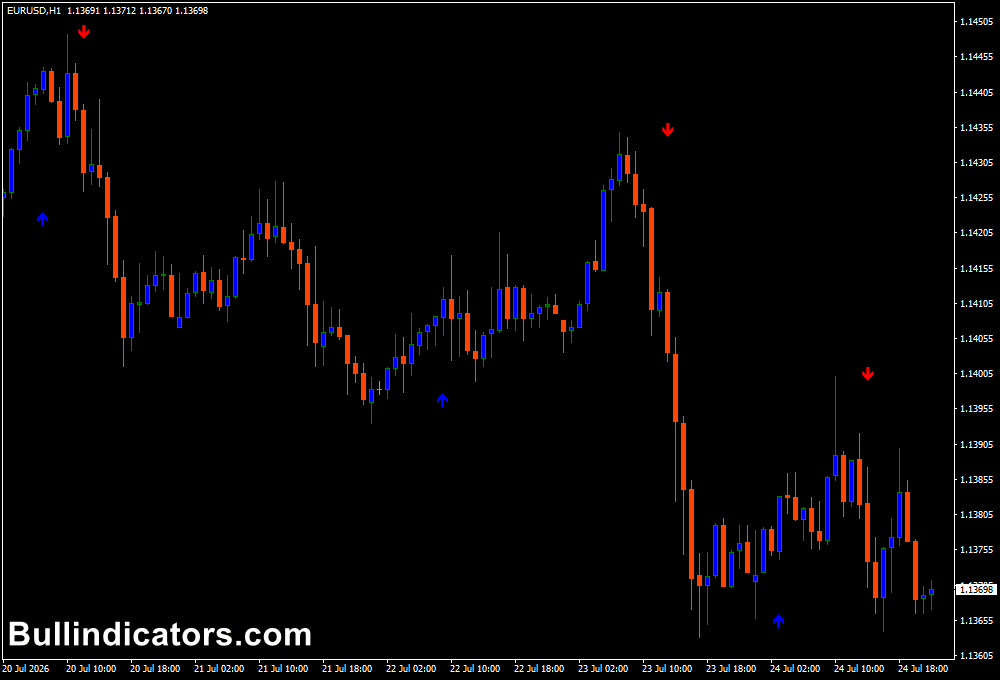
Indicator Chart Setup
The indicator is plotted directly onto the price chart where vertical Aqua and Magenta bars are generated whenever a potential market opportunity develops.
Aqua bars indicate bullish conditions, while Magenta bars suggest bearish momentum.
Because the signals are displayed outside the main chart, candlesticks remain fully visible for additional price action analysis.
For greater reliability, many traders wait until the current candle has closed before acting on a newly generated signal.
This helps avoid reacting to temporary price fluctuations before confirmation is complete.
Core Features
- Simple Aqua and Magenta entry signals.
- Separate indicator window keeps charts uncluttered.
- Suitable for trend reversals and continuation trades.
- Works on every MT4 timeframe.
- Can be combined with price action and technical analysis.
- Supports major Forex pairs, indices, and commodities.
- Lightweight and easy to configure.
Best for
- Finding trade entry opportunities.
- Momentum trading.
- Trend continuation setups.
- Reversal trading.
- Signal confirmation.
- Simple visual trading strategies.
Best Markets
- GBP/JPY for strong momentum moves.
- EUR/USD during London session volatility.
- GBP/USD after major economic releases.
- XAU/USD (Gold) during trending markets.
- AUD/USD during Asian session breakouts.
- EUR/GBP when trading medium-term reversals.
Trading Styles
- M1 and M5 scalping during active sessions.
- M15 momentum trading.
- M30 breakout strategies.
- H1 intraday trend trading.
- H4 swing trading with price action confirmation.
- Daily trend-following positions.
How traders use it
An Aqua signal suggests bullish momentum may be developing.
Many traders wait for the candle to close before entering a BUY position, then place the stop-loss below the most recent swing low.
Profit targets can be based on nearby resistance levels, a fixed risk-to-reward ratio, or an opposite signal.
When a Magenta signal appears, it indicates potential bearish momentum.
A SELL position can be considered after candle confirmation, with the stop-loss positioned above the latest swing high.
Conservative traders often combine these signals with higher-timeframe trend analysis, only taking BUY signals during broader uptrends and SELL signals during established downtrends.
Because the indicator focuses on identifying potential turning points, combining it with support and resistance zones or candlestick confirmation can significantly improve trade quality.
Get Instant Free Access
Indicator Settings
- KPeriod: Defines the calculation period for the K line.
- DPeriod: Sets the calculation period for the D line.
- Slowing: Controls the smoothing applied to the indicator.
- Method: Selects the moving average method used in the calculations.
- Price: Chooses the applied price, such as Close, Open, High, or Low.
- aey_WPR: Adjusts the Williams %R reference values.
- ExtWPRPeriod: Specifies the calculation period for Williams %R.
- ZoneHighPer: Defines the upper threshold level.
- ZoneLowPer: Defines the lower threshold level.
Important Notes
- Always wait for the signal candle to close before entering a trade.
- Signals are often more reliable during periods of strong market momentum.
- M1 and M5 charts work well for active scalpers during London and New York sessions.
- H1 and H4 timeframes generally produce fewer but stronger trading opportunities.
- Use nearby support and resistance levels to improve stop-loss and take-profit placement.
- The indicator performs best when combined with trend confirmation rather than traded in isolation.
- Proper money management remains essential regardless of signal quality.









