
The High Way Channel indicator for MT4 is a dynamic channel-based trading tool designed to highlight potential reversal areas and price movement zones.
The indicator creates a visual channel around price action, helping to identify areas where the market may slow down, reject a level, or continue toward the opposite side of the range.
The unique feature of this tool is the use of multiple channel zones.
Instead of showing only a single upper and lower boundary, it provides different areas of interest that can be used for aggressive or more conservative trade entries.
This makes it suitable for scalpers, intraday traders, and swing traders who rely on price location before opening a position.
Because the channel automatically adjusts with changing market conditions, it can be applied to different assets and timeframes without manually redrawing support and resistance areas.
Why Use the High Way Channel Indicator
Price channels are widely used because markets often react around established trading zones.
The High Way Channel Indicator simplifies this concept by automatically plotting important areas where buyers and sellers may become active.
The blue and red zones provide different approaches to trade selection.
The blue area can be used by traders looking for earlier entries with more risk, while the red area highlights deeper channel levels where price may offer stronger reversal opportunities.
Another advantage is that the indicator provides a clear framework for planning trades.
Instead of entering randomly after a price move, users can wait until the market reaches a predefined area and then confirm the setup with price action or trend analysis.
Download This MT4 Indicator for Free
Indicator Chart Setup
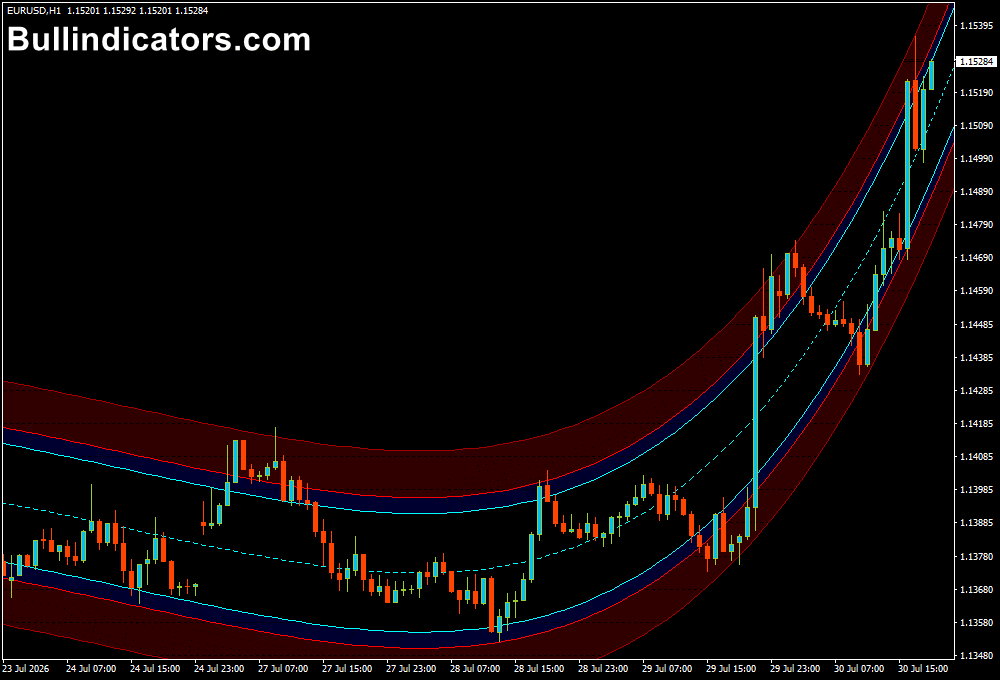
The High Way Channel Indicator is displayed directly on the price chart using several colored channel lines.
The central regression line follows the general price direction, while additional bands create zones where potential reactions may occur.
When price approaches the outer areas of the channel, users can look for reversal patterns, trend continuation signals, or additional confirmation before entering a trade.
The visual layout makes it easy to understand where price is positioned within the current market range.
Core Features
- Automatically creates dynamic price channels.
- Identifies potential reversal zones.
- Includes multiple channel levels for different trading approaches.
- Adapts to changing market conditions.
- Works with scalping, intraday, and swing strategies.
- Can be combined with price action analysis.
Best For
- Channel trading.
- Reversal setups.
- Pullback entries.
- Support and resistance analysis.
- Finding trade locations within market ranges.
Best Markets
- EUR/USD on the M5 and M15 charts for short-term channel movements.
- GBP/USD on the M15 timeframe when price creates strong intraday swings.
- USD/JPY on the H1 chart for identifying larger price boundaries.
- XAU/USD (Gold) on M5 and M15 charts where volatility creates clear channel reactions.
- GBP/JPY during active London trading hours for wider price movements.
- US30 and NAS100 on lower timeframes when looking for pullback opportunities.
- Currency pairs and instruments that frequently respect technical price zones.
Trading Styles
- Scalping.
- Intraday trading.
- Swing trading.
- Mean reversion strategies.
- Price action trading.
- Channel breakout trading.
How Traders Use It
The High Way Channel Indicator is commonly used by first identifying the overall market direction before looking for entries.
For scalping and intraday trading, checking the higher timeframe trend can help avoid taking positions against stronger market momentum.
For example, if the H1 trend is bullish, many short-term users focus mainly on buy setups when price reaches the lower channel zones on the M5 or M15 chart.
This approach allows short-term entries to follow the larger market direction.
Buy Example: When the higher timeframe trend is bullish, wait for price to pull back toward the lower channel area.
A bullish candlestick pattern such as an engulfing candle or rejection wick can provide additional confirmation.
A stop loss can be placed below the recent swing low, while the opposite channel zone can be used as a potential profit target.
Sell Example: During a bearish higher timeframe trend, monitor the upper channel zone for possible short opportunities.
A bearish rejection candle or reversal pattern can confirm the setup.
The stop loss is commonly positioned above the latest swing high, with the lower channel area acting as a possible target.
Get Instant Free Access
Indicator Settings
- Period – Determines the number of candles used in the channel calculation. Lower values make the channel react faster, while higher values create smoother movements.
- Regression Degree – Controls how the channel adapts to current price behaviour and the strength of the regression calculation.
- K_N_L Dev 1, 2, 3 – Adjust the distance and placement of the different channel bands around price.
- Std Channel Color – Changes the color of the standard deviation channel line.
- Regression Color 1 – Controls the appearance of the central regression line.
- Regression Color 2 – Sets the color of the inner channel boundary.
- Regression Color 3 – Defines the color of the outer channel boundary.
- Colors – Allows customization of the indicator appearance to match your MT4 template.
Important Notes
- Use higher timeframe direction as additional confirmation when scalping.
- The indicator works best when combined with price action signals.
- Blue and red zones represent potential reaction areas, not guaranteed reversal points.
- Strong trends can cause price to remain near one side of the channel for extended periods.
- Suitable for Forex, commodities, indices, and other MT4-supported markets.
- Always apply proper risk management when trading channel-based setups.









