
The BB Alert Arrows indicator for MT4 is a simplified Bollinger Bands trading tool that generates clear buy and sell arrows without displaying the traditional Bollinger Bands on the chart.
Instead of interpreting upper and lower bands manually, the indicator automatically identifies potential reversal points and marks them with visual arrow signals.
The indicator is designed for traders who want fast decision-making and clean charts.
It also includes optional sound and email alerts, making it suitable for traders who monitor multiple currency pairs simultaneously.
Whether you are trading short-term momentum or longer-term trends, the BB Alert Arrows Indicator provides straightforward entry signals that can easily be combined with other forms of technical analysis.
Why traders use the BB Alert Arrows Indicator
Bollinger Bands are widely used to identify overextended price movements, but reading the bands continuously can become time-consuming.
The BB Alert Arrows Indicator simplifies the process by generating bullish and bearish arrows whenever price reacts from the outer Bollinger Bands.
New traders appreciate the easy-to-understand signals, while experienced traders often combine the arrows with support and resistance, moving averages, trendlines, or candlestick patterns to improve trade selection.
The indicator also works well within multi-timeframe trading strategies, allowing traders to identify the higher timeframe trend before searching for precise entries on lower charts.
Because the indicator reacts to price reversals, it performs particularly well when markets temporarily become overbought or oversold before returning to the prevailing trend.
Download This MT4 Indicator for Free
Indicator Chart Setup
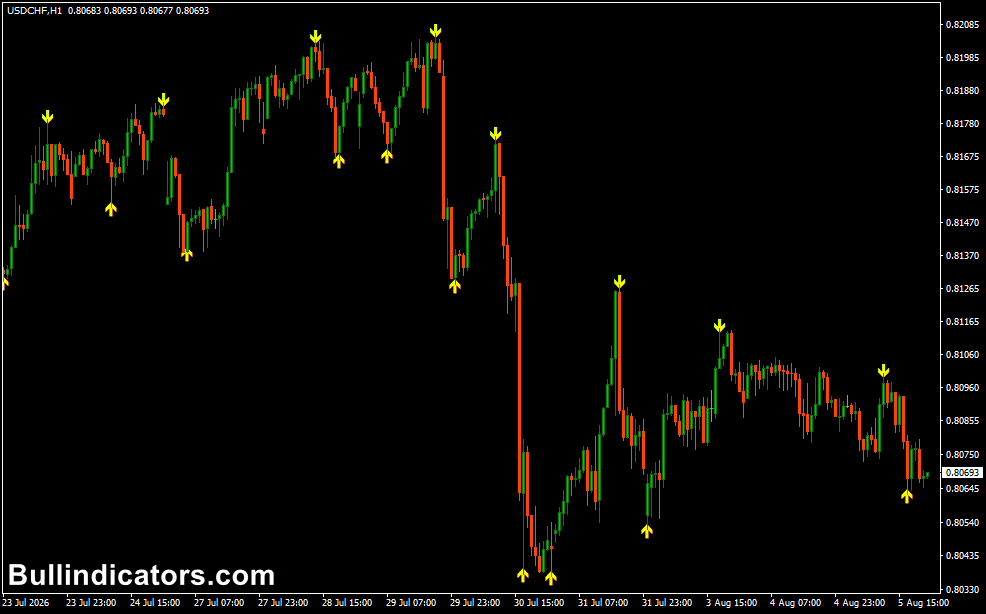
The indicator displays yellow buy and sell arrows directly on the price chart whenever a valid Bollinger Band reversal signal is detected.
Buy arrows appear below price after bullish reversals from the lower Bollinger Band, while sell arrows appear above price following bearish reversals from the upper Bollinger Band.
Optional sound and email alerts notify you immediately when new trading opportunities appear.
Core Features
- Generates automatic Bollinger Band buy and sell signals.
- Displays clear bullish and bearish arrows.
- Supports sound and email notifications.
- Keeps charts clean by hiding the Bollinger Bands.
- Suitable for all MT4 timeframes.
- Works well with multi-timeframe analysis.
- Easy to combine with other technical tools.
Best for
- Reversal trading.
- Trend continuation entries.
- Top-down market analysis.
- Multi-timeframe trading.
- Volatility-based strategies.
Best Markets
- EUR/USD during the London session.
- GBP/USD after major economic releases.
- USD/JPY during Asian trading hours.
- XAU/USD (Gold) during New York volatility.
- GBP/JPY for strong momentum moves.
- Highly liquid Forex pairs.
Trading Styles
- Scalping.
- Intraday trading.
- Swing trading.
- Reversal trading.
- Multi-timeframe trading.
- Momentum trading.
How traders use it
A common method is to determine the overall trend on the H1 or H4 chart before switching to the M5 or M15 chart for entries.
During an uptrend, traders wait for a buy arrow after a temporary pullback. During a downtrend, they look for sell arrows following short-term rallies.
Stop-loss orders are commonly placed beyond the most recent swing high or swing low, while profit targets can be based on nearby support and resistance levels or a predefined risk-to-reward ratio.
High-Volatility Breakout Example
The BB Alert Arrows Indicator can also help capture strong breakout moves after periods of market compression.
- Open the EUR/USD or GBP/USD M15 chart during the London or New York session.
- Wait for price to consolidate in a narrow range before volatility begins to increase.
- When price breaks out strongly and the first pullback produces a new buy or sell arrow, enter in the direction of the breakout.
- Place the stop-loss behind the breakout candle or the most recent swing point.
- Allow the position to run while momentum remains strong.
- Exit at the opposite arrow or secure profits using a trailing stop.
This approach combines the momentum of a breakout with the indicator’s reversal signals, allowing traders to enter after the initial expansion rather than chasing the first large candle.
Get Instant Free Access
Indicator Settings
- SignalGap – Adjusts the distance between the price candles and the signal arrows.
- Colors – Customize the appearance of the bullish and bearish arrows.
- Alerts – Enable or disable sound and email notifications.
Important Notes
- The indicator is based on Bollinger Band reversal principles.
- Use higher timeframes to identify the primary trend before entering on lower charts.
- Combine arrow signals with support and resistance for higher-quality setups.
- Avoid trading directly into major economic news announcements.
- Always use stop-loss protection to manage risk.
- The indicator works best on liquid markets with healthy trading volume.
- Practice on a demo account before applying the strategy to a live trading account.









