
The Market Sessions indicator for MT4 helps you track the major forex trading sessions directly on the price chart.
It marks Sydney, Tokyo, London, and New York with vertical lines, making it easier to see when each market becomes active and how price behaves during different periods of the trading day.
The tool also displays the opening price of the current session, the previous session high and low, and upcoming sessions.
This makes it particularly useful for scalpers and intraday traders who base their decisions on session breakouts, liquidity, volatility, and changes in market momentum.
Download the Market Sessions indicator for MT5 here.
Why traders use the Market Sessions Indicator
Forex activity changes considerably as different financial centers open and close.
London can bring a substantial increase in liquidity after the quieter Asian period, while the overlap between London and New York often produces stronger price movement.
Having these periods clearly marked helps traders organize their analysis around the market session they prefer to trade.
Previous session highs and lows are also useful reference levels.
A break above a previous high can indicate bullish continuation, while a break below a previous low can signal increasing bearish pressure.
These levels can be combined with price action and other technical methods to build intraday setups.
Download This MT4 Indicator for Free
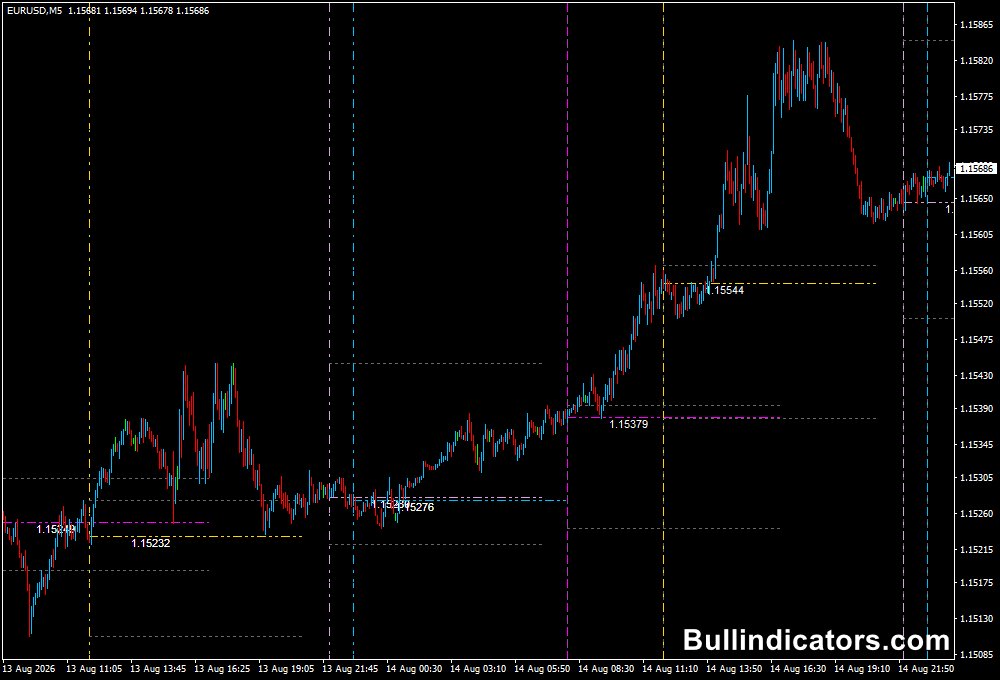
Indicator Chart Setup
The chart is divided into trading-session periods using vertical dotted lines.
Sydney, Tokyo, London, and New York can each have their own color, making it easy to distinguish the different market windows.
The current session opening price can be displayed, while the previous session’s high and low provide additional horizontal reference points.
Future sessions can also be projected onto the chart, allowing you to prepare for upcoming market activity.
Core Features
- Marks Sydney, Tokyo, London, and New York trading sessions.
- Displays the opening price of the current session.
- Shows the previous trading session high and low.
- Projects future market sessions onto the chart.
- Allows individual colors for each major session.
- Supports adjustable broker GMT offset settings.
- Works across multiple MT4 timeframes.
Best for
- Identifying the start and end of major trading sessions.
- Trading breakouts from previous session highs and lows.
- Planning trades around periods of increased liquidity.
- Comparing price behavior between Asian, European, and US sessions.
- Organizing intraday strategies around specific market hours.
Best Markets
- EURUSD during the London and London-New York overlap.
- GBPUSD when trading London-session momentum and breakouts.
- USDJPY during Tokyo and early London activity.
- AUDUSD and NZDUSD during Sydney and Tokyo market hours.
- XAUUSD during London and New York when volatility typically increases.
Trading Styles
- Scalping on M1, M5, and M15 charts.
- Intraday trading based on session breakouts and reversals.
- London-session breakout strategies.
- New York session momentum trading.
- Asian-session range strategies.
How traders use it
The Market Sessions Indicator works particularly well for scalpers and intraday traders because session timing can have a direct impact on volatility and liquidity.
A simple approach is to mark the previous session’s high and low and then monitor how price behaves when a new session begins.
Previous Session High Breakout – Buy Setup
- Identify the high of the previous trading session.
- Wait for the next major session to open.
- Monitor price as it approaches the previous session high.
- Look for a decisive bullish candle to break and close above the level.
- Confirm that the broader trend supports bullish continuation.
- Enter a buy after the breakout confirmation.
- Place the stop loss below the breakout structure or previous session low when appropriate.
- Target the next resistance level or use a predefined risk-to-reward ratio.
Previous Session Low Breakout – Sell Setup
- Mark the low of the previous trading session.
- Wait for the next active market session.
- Monitor price as it approaches the previous session low.
- Look for a bearish candle to break and close below the level.
- Confirm that the broader trend favors the downside.
- Enter a sell after the breakout has been confirmed.
- Place the stop above the breakout structure or previous session high when appropriate.
- Target the next support area or use a predefined risk-to-reward objective.
Always trade in the direction of the main trend whenever possible.
Session levels are reference points, not guaranteed reversal or breakout signals, so price action and market context remain important.
Get Instant Free Access
Indicator Settings
- Sydney: Sets the starting time of the Sydney session.
- Tokyo: Defines the Tokyo market opening time.
- London: Sets the opening time for the London session.
- Newyork: Defines the New York market opening time.
- gmtSeverOffset: Adjusts for the difference between broker server time and GMT.
- showInIndicatorWindows: Controls whether the session information is displayed in the indicator window.
- showFutureSessions: Projects upcoming session lines into future chart periods.
- showOpenPrice: Displays the opening price of the current session.
- showPreviousRange: Draws reference lines based on previous trading-session ranges.
- colourLabels: Controls the color display of the session labels.
- maxTimeframe: Sets the highest chart timeframe on which the session lines will be displayed.
- tokyoColour: Sets the color of the Tokyo session line.
- sydneyColour: Sets the color of the Sydney session line.
- londonColour: Sets the color of the London session line.
- newYorkColour: Sets the color of the New York session line.
- futureSessionColour: Sets the color used for projected future sessions.
Important Notes
- The tool is particularly well suited to scalpers and intraday traders.
- Check your broker’s server time when configuring the GMT offset.
- Session times can be affected by daylight-saving changes in some regions.
- Previous session highs and lows can act as breakout or reaction levels but do not guarantee a directional move.
- On higher timeframes, session lines can become crowded, so disabling selected sessions may improve chart readability.
- Use appropriate risk management around session openings because volatility can increase rapidly.









