
The Time Indicator for MT4 is a practical timing tool that displays both broker server time and local computer time directly on the trading chart.
This is particularly useful when a trading strategy depends on specific market sessions, opening times or short trading windows.
For scalpers and day traders, knowing the exact broker time can make it easier to coordinate entries with the London open, New York open, session overlaps or scheduled economic events.
The tool does not generate BUY or SELL signals; it provides the time reference needed to execute an existing strategy at the right moment.
Why traders use the Time Indicator
MT4 broker servers can operate on a different timezone from the computer being used for trading.
That can make session-based strategies unnecessarily difficult to manage, especially when a setup is only valid during a particular part of the trading day.
The Time Indicator solves this by displaying both clocks on the chart.
A scalper can quickly check the broker time without leaving MT4, while a day trader can coordinate technical setups with specific market hours.
Its main advantage is simplicity.
It does not attempt to predict price direction or add another layer of market analysis.
It simply gives the trader an accurate time reference while the actual trading system handles the entry decision.
Download This MT4 Indicator for Free
Indicator Chart Setup
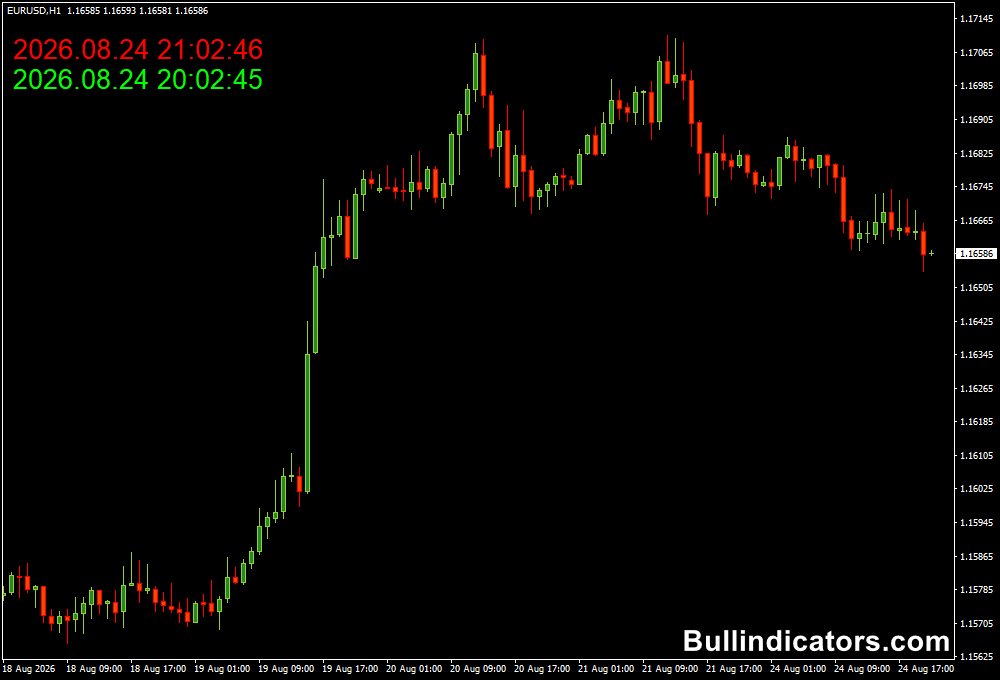
The Time Indicator displays two separate time readings on the MT4 chart.
One represents the broker’s server time and the other represents the local computer time.
The two readings can be assigned different colors through the settings, making them easy to distinguish.
This is especially useful when monitoring a fast M1 or M5 chart where the trading window may only last for a limited period.
Core Features
- Displays broker server time directly on the MT4 chart.
- Shows local computer time for quick comparison.
- Uses separate colors for the two time references.
- Useful for session-based trading strategies.
- Helps coordinate entries with market opens and overlaps.
- Suitable for Forex and other MT4-traded markets.
Best for
- Scalping during specific market sessions.
- M1 and M5 strategies that rely on precise timing.
- Intraday setups around the London and New York sessions.
- Strategies that avoid trading during certain hours.
- Monitoring scheduled economic events alongside a news calendar.
Best Markets
- EUR/USD: Well suited to session-based scalping around European and U.S. market activity.
- GBP/USD: Useful for traders concentrating on the London session.
- GBP/JPY: A suitable choice for short-term setups during active European hours.
- USD/JPY: Useful when trading around Asian and U.S. session activity.
- XAU/USD: Helpful for timing short-term gold strategies around major market openings.
- Major indices: Useful when a strategy is built around the opening or closing hours of a specific exchange.
Trading Styles
- Scalping: Particularly useful on M1 and M5 when entries are restricted to specific periods.
- Day trading: Helps align intraday setups with the most relevant market sessions.
- Session trading: Useful for systems designed around London, New York or Asian market hours.
- News trading: Provides a convenient time reference when working with an economic calendar.
How traders use it
The Time Indicator works best as part of an existing trading system.
For example, a scalper may decide to trade EUR/USD only during the London-New York overlap.
The broker clock provides a constant reference for determining when that trading window begins and ends.
On an M5 chart, the trader can wait for the normal entry conditions from a trend, breakout or price-action strategy.
When the setup appears during the predefined trading period, the position can be considered according to the system’s rules.
The same principle applies to news trading.
A trader can compare the broker time displayed on MT4 with the release time shown on an economic calendar.
This makes it easier to prepare before an event or avoid opening new positions during an unwanted volatility spike.
The tool is most valuable on the lower timeframes because timing has a direct impact on short-term entries.
On H4, D1 and weekly charts, the precise minute is generally far less relevant.
Get Instant Free Access
Indicator Settings
- Broker Time Color: Determines the color used for the broker server time displayed on the chart.
- Computer Time Color: Determines the color used for the local computer time.
Important Notes
- The Time Indicator does not provide BUY or SELL signals.
- It does not measure trend direction, momentum, volatility or market strength.
- Use the displayed time together with a separate trading strategy.
- Its greatest practical value is on M1, M5 and M15 charts.
- Always account for daylight-saving changes when planning session-based strategies.
- Broker server time can differ from both your local time and the timezone used by an economic calendar.









