
The Breakout Box Indicator for MT4 is a breakout trading tool that automatically identifies consolidation zones where price is building momentum before making its next move.
It draws a rectangle around significant support and resistance areas, helping traders spot potential breakout opportunities without manually analyzing every price swing.
The indicator is designed for lower timeframes and produces its most reliable signals on the H1 chart, making it a valuable addition for traders who focus on active market sessions.
Why traders use the Breakout Box Indicator
Breakout strategies are popular because strong market moves often begin after periods of consolidation.
The Breakout Box Indicator simplifies this process by automatically marking the price range where buyers and sellers are in balance before one side gains control.
By displaying these important trading zones directly on the chart, the indicator reduces manual analysis and allows traders to prepare their entries before a breakout occurs.
This saves time while creating a more objective trading process.
The indicator is suitable for traders of all experience levels.
Beginners can easily recognize important support and resistance areas, while experienced traders can combine the breakout boxes with trend analysis, candlestick confirmation, or other technical tools.
It performs especially well after the Asian trading session.
During the quieter Asian hours, price frequently forms a consolidation range.
As the London session opens and volatility increases, the breakout from this range often creates excellent trading opportunities.
Download This MT4 Indicator for Free
Indicator Chart Setup
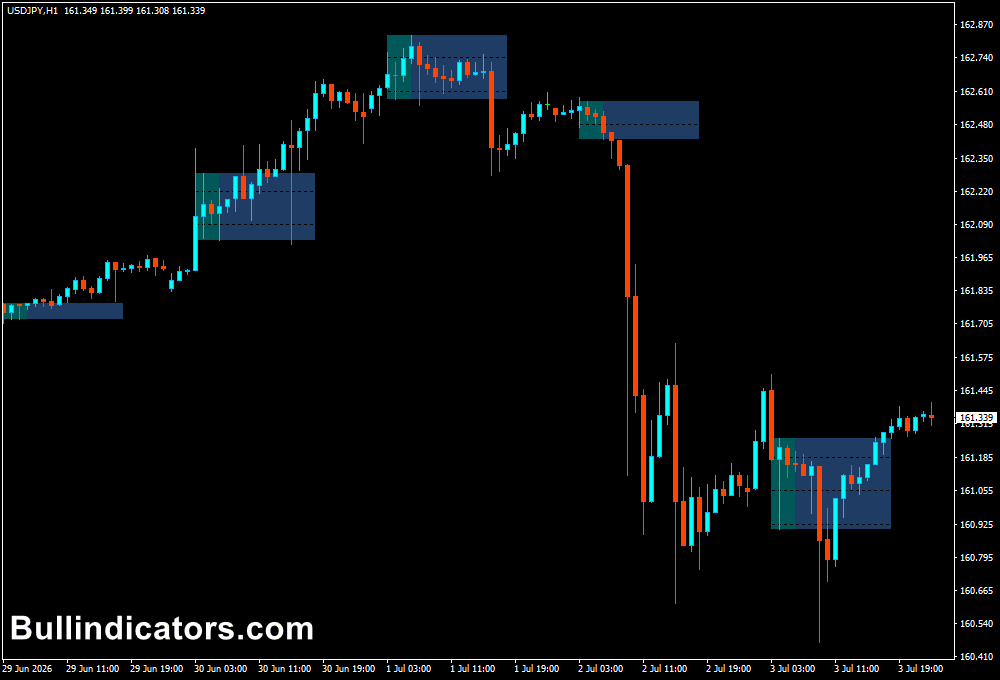
After attaching the indicator to a MetaTrader 4 chart, a rectangle is automatically drawn around recent consolidation areas.
The box highlights the support and resistance boundaries that traders monitor for potential breakouts.
As new consolidation periods develop, the indicator updates the boxes accordingly.
It is intended for timeframes below H4, with H1 generally delivering the highest-quality breakout signals.
Core Features
- Automatically identifies consolidation ranges.
- Draws breakout boxes around important support and resistance zones.
- Updates boxes as new price structures develop.
- Supports both breakout and breakout-retest trading methods.
- Works best on H1 and lower timeframes.
Best for
- Trading breakout strategies.
- Finding important support and resistance areas.
- Planning breakout and retest entries.
- Preparing trades before periods of higher volatility.
- Adding structure to technical analysis.
Best Markets
- Major Forex currency pairs.
- Minor currency pairs.
- Gold (XAU/USD).
- Major stock indices.
- Other liquid CFD markets.
Trading Styles
- Scalping.
- Intraday trading.
- Day trading.
- Breakout trading.
- Momentum trading.
How traders use it
One common approach is to trade in the direction of the overall trend.
Traders wait for price to close outside the breakout box before opening a position.
A close above the box may provide a buying opportunity, while a close below the box may indicate a selling opportunity.
Many traders prefer waiting for a breakout followed by a retest.
After price moves outside the box, they wait for the next candle to test the breakout level and reject it before entering.
This additional confirmation often filters out weaker breakouts and improves trade quality.
Get Instant Free Access
Indicator Settings
- Period Begin – Sets the starting time used to calculate the consolidation period that forms the breakout box.
- Period End – Defines the ending time of the consolidation period before breakout levels are established.
- Box End – Controls how long the breakout box extends into future candles for easier monitoring of price interaction.
- Colors – Allows you to customize the appearance of the breakout box to improve chart visibility.
Important Notes
- The indicator is intended for timeframes below H4 and performs best on the H1 timeframe.
- The highest-quality breakout setups often occur after the Asian session as London market volatility increases.
- Waiting for a candle to close outside the box can reduce false breakout signals.
- A breakout followed by a successful retest often provides stronger confirmation than entering immediately.
- Use proper risk management and combine the indicator with the overall market trend for better trade selection.









