
The Spread indicator for MT4 is a useful trading tool that displays the current spread of any currency pair directly on the MetaTrader 4 chart.
The spread represents the difference between the bid and ask price and is an important factor that can affect trading costs and entry accuracy.
This indicator helps traders monitor spread conditions in real-time and review historical spread behavior.
By understanding how spreads change during different market sessions, news events, and volatile periods, traders can make better decisions about when to enter or avoid trades.
The Spread Indicator is especially valuable for traders who compare brokers, trade currency pairs with higher spreads, or want better control over stop-loss placement and overall trade costs.
Why traders use the Spread Indicator
Forex spreads can change throughout the trading day depending on liquidity, volatility, and market conditions.
During major economic announcements or low liquidity periods, spreads can increase significantly and impact trade execution.
Forex traders use the Spread Indicator to quickly see whether current spread conditions are suitable for opening positions.
The tool provides valuable information before entering a trade, helping traders avoid unnecessary costs caused by unusually wide spreads.
The indicator is also useful for comparing different currency pairs.
Major pairs usually have tighter spreads, while exotic and minor pairs can experience larger differences between buying and selling prices.
Download This MT4 Indicator for Free
Indicator Chart Setup
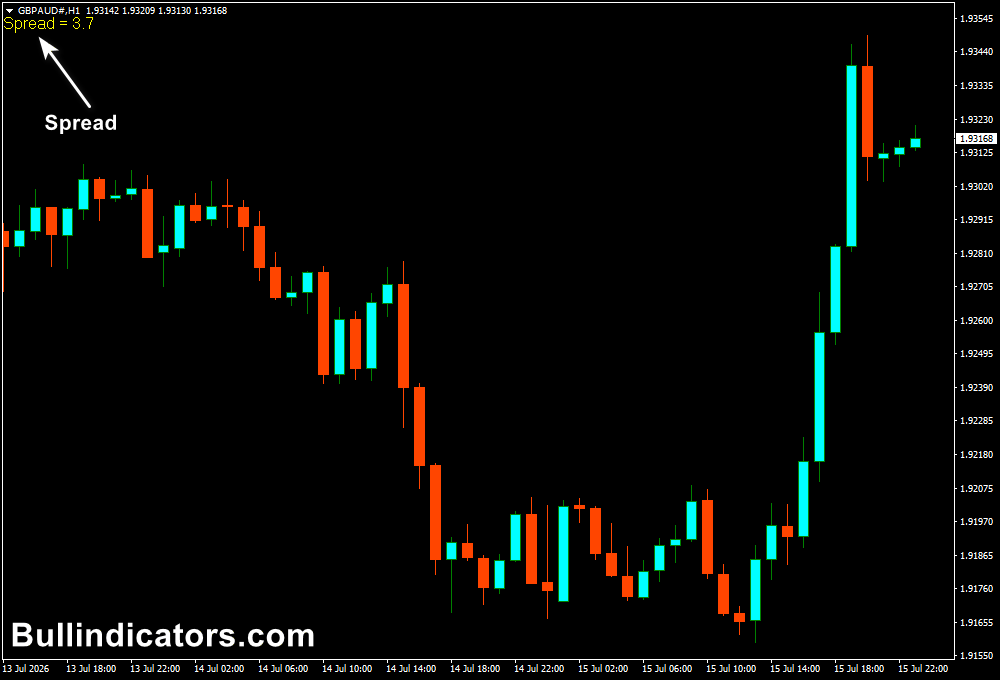
After applying the Spread Indicator to a MetaTrader 4 chart, traders will see a spread value displayed directly on the chart.
The information is usually shown in the corner of the trading window and updates automatically as bid and ask prices change.
The displayed spread value allows traders to monitor current market conditions without opening additional platform windows.
The Spread MT4 indicator records spread changes while running, giving traders insight into previous spread behavior during the analyzed period.
Core Features
- Displays real-time forex spread values on the MT4 chart
- Tracks spread changes while the indicator is active
- Helps identify periods with increased trading costs
- Useful for comparing spreads between currency pairs and brokers
- Supports better entry timing and trade management
- Lightweight indicator with simple chart display
Best for
- Monitoring broker spread conditions
- Avoiding trades during periods of excessive spread widening
- Managing trading costs for scalping strategies
- Analyzing currency pairs with different liquidity levels
- Improving stop-loss placement decisions
Best Markets
- Major forex pairs such as EUR/USD, GBP/USD, and USD/JPY with normally lower spreads
- Minor pairs such as CHF/JPY and GBP/NZD where spreads can vary more
- Gold (XAU/USD), especially during volatile market periods
- Indices where trading costs can change around market openings
- Currency pairs affected by economic news releases
Trading Styles
- Scalping where spread costs have a strong impact on profitability
- Day trading during active market sessions
- News trading preparation by monitoring spread expansion
- Short-term momentum trading with spread filtering
- Manual trading strategies requiring better execution awareness
How traders use it
Traders generally use the Spread Indicator as a market condition filter.
Before opening a position, they check whether the current spread is within an acceptable range for their strategy.
For example, a scalper may avoid entering trades when spreads suddenly increase because small price movements may not cover the additional trading cost.
Longer-term traders can also use spread information when selecting currency pairs and calculating realistic stop-loss distances.
A simple trading approach is to wait for a low spread environment before entering a setup.
After confirming the trade direction with price action or another technical method, traders can execute positions with better cost awareness.
Get Instant Free Access
Indicator Settings
- Display_x: Controls the horizontal position of the spread display on the chart.
- DisplaySize: Adjusts the size of the displayed spread text. Default value is 12.
- Colors: Allows customization of the display appearance.
- Corner: Selects which chart corner displays the spread information.
Important Notes
- The indicator shows spread information but does not predict future price movements.
- Spreads can increase significantly during major economic announcements and low liquidity periods.
- Traders should consider spread costs when calculating potential profit and risk.
- Currency pairs with higher spreads require careful trade management.
- The indicator works best when combined with a complete trading strategy and proper risk control.









