
The Symbol Changer indicator for Metatrader 4 is a practical chart management tool designed to make navigating through multiple financial markets faster and more efficient.
Instead of opening numerous separate charts, traders can switch between currency pairs and timeframes directly from one active chart window.
This tool is especially useful for traders who analyze multiple markets or follow a top-down trading approach.
By providing quick access to different symbols and timeframes, the Symbol Changer helps organize the trading workspace and reduces the time spent searching through the Market Watch window.
Whether you are analyzing daily trends, checking H4 confirmation levels, or looking for short-term entries on M15 or M5 charts, this utility provides a convenient way to move between different views without interrupting your analysis.
Why traders use the Symbol Changer Indicator
Professional market analysis often requires reviewing several currency pairs and timeframes before making a trading decision.
Opening dozens of charts can make the platform difficult to manage and slow down the analysis process.
The Symbol Changer solves this problem by adding clickable buttons directly onto the chart.
Traders can quickly select their preferred currency pair and timeframe while keeping their workspace clean and organized.
This makes it particularly valuable for traders who use multi-timeframe strategies.
For example, a trend trader can quickly move from the Daily chart to H4 and then H1 to analyze the same market from different perspectives.
Download This MT4 Indicator for Free
Indicator Chart Setup
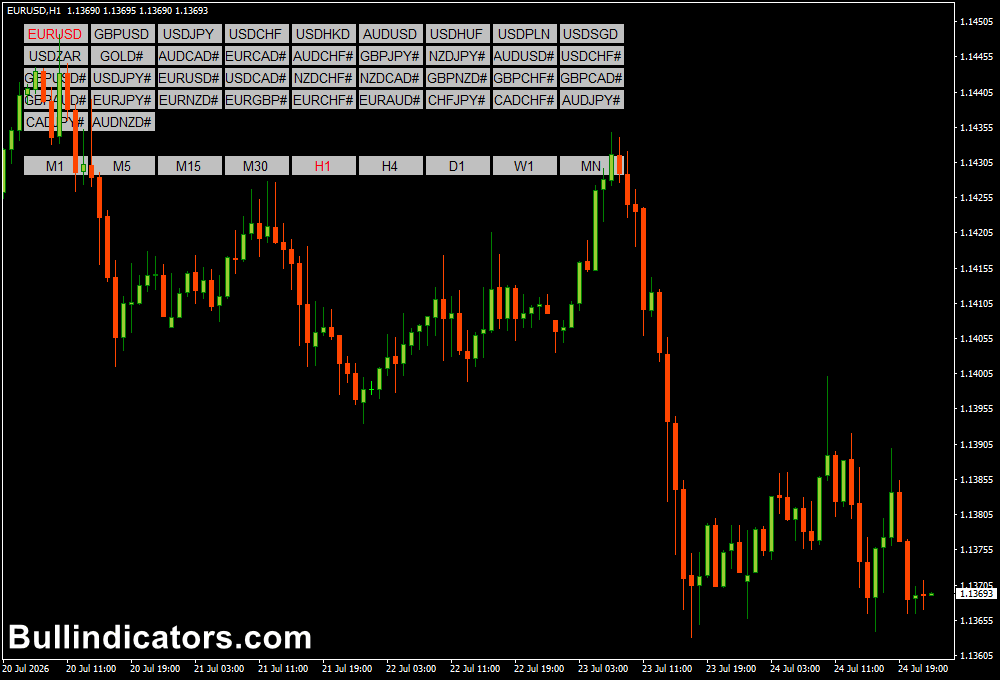
After installation, the Symbol Changer displays a control panel directly on the MetaTrader 4 chart.
The panel contains buttons for available trading instruments and chart periods.
By clicking a currency pair button, the selected market instantly loads in the current chart window.
Timeframe buttons allow traders to switch between M1, M5, M15, H1, H4, Daily, Weekly, and Monthly charts without manually changing the chart settings.
The layout can be customized by adjusting the button colors, background panel, and font size to match your preferred trading environment.
Core Features
- Instant switching between currency pairs.
- Quick access to all MT4 timeframes.
- Reduces the need for multiple open charts.
- Useful for multi-timeframe analysis.
- Helps organize the MetaTrader workspace.
- Simple click-based navigation.
- Customizable button appearance.
Best for
- Top-down market analysis.
- Multi-pair Forex traders.
- Trend-following strategies.
- Price action analysis.
- Scalpers monitoring multiple markets.
- Traders using several timeframe confirmations.
Best Markets
- Major Forex pairs such as EUR/USD and GBP/USD.
- JPY pairs including USD/JPY and GBP/JPY.
- Gold (XAU/USD) and other commodities.
- Stock indices such as NASDAQ and US30.
- Cryptocurrency pairs available through MT4 brokers.
- Any instrument listed in the MetaTrader Market Watch.
Trading Styles
- Scalping with fast M1 and M5 chart switching.
- Intraday trading using M15 and H1 analysis.
- Swing trading with H4 confirmation.
- Long-term trend analysis on Daily and Weekly charts.
- Multi-timeframe price action strategies.
- Technical analysis workflows.
How traders use it
The Symbol Changer is mainly used to improve the analysis process rather than generate direct trading signals.
It becomes especially valuable when applying a top-down approach.
For example, a trader analyzing GBP/USD may first open the Daily chart to identify the overall market direction.
After finding a bullish trend, the trader can instantly switch to H4 to confirm momentum and then move to H1 or M15 to search for a suitable entry area.
Scalpers can also benefit from this tool by quickly moving between several currency pairs during active sessions.
Instead of keeping ten or twenty charts open, they can monitor markets from a single workspace and switch instantly when a setup appears.
The indicator is also useful for traders who combine multiple strategies.
A trader may check trend direction on a higher timeframe, review support and resistance levels, and then switch to a lower timeframe to fine-tune the entry.
Get Instant Free Access
Indicator Settings
- Font Size: Controls the size of the text displayed on the buttons.
- Back Panel Color: Changes the background color of the control panel.
- Button Color: Adjusts the appearance of the symbol and timeframe buttons.
- Button Border Color: Customizes the border color around each button.
Important Notes
- The Symbol Changer does not provide BUY or SELL signals.
- It is designed to improve chart navigation and analysis efficiency.
- Higher timeframe analysis can provide better context before entering trades.
- Keeping fewer charts open can make the trading workspace easier to manage.
- The tool works best when combined with a complete trading strategy.
- Make sure all required symbols are visible in the MT4 Market Watch window.
- It can save significant time for traders analyzing multiple instruments.









