
The Keltner Channel with Signals indicator for Metatrader 4 is a trend-following trading tool that combines Keltner Channels with a Jurik Moving Average to identify potential market opportunities.
By analyzing volatility, price location, and momentum direction, the indicator helps traders recognize when a new trend may be developing.
Keltner Channels are based on moving averages and Average True Range (ATR), creating dynamic upper and lower boundaries around price.
The addition of Jurik Moving Average improves the traditional approach by providing a smoother calculation with reduced market noise.
The indicator displays visual BUY and SELL arrows, making it suitable for traders who prefer straightforward trend signals.
It can be used for scalping, intraday trading, and swing strategies across Forex pairs, commodities, and indices.
Why traders use the Keltner Channel with Signals Indicator
Trend traders often look for confirmation that price momentum is strong enough before entering a position.
The Keltner Channel provides this information by showing whether price is trading above or below important channel levels.
When price remains above the middle line and approaches the upper channel, it indicates bullish market conditions.
When price stays below the middle line and moves toward the lower channel, bearish pressure may be dominant.
The Jurik Moving Average adds another layer of confirmation by changing color according to momentum direction.
Many traders use this combination to avoid weaker setups and focus on trades that follow the broader market movement.
For better results, traders often combine this indicator with a higher timeframe trend filter.
For example, when trading on the M15 chart, checking the H1 trend first can help determine the preferred direction.
If the H1 trend is bullish, traders focus mainly on BUY signals on M15.
Aligning lower timeframe entries with the larger trend can significantly improve trade quality.
Download This MT4 Indicator for Free
Indicator Chart Setup
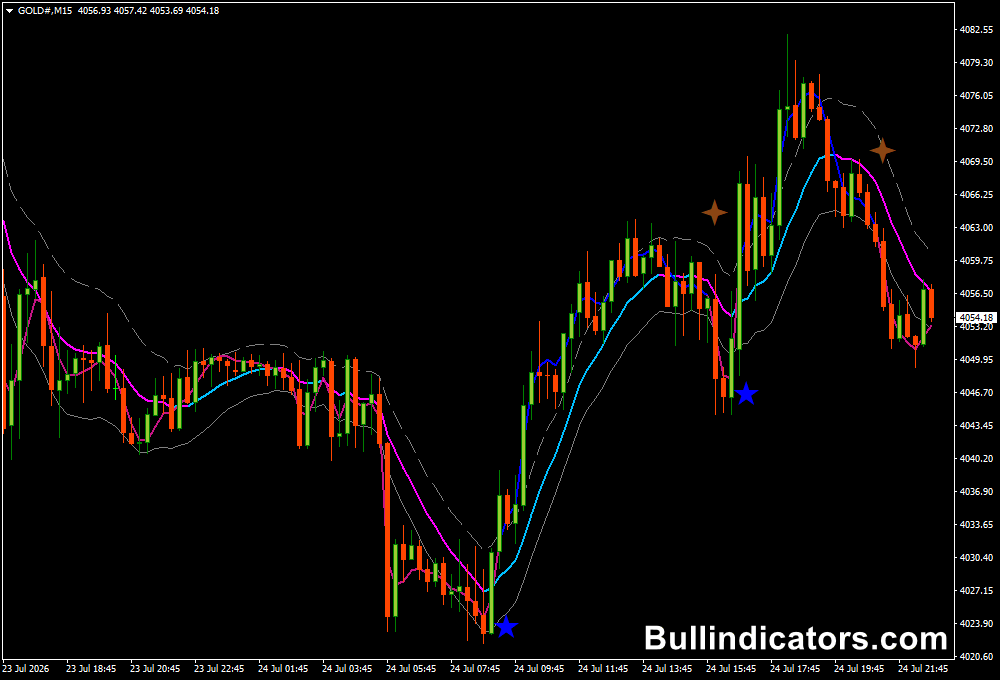
The Keltner Channel with Signals indicator appears directly on the price chart and displays a channel consisting of an upper band, middle line, and lower band.
The Jurik Moving Average changes color to represent market momentum, while arrow signals highlight possible entry points.
A BUY signal is generated when the Jurik Moving Average changes from magenta to blue and price moves above the relevant Keltner Channel levels.
A SELL signal appears when momentum turns bearish and price moves below the channel structure.
The channel width adapts according to market volatility through ATR calculations.
During high volatility periods, the bands expand, while calmer market conditions create narrower channels.
Core Features
- Combines Keltner Channels with Jurik Moving Average.
- Provides visual BUY and SELL arrow signals.
- Uses ATR-based volatility calculations.
- Reduces market noise compared with traditional moving averages.
- Suitable for trend-following strategies.
- Fully customizable parameters.
- Works across multiple timeframes.
Best for
- Trend continuation setups.
- Momentum-based entries.
- Volatility analysis.
- Breakout strategies.
- Multi-timeframe trading.
- Price action confirmation.
Best Markets
- EUR/USD and GBP/USD for directional Forex trends.
- GBP/JPY for stronger momentum movements.
- Gold (XAU/USD) during active trading sessions.
- US30 and NASDAQ when markets are trending.
- Crude Oil during high volatility periods.
- Major currency pairs during London and New York sessions.
Trading Styles
- M1 and M5 scalping during strong momentum periods.
- M15 intraday trend trading.
- H1 day trading strategies.
- H4 swing trading.
- Daily trend-following systems.
- Multi-timeframe analysis.
How traders use it
The most common approach is to trade in the direction of the dominant trend.
Traders first identify the overall market bias on a higher timeframe and then use a lower timeframe for entry timing.
Example BUY strategy:
- The H1 chart shows price trading above the Keltner Channel middle line.
- The overall trend is bullish, so only BUY setups are considered.
- The trader moves to the M15 chart and waits for a BUY arrow signal.
- The Jurik Moving Average changes to blue and confirms increasing momentum.
- A BUY position is opened with a stop-loss below the recent swing low.
- The trade is managed until the opposite signal appears or a target level is reached.
This higher timeframe confirmation approach helps filter many weak signals.
Many traders report better consistency when they avoid taking lower timeframe signals that move against the main trend direction.
Scalpers can also combine the Keltner Channel with additional confirmation tools.
For example, a momentum indicator or price action pattern can be used alongside the arrow signal before entering a trade.
Get Instant Free Access
Indicator Settings
- TimeFrame: Sets the timeframe used for calculations.
- MA_PERIOD: Defines the moving average period.
- MA_MODE: Selects the moving average method. Default value 3 uses Linear Weighted Moving Average.
- PRICE_MODE: Determines the applied price. Default value 0 uses closing prices.
- ATR_PERIOD: Controls the number of periods used for ATR calculation.
- K: Adjusts the width of the Keltner Channel. Higher values create wider channels.
- ATR_MODE: Enables or disables ATR-based calculations.
- Length: Sets the calculation period for the Jurik Moving Average.
Important Notes
- Different currency pairs may require different ATR settings because volatility varies between markets.
- Higher timeframe confirmation can improve the reliability of lower timeframe signals.
- Using the indicator with the overall trend direction can reduce countertrend trades.
- The best results usually occur during strong trending market conditions.
- Avoid relying only on arrow signals during sideways markets.
- Support and resistance zones can provide additional trade confirmation.
- Always test settings before applying them to live trading.









