
Forex Factory Calendar Indicator for MT4
The Forex Factory Calendar indicator for Metatrader 4 brings important economic news events directly into your trading platform.
Instead of constantly switching between charts and external websites, traders can monitor upcoming announcements while analyzing the market.
Economic releases such as Non-Farm Payrolls (NFP), inflation reports, interest rate decisions, and central bank speeches can create strong price movements within seconds.
The Forex Factory Calendar Indicator helps traders prepare for these periods of increased volatility.
This tool does not generate BUY or SELL signals.
Its purpose is to provide essential market information so traders can adjust their strategy, manage open positions, or look for short-term opportunities around major news events.
The indicator is especially useful for scalpers who want to take advantage of fast market movements after important releases.
With proper risk management, news volatility can create opportunities to capture quick pip movements on major currency pairs.
Why traders use the Forex Factory Calendar Indicator
Forex markets can react strongly to unexpected economic data.
A positive or negative announcement can quickly change the direction of a currency pair, making it important to know when major events are scheduled.
The Forex Factory Calendar Indicator displays upcoming economic releases directly on the MT4 chart.
This allows traders to avoid entering trades before risky events or prepare specific news trading strategies.
Scalpers often use this tool before major announcements because increased volatility can create rapid price movements.
For example, during NFP releases, EUR/USD, GBP/USD, and USD/JPY can experience large moves within minutes.
Day traders and swing traders also benefit from knowing when important events are approaching because they can adjust stop-loss levels, reduce exposure, or wait until the market settles after the announcement.
Download This MT4 Indicator for Free
Indicator Chart Setup
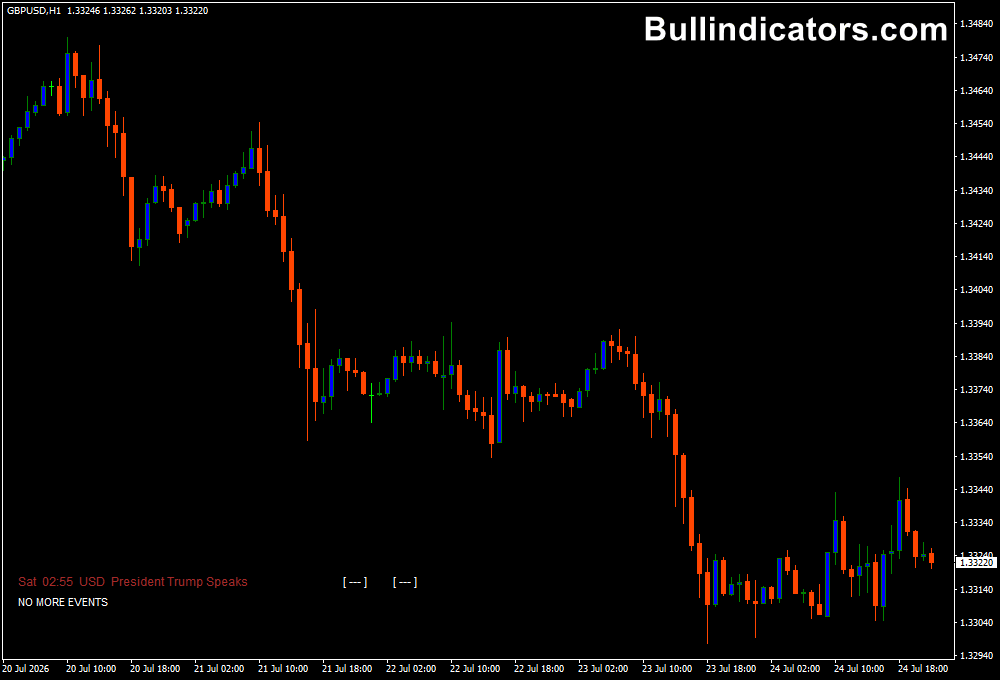
The Forex Factory Calendar Indicator displays upcoming economic events directly on the MT4 chart.
Depending on the selected settings, it can show high, medium, and low-impact news releases, speeches, holidays, and other important financial events.
The indicator provides information about the event time, currency affected, and importance level.
Traders can quickly see whether upcoming news may influence their current trading positions.
For scalping strategies, this information is valuable because traders can prepare before the release and monitor price action during periods of increased volatility.
Core Features
- Displays Forex Factory economic news directly on MT4.
- Shows upcoming high, medium, and low-impact events.
- Helps traders prepare for market volatility.
- Supports scalping and news trading strategies.
- Allows filtering of specific currencies and events.
- Shows important speeches from financial leaders.
- Automatically updates economic calendar information.
Best for
- News-based trading strategies.
- Forex scalping around economic releases.
- Managing risk before major announcements.
- Day trading preparation.
- Fundamental analysis.
- Combining economic events with technical setups.
Best Markets
- EUR/USD during ECB announcements and Eurozone data.
- GBP/USD around Bank of England decisions and UK reports.
- USD/JPY during Federal Reserve announcements and US economic releases.
- Gold (XAU/USD) during inflation reports and interest rate decisions.
- US indices during major US economic data releases.
- Currency pairs involving the affected currency from scheduled news.
Trading Styles
- M1 and M5 scalping during high-impact news releases.
- M15 intraday trading after market reactions.
- Breakout strategies around economic announcements.
- Fundamental news trading.
- Technical trading with volatility filters.
- Swing trading with event risk management.
How traders use it
The Forex Factory Calendar Indicator is commonly used before opening trades to check whether important events are approaching.
A typical scalping approach is to wait for a major news release, observe the first market reaction, and then look for a confirmed setup after volatility begins to stabilize.
Example news scalping setup:
- The trader checks the calendar and identifies a high-impact USD event.
- The trader prepares a USD currency pair such as EUR/USD or GBP/USD.
- After the announcement, the trader waits for the initial price spike to slow down.
- Price action confirmation is used before entering a short-term trade.
- A tight stop-loss is applied because news markets can move quickly.
- The position is managed carefully as volatility decreases.
Technical traders can also use the indicator as a protection tool.
Before entering a setup, checking upcoming news can prevent being caught in unexpected market movements.
Combining the economic calendar with price action, support and resistance, or trend indicators can create a more complete trading approach.
Get Instant Free Access
Indicator Settings
- Report for active chart only: Displays news related only to the current chart currency.
- Include high: Shows high-impact economic events.
- Include medium: Displays medium-impact news releases.
- Include low: Includes low-impact calendar events.
- Include speaks: Shows scheduled speeches from central bank officials and important financial figures.
- Include holidays: Displays market holidays.
- Find keyword: Filters events based on selected keywords.
- Ignore keyword: Removes unwanted events from the calendar.
- Allow updates: Enables automatic calendar updates.
- Update every: Controls how frequently the calendar information refreshes.
Important Notes
- The indicator does not provide direct BUY or SELL signals.
- News releases can create extreme volatility and require proper risk management.
- Not every economic announcement creates a tradable opportunity.
- High-impact events usually have the biggest effect on currency movements.
- Scalpers should avoid entering blindly during the first seconds after major news.
- Combining news information with technical analysis can improve decision-making.
- Always test news trading strategies on a demo account before using real funds.









