
The Forex Signals indicator for MT4 is a signal-based trading indicator that helps traders identify potential market entries with clear visual alerts.
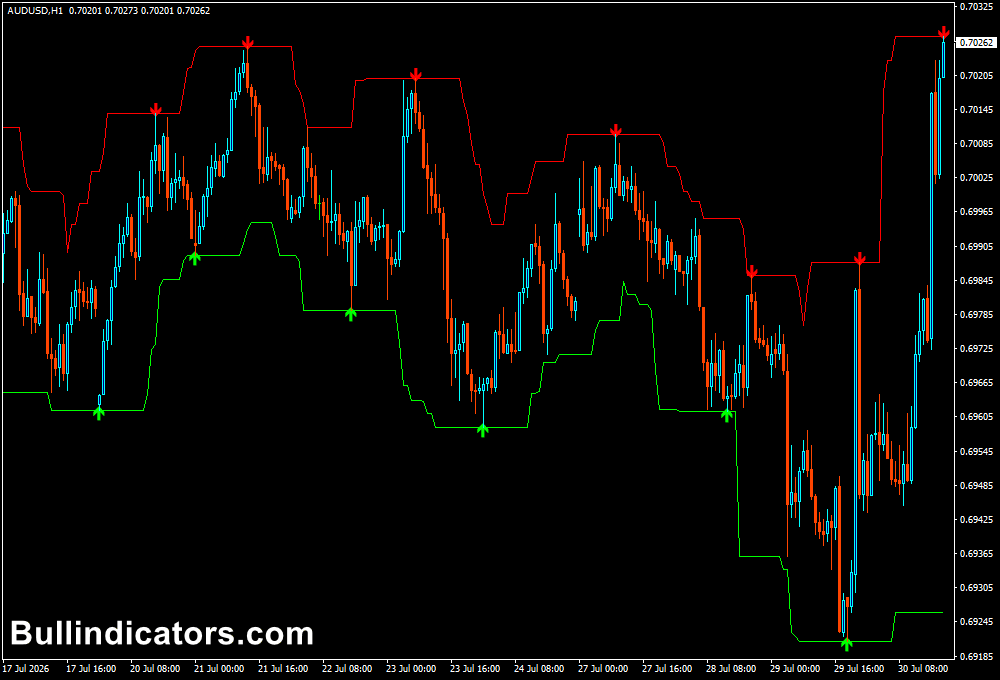
It plots buy and sell arrows directly on the chart while drawing a price channel that serves as a guide for stop loss and take profit placement.
The indicator is designed for traders who prefer fast chart analysis and works particularly well for short-term Forex trading.
Since every signal is displayed automatically, traders can focus on managing trades rather than spending time searching for setups.
This tool supports any trading instrument available in MetaTrader 4, including Forex pairs, commodities, indices, and cryptocurrencies offered by the broker.
Why Traders Use the Forex Signals Indicator
One of the reasons traders choose the Forex Signals Indicator is because it combines trade entries with basic trade management.
Every signal is accompanied by a channel that provides realistic price targets and protective stop loss levels.
This allows traders to create a trading plan immediately after a signal appears.
The indicator is especially popular among scalpers because it reacts quickly to short-term price movements.
Many traders also combine it with trend indicators or support and resistance analysis to filter weaker signals and improve overall trading performance.
Download This MT4 Indicator for Free
Indicator Chart Setup
After applying the indicator to a MetaTrader 4 chart, green arrows appear below price to signal potential buying opportunities, while red arrows appear above price to indicate possible selling opportunities.
A trading channel is also plotted around price action, providing clear visual reference points for trade management.
The chart remains clean and easy to read, making the indicator suitable for traders who want to react quickly during active market sessions without being distracted by multiple technical tools.
Core Features
- Automatic buy and sell arrow signals.
- Built-in price channel for trade management.
- Visual stop loss and take profit guidance.
- Works on all MT4 financial instruments.
- Supports multiple chart timeframes.
- Easy to combine with existing trading systems.
Best For
- Scalping strategies.
- Intraday trading.
- Momentum trading.
- Quick trade confirmation.
- Beginner and experienced MT4 traders.
Best Markets
- EUR/USD on the M5 and M15 charts during the London session when liquidity is at its highest.
- GBP/USD on the M5 timeframe during the London and New York session overlap for stronger price swings.
- USD/JPY on the M15 chart during the Asian session when the pair is most active.
- XAU/USD (Gold) on the M5 chart for short-term breakout and momentum trades.
- EUR/JPY on the M15 timeframe during the European trading session.
- NAS100 and US30 on the M5 chart during the first hours of the New York session.
- Major currency pairs with tight spreads where fast execution benefits scalping strategies.
Trading Styles
- Scalping.
- Day trading.
- Momentum trading.
- Session trading.
- Manual discretionary trading.
- Short-term trend following.
How Traders Use It
Using the Forex Signals Indicator is simple.
When a green arrow appears, traders look for a buying opportunity after the signal candle has closed.
The lower channel boundary is commonly used as the stop loss, while the upper channel provides a logical profit objective.
When the indicator generates a red arrow, traders prepare for a short position.
The stop loss is usually placed above the upper channel, while the lower channel becomes the first take profit target.
This structured approach helps traders maintain consistent risk management on every trade.
For better accuracy, many traders only trade in the direction of the prevailing trend or wait for additional confirmation from higher timeframe price action before entering the market.
Get Instant Free Access
Indicator Settings
- Signal Gap – Sets the distance between the buy and sell arrows and the candles, improving visibility on different chart sizes.
- Colors – Lets traders customize the colors of the arrows and channel lines to match their preferred MT4 chart template.
- Line Style – Changes the appearance and thickness of the channel lines for better readability.
Important Notes
- Designed mainly for M1, M5 and M15 trading.
- Delivers the best results during active market sessions.
- Wait for the signal candle to close before entering a position.
- Use the channel as a guide for stop loss and take profit placement.
- Combine with higher timeframe trend analysis for stronger trade selection.
- Apply proper position sizing and risk management on every trade.









