
The FX Sniper Scalper indicator for MT4 is a trend-following tool that helps identify the current market direction while highlighting potential trend reversals.
It plots a colored line directly on the chart, allowing you to quickly determine whether buyers or sellers are in control.
The change in color provides a simple visual signal that can be used for both entries and exits.
The indicator is especially effective on the M1, M5, and M15 timeframes where trends develop quickly and frequent trading opportunities appear throughout the day.
It can also be used on higher timeframes, but its strength lies in short-term trading where fast trend recognition is essential.
Why Use the FX Sniper Scalper Indicator
Following the prevailing trend remains one of the simplest ways to improve trading consistency.
The FX Sniper Scalper Indicator removes much of the uncertainty by displaying the current market direction with a single colored line.
Green represents bullish momentum, while red indicates bearish conditions.
The visual presentation makes it suitable for beginners, while experienced Forex traders often combine it with momentum indicators, moving averages, or market structure analysis to eliminate weaker signals.
Since the trend changes are clearly displayed, positions can be managed with greater confidence.
Download This MT4 Indicator for Free
Indicator Chart Setup
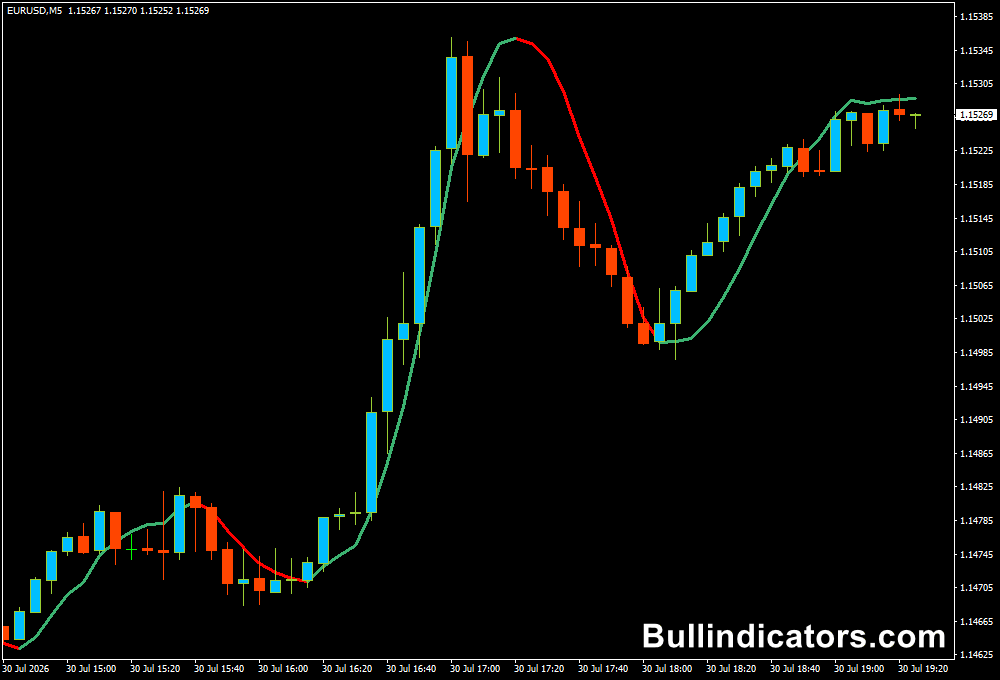
After attaching the FX Sniper Scalper Indicator to a MetaTrader 4 chart, a colored trend line appears in the main chart window.
During bullish conditions, the line turns green.
When bearish momentum takes control, it changes to red.
The color transition often signals the beginning of a new trend and provides an opportunity to evaluate a potential trade.
The clean display leaves plenty of room for additional analysis, making it easy to combine with other confirmation tools.
Core Features
- Displays the current market trend with a colored line.
- Highlights potential trend reversals.
- Provides visual entry and exit signals.
- Works on every MT4 financial instrument.
- Simple chart layout suitable for fast analysis.
- Easy to combine with other technical tools.
Best For
- Scalping.
- Short-term trend trading.
- Momentum trading.
- Intraday trading.
- Trend confirmation.
Best Markets
- EUR/USD on the M1, M5, and M15 charts during the London session.
- GBP/USD on the M5 timeframe during the London and New York session overlap.
- USD/JPY on the M5 chart during active Asian trading hours.
- XAU/USD (Gold) on the M1 and M5 charts for fast momentum moves.
- EUR/JPY on the M15 timeframe during strong European market activity.
- NAS100 and US30 on the M5 chart during the New York open.
- Major Forex pairs with low spreads where short-term trends develop efficiently.
Trading Styles
- Scalping.
- Day trading.
- Momentum trading.
- Trend following.
- Session trading.
- Manual discretionary trading.
How Traders Use It
A long position is considered when the trend line changes from red to green.
Many traders wait for the current candle to close before entering, helping to avoid false reversals.
A protective stop loss is commonly placed below the most recent swing low, while profits are managed using nearby resistance levels or a minimum 1:2 risk-to-reward ratio.
When the line changes from green to red, attention shifts to selling opportunities.
The stop loss is generally placed above the previous swing high, while the trade remains open until an opposite trend signal appears or the planned profit target has been reached.
The indicator performs best on the M1, M5, and M15 charts where trend changes occur frequently and market momentum can develop rapidly during the major trading sessions.
Combine with the MACD 4C Indicator
One effective way to improve signal quality is by combining the FX Sniper Scalper Indicator with the MACD 4C Indicator.
The MACD 4C displays a green histogram above the zero line during bullish momentum and a red histogram below the zero line during bearish momentum.
Using both tools together helps filter trades that move against the prevailing momentum.
Buy Example: Wait until the FX Sniper trend line turns green. Only enter the trade if the MACD 4C histogram is green and positioned above the zero line.
Place the stop loss below the latest swing low and manage the position until the trend line changes color or your profit target is reached.
Sell Example: Wait for the FX Sniper trend line to turn red. Confirm that the MACD 4C histogram is red and below the zero line before opening a short position.
Position the stop loss above the previous swing high and exit when an opposite signal appears or your predefined target has been achieved.
Get Instant Free Access
Indicator Settings
- Rperiod – Determines the calculation period used to identify the market trend. Lower values produce faster signals, while higher values generate smoother trend changes.
- Type – Selects which price data is used for the calculations, such as Close, Open, High, Low, Median Price, or Typical Price.
Important Notes
- Produces the strongest performance on the M1, M5, and M15 charts.
- Green trend lines indicate bullish market conditions.
- Red trend lines indicate bearish market conditions.
- Works well during the London and New York trading sessions.
- Combining it with the MACD 4C Indicator can reduce false signals.
- Always apply sound money management and realistic position sizing.









