
The Forex Market Hours GMT v23 indicator for MT4 is a practical session clock that displays the opening and closing times of the world’s major financial markets directly on your MetaTrader 4 chart.
It shows the complete schedule for the Sydney, Tokyo, Frankfurt, London, and New York sessions, making it easy to identify the current market phase without leaving the trading platform.
Market activity changes throughout the day as different financial centers open and close.
Liquidity, volatility, and trading volume are rarely the same during every session.
This tool helps you recognize these changes at a glance, making it much easier to plan entries, exits, and trading schedules.
It is particularly useful on charts below the H4 timeframe where session changes have a greater impact on price movement.
Why Use the Forex Market Hours GMT v23 Indicator
Different trading sessions create different market conditions.
During the Asian session, many currency pairs move within relatively narrow ranges, while the London and New York sessions often produce stronger trends and larger price swings.
Knowing exactly which markets are open helps improve trade selection and timing.
The Forex Market Hours GMT v23 Indicator automatically displays all major sessions in GMT and accounts for Daylight Saving Time adjustments.
It also highlights the overlapping periods between financial centers, which are often the most active times of the trading day.
Download This MT4 Indicator for Free
Indicator Chart Setup
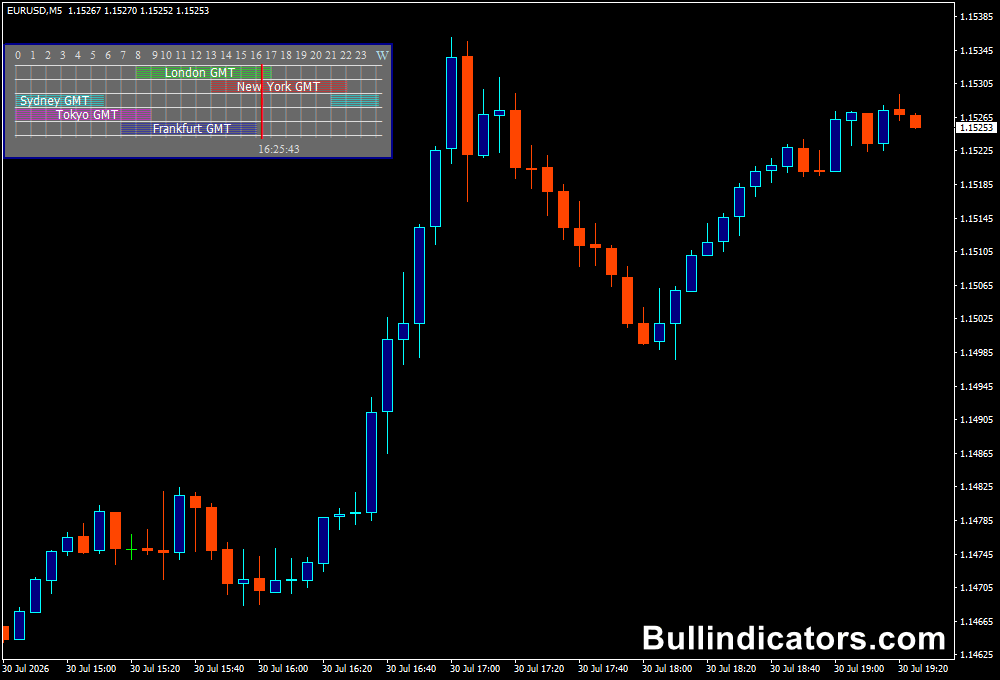
After attaching the indicator to a MetaTrader 4 chart, a compact information panel appears in the upper-left corner.
A GMT timeline runs across the top, while each trading session is displayed underneath according to its opening and closing times.
The panel automatically updates throughout the day, allowing you to immediately see which financial centers are active.
The layout is clean and does not interfere with price analysis, making it suitable for combining with trend indicators, oscillators, support and resistance levels, or price action strategies.
Core Features
- Displays Sydney, Tokyo, Frankfurt, London, and New York trading sessions.
- Automatically adjusts market hours for Daylight Saving Time.
- Shows session overlap periods.
- Uses GMT as the reference time.
- Simple panel that occupies very little chart space.
- Works on every MT4 financial instrument.
Best For
- Planning trading schedules.
- Finding high-volatility trading periods.
- Session-based trading strategies.
- Price action analysis.
- Intraday and scalping setups.
Best Markets
- EUR/USD on the M5, M15, and H1 charts during the London session.
- GBP/USD during the London-New York overlap when market participation is highest.
- USD/JPY during the Tokyo session for Asian market activity.
- XAU/USD (Gold) during the London and New York sessions where volatility is often strongest.
- EUR/JPY during the European morning when both Asian and European flows influence price.
- US30 and NAS100 during the New York session after the US cash market opens.
- Most effective on M1, M5, M15, H1, and H4 charts where session changes directly affect price behaviour.
Trading Styles
- Scalping.
- Day trading.
- Session breakout trading.
- Price action trading.
- News trading.
- Intraday momentum trading.
How Traders Use It
The session panel is primarily used to determine the most suitable time to trade a particular market.
For example, many participants focus on EUR/USD and GBP/USD during the London session, while USD/JPY receives more attention during Tokyo trading hours.
Precious metals and US indices generally become more active once New York opens.
The overlap between London and New York is often considered one of the busiest periods of the trading day.
Higher liquidity and stronger momentum frequently produce better trading opportunities for short-term strategies.
By displaying these overlapping sessions automatically, the panel helps you prepare for periods of increased market activity.
Since the information is always visible on the chart, there is no need to manually convert time zones or calculate session opening hours.
This makes planning significantly easier, particularly for traders operating from different parts of the world.
Get Instant Free Access
Indicator Settings
- Season – Selects whether the session schedule follows the Summer or Winter trading calendar. Local market hours are automatically adjusted, while Tokyo follows its own standard schedule.
- Season2 – Defines which seasonal calendar should be used when applying Daylight Saving Time adjustments.
- isSummerDST – Enables or disables Daylight Saving Time for summer trading schedules.
- FFSYD – Adjusts the opening time of the Sydney trading session following the New York market close.
- Colors – Customizes the appearance of the session panel and text for better visibility on different chart templates.
Important Notes
- Most useful on charts below the H4 timeframe.
- Automatically updates session schedules throughout the trading week.
- Displays all major Forex trading sessions in GMT.
- Helps identify high-liquidity overlap periods.
- Suitable for Forex, commodities, indices, and other CFD markets.
- Can be used alongside any trading strategy without affecting chart analysis.









