
The Gann Signal indicator for MT4 transforms the principles of W.D. Gann’s trading methodology into an easy-to-read trading system.
Rather than manually drawing Gann angles and calculating market geometry, the tool automatically generates buy and sell arrows whenever potential trading opportunities appear.
This allows both beginners and experienced Forex traders to benefit from Gann-based market analysis without performing complex calculations.
The indicator works on every timeframe from M1 to D1 and supports all currency pairs and CFDs available in MetaTrader 4.
While it can be used as a standalone signal generator, the highest-quality setups are usually found when trading in the direction of the prevailing market trend.
Why Use the Gann Signal Indicator
Traditional Gann analysis requires precision and experience to correctly draw angles and identify potential turning points.
The Gann Signal Indicator automates this entire process by providing clear visual entry signals directly on the chart.
This saves time while making the strategy accessible to every MT4 user.
The arrows are simple to interpret.
A green arrow highlights a potential buying opportunity, while a red arrow signals possible bearish momentum.
Although the signals are straightforward, filtering them with the overall trend can significantly improve trading accuracy and reduce false entries during ranging markets.
Download This MT4 Indicator for Free
Indicator Chart Setup
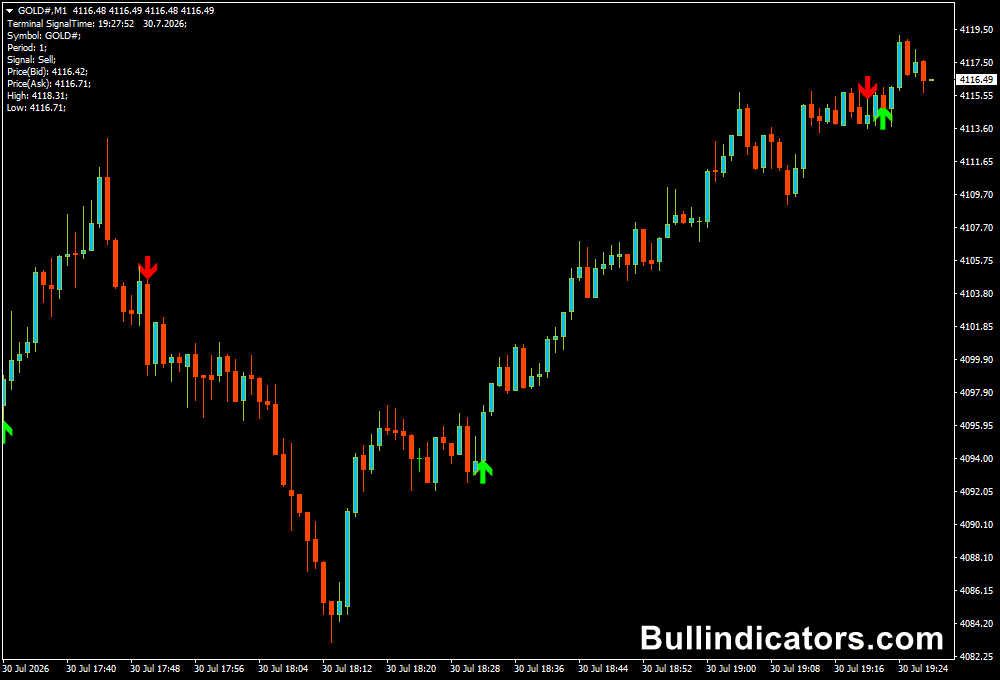
The Gann Signal Indicator places green and red arrows directly on the price chart whenever new trading opportunities are detected.
Green arrows appear below price during bullish conditions, while red arrows are plotted above price when bearish momentum develops.
Since the signals are displayed on the main chart, they are easy to monitor alongside candlesticks and other technical tools.
The clean presentation makes it suitable for combining with moving averages, trend filters, support and resistance levels, or momentum indicators without overcrowding the workspace.
Core Features
- Automatic buy and sell arrow signals.
- Based on the principles of Gann market analysis.
- No manual drawing of Gann angles required.
- Supports all MT4 timeframes from M1 to D1.
- Compatible with Forex pairs, commodities, indices, and CFDs.
- Easy integration with other technical strategies.
Best For
- Trend-following strategies.
- Swing trading.
- Intraday trading.
- Scalping on lower timeframes.
- Entry confirmation.
Best Markets
- EUR/USD on the M15 and H1 charts during the London session.
- GBP/USD on the M15 timeframe after strong breakouts from support or resistance.
- USD/JPY on the H1 chart during the Tokyo and London sessions.
- XAU/USD (Gold) on the M15 chart during the London-New York overlap.
- EUR/JPY on the H1 timeframe when clear trends are developing.
- US30 and NAS100 on the M15 chart during the first hours of New York trading.
- Major currency pairs where sustained trends produce cleaner arrow signals.
Trading Styles
- Trend following.
- Day trading.
- Swing trading.
- Momentum trading.
- Breakout trading.
- Manual technical analysis.
How Traders Use It
A green arrow suggests that bullish momentum may be developing.
Many traders wait for the current candle to close before opening a long position, especially when price is already trading above a major moving average or recent support level.
Protective stops are commonly placed below the latest swing low, while profit targets are based on nearby resistance or a predefined risk-to-reward ratio.
When a red arrow appears, attention shifts to selling opportunities.
Higher probability setups often occur when the market is already trending lower or has rejected an important resistance zone.
In these situations, the stop loss is normally placed above the previous swing high while profits are managed using nearby support levels or trailing stops.
Although the indicator can generate signals in all market conditions, avoiding trades against the dominant trend usually produces more consistent results.
Green arrows during strong downtrends and red arrows during strong uptrends are often best ignored until market direction aligns with the signal.
Get Instant Free Access
Indicator Settings
- Periods – Specifies the number of historical bars used in the indicator calculations. Lower values produce more frequent signals, while higher values focus on stronger market moves.
- Colors – Changes the appearance of the bullish and bearish arrows to match your preferred MT4 template.
- Style – Adjusts the display style of the plotted signals for improved visibility on different chart backgrounds.
Important Notes
- Suitable for every timeframe from M1 through D1.
- Green arrows indicate potential buying opportunities.
- Red arrows identify possible selling opportunities.
- Trend confirmation can significantly improve signal quality.
- Works well with moving averages, support and resistance, and momentum indicators.
- Always use stop losses and proper risk management before entering a position.









