
The Chandelier Exit Indicator for MT4 is a trend-following tool designed to help traders remain in profitable trades while reducing the risk of exiting too early.
Instead of relying on fixed stop-loss distances, the indicator calculates dynamic exit levels using the Average True Range (ATR), allowing stop-loss levels to adapt to changing market volatility.
It also generates potential buy and sell opportunities when price crosses the indicator, making it useful for both trade entries and trade management.
Why traders use the Chandelier Exit Indicator
Traders use the Chandelier Exit Indicator because it combines trend identification with a volatility-based trailing stop.
During strong trends, the indicator adjusts automatically as volatility changes, helping traders protect profits while allowing enough room for price fluctuations.
This makes it particularly effective for holding winning positions longer without relying on fixed exit targets.
Another advantage is its straightforward interpretation.
When price crosses above the indicator, it may signal the beginning of a bullish trend.
A crossover below the indicator can indicate increasing bearish momentum.
Since the stop levels continuously update, traders always have a logical reference for managing risk throughout the trade.
Download This MT4 Indicator for Free
Indicator Chart Setup
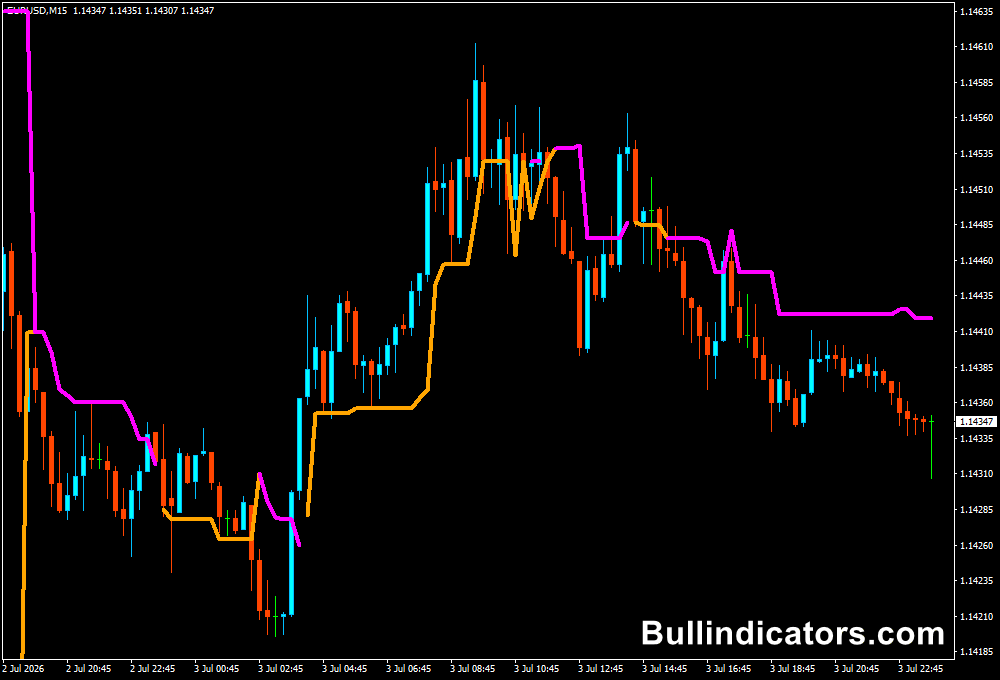
After attaching the indicator to a MetaTrader 4 chart, traders will see dynamic trailing stop levels plotted directly on the main price area.
During an uptrend, the stop level appears below price and gradually rises as the trend develops.
During a downtrend, the level moves above price and follows the market lower.
Crossovers between price and the indicator can highlight potential trend reversals or new trading opportunities.
Core Features
- ATR-based dynamic trailing stop-loss calculation
- Automatic trend identification
- Buy and sell signals from price crossovers
- Adjustable ATR multiplier for different market conditions
- Simple visual display on the main chart
Best for
- Following established market trends
- Managing open trades with dynamic stops
- Reducing premature trade exits
- Identifying potential trend reversals
- Improving overall risk management
Best Markets
- Major Forex pairs such as EURUSD, GBPUSD,…
- Cross currency pairs, for instance, EURCHF, GBPJPY,..
- Gold (XAU/USD) and Silver
- Stock indices
- Cryptocurrency CFDs with sustained trends
Trading Styles
- Swing trading
- Scalping
- Trend trading
- Intraday trading
- Breakout trading
How traders use it
Many traders use the Chandelier Exit Indicator as both an entry confirmation and a trade management tool.
A buy setup is considered when price closes above the indicator after previously trading below it.
Conversely, a sell setup appears when price crosses below the indicator.
Once a trade is active, the trailing stop automatically follows the trend, allowing traders to stay invested until price closes beyond the dynamic stop level.
The indicator also works well alongside moving averages, support and resistance analysis, or price action strategies for additional confirmation.
Get Instant Free Access
Indicator Settings
- Range: Defines the historical calculation range used by the indicator.
- Shift: Moves the indicator values forward or backward on the chart for display purposes.
- ATR Period: Determines how many candles are used to calculate the Average True Range, affecting the sensitivity of the trailing stop.
- Multiple ATR: Sets the ATR multiplier used to position the stop-loss levels. Higher values create wider stops, while lower values produce tighter trailing stops.
Important Notes
- Performs best in trending market conditions.
- May generate false crossover signals during sideways markets.
- Always combine with proper position sizing and risk management.
- Higher ATR multipliers reduce stop-outs but increase stop distance.
- Test different ATR settings to match your preferred market and timeframe.









