
The Semafor Alert indicator for MT4 provides three levels of BUY and SELL signals based on different calculation periods.
Built around the classic ZigZag methodology, it highlights potential turning points and trend movements directly on the MetaTrader 4 chart.
The three signal levels allow the same tool to be adapted to different trading approaches.
Lower-level signals can provide more frequent opportunities, while the higher level is designed to highlight larger market swings.
Alerts can also be controlled independently, allowing focus on the signal level that best fits a particular strategy.
It supports everything from short-term intraday trading to higher-timeframe analysis, with signals available across M1 through monthly charts.
Why traders use the Semafor Alert Indicator
One of the main advantages is the separation of signals into three levels.
This gives traders more flexibility when deciding how much market movement they want to capture.
A Level 3 signal can be useful for identifying a larger potential reversal, while Level 1 and Level 2 signals can help with earlier entries, exits, or continuation trades.
The combination can also be useful when managing an existing position: a higher-level signal may establish the trade direction.
In contrast, a lower-level signal can provide an earlier exit indication.
The independent alerts are another practical feature.
Popup notifications can be enabled so that important signals do not require constant chart monitoring.
Download This MT4 Indicator for Free
Indicator Chart Setup
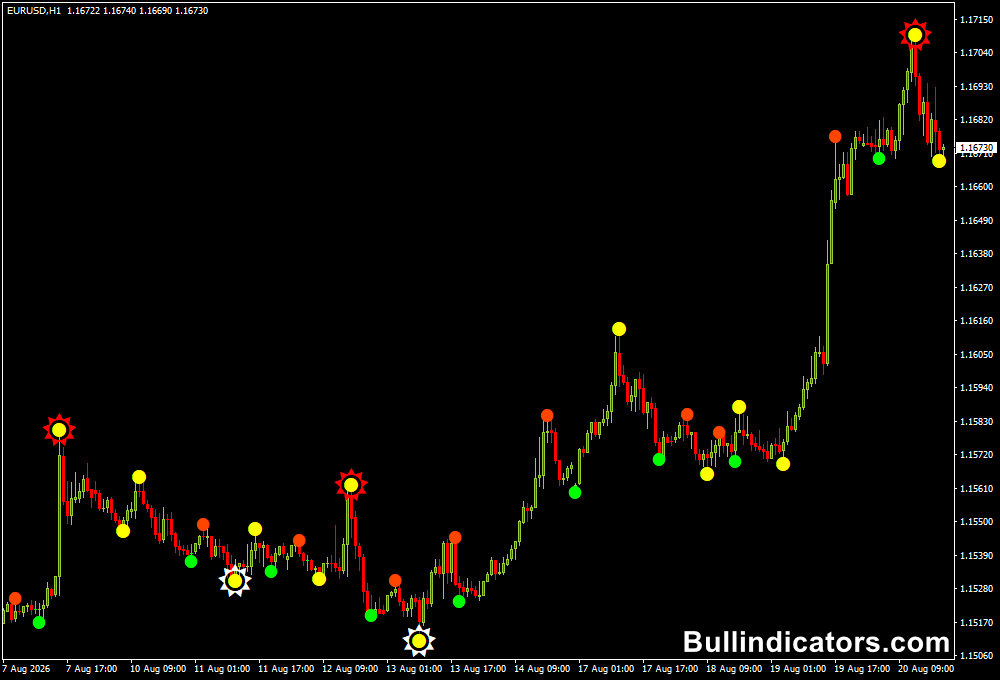
The Semafor Alert indicator places symbols directly above or below price to identify potential bearish and bullish turning points.
The three levels use different symbols and colors, allowing the signal strength or calculation level to be distinguished at a glance.
Signals below price generally indicate bullish conditions, while signals above price point toward bearish pressure.
A trader can then wait for confirmation before opening a position.
For short-term trading, the signals become particularly useful when combined with another tool that establishes the prevailing direction.
This reduces the risk of taking every Semafor signal independently, especially during sideways markets.
Core Features
- Three independent BUY and SELL signal levels.
- Based on classic ZigZag calculations.
- Separate settings for low, medium, and high signal periods.
- Custom symbols for each Semafor level.
- Popup alerts for newly detected signals.
- Suitable for M1 through monthly charts.
- Can be combined with other technical indicators.
Best for
- Identifying potential market turning points.
- Short-term reversal and continuation setups.
- Multi-timeframe analysis.
- Scalping with additional trend confirmation.
- Managing entries and exits using different signal levels.
Best Markets
- EURUSD for tight-spread M1 and M5 scalping.
- GBPUSD when stronger intraday movement is available.
- USDJPY for fast London and New York session setups.
- GBPJPY for aggressive short-term strategies where larger moves can develop quickly.
- Gold (XAUUSD) for traders comfortable with higher volatility and wider price swings.
Trading Styles
- M1 scalping with trend confirmation.
- M5 intraday trading.
- Multi-timeframe trend following.
- Reversal trading around established swing points.
- Short-term position management using lower-level signals for exits.
How traders use it
A practical M1 scalping approach is to combine the Semafor Alert Indicator with the Trend Finder Scalper Indicator for MT4.
The Trend Finder Scalper can be used to establish the short-term market direction, while Semafor identifies a potential entry area on the M1 chart.
How does it work:
For example, suppose the Trend Finder Scalper indicates bullish conditions on M1.
The trader can wait for a Semafor BUY signal below price.
Once the signal appears, the entry can be considered after the candle confirms the move and price begins moving in the direction of the established trend.
For a 10-pip objective, a small stop can be placed below the recent M1 swing low.
A setup could therefore target approximately 10 pips while keeping the initial risk relatively tight.
The exact stop distance should depend on current volatility and the nearby market structure.
A bearish setup works oppositely: the Trend Finder Scalper should indicate downward pressure, followed by a Semafor SELL signal above price.
A stop can be placed above the recent M1 swing high, with a target around 10 pips when market conditions support the move.
This approach is best suited to liquid sessions where M1 price action has sufficient movement.
It is also important to wait for confirmation rather than entering solely because a Semafor symbol has appeared.
Get Instant Free Access
Indicator Settings
- Period1 – Defines the calculation period for the low Semafor level.
- Period2 – Sets the calculation period for the medium Semafor level.
- Period3 – Controls the higher-level Semafor calculation.
- Dev_Step_1 – Sets the deviation and step values for the lower-level calculation.
- Dev_Step_2 – Controls deviation and step values for the medium level.
- Dev_Step_3 – Defines deviation and step values for the high-level calculation.
- Symbol_1_Kod – Selects the chart symbol used for Level 1 signals.
- Symbol_2_Kod – Selects the symbol displayed for Level 2 signals.
- Symbol_3_Kod – Determines the chart symbol for Level 3 signals.
- BoxAlerts – Enables or disables popup alert messages.
Important Notes
- Semafor signals are calculated using ZigZag-based logic and should not be treated as guaranteed entry points.
- For M1 scalping, use a liquid currency pair and trade during active market sessions.
- Combining the signal with the Trend Finder Scalper can provide directional confirmation before an entry.
- Keep the stop loss beyond a logical M1 swing rather than forcing an artificially small stop.
- A 10-pip target works best when current volatility and momentum are sufficient to reach it.
- Test the strategy on a demo account before risking real capital.









