
The SSL Channel Chart Alert indicator for Metatrader 4 is a trend-following tool based on moving average calculations.
It highlights changes in market direction by displaying bullish and bearish crossover signals directly on the chart.
The indicator is designed to help traders recognize when momentum shifts and when a potential new trend begins.
By using two colored channel lines, the SSL Channel makes trend transitions easier to identify without adding unnecessary complexity to the chart.
It can be used for swing trading, intraday setups, and short-term scalping strategies.
The built-in alerts also allow traders to monitor crossover events without constantly watching price movements.
Why traders use the SSL Channel Chart Alert Indicator
Trend direction is one of the most important factors when analyzing financial markets.
The SSL Channel provides a simple visual method to determine whether buyers or sellers currently have control.
Green and red channel changes help traders recognize possible entry points while staying aligned with market momentum.
The indicator is also useful as a confirmation tool.
Many experienced traders combine it with momentum indicators, price action, or support and resistance analysis before entering a trade.
For scalping strategies, the SSL Channel can be paired with an arrow-based entry tool on lower timeframes such as M1 and M5.
For example, a green SSL crossover combined with a blue buy arrow can provide additional confirmation, while a red SSL crossover together with a red sell arrow can support a short setup.
Download This MT4 Indicator for Free
Indicator Chart Setup
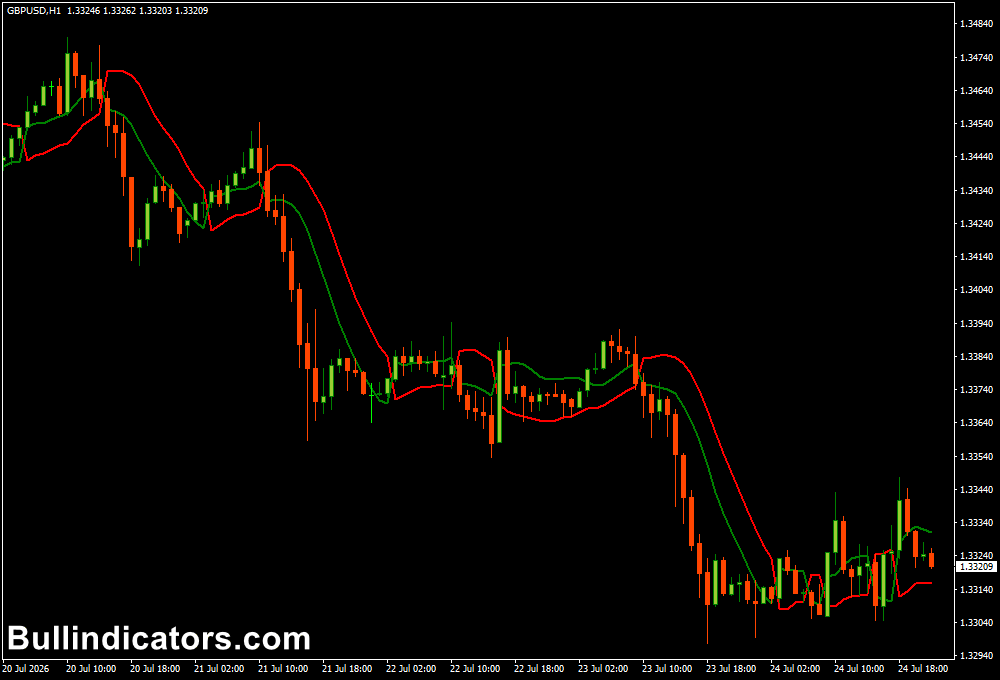
The chart displays two colored SSL Channel lines that change position when market conditions shift.
A bullish crossover occurs when the green line moves above the red line, suggesting increasing buying pressure.
A bearish crossover appears when the green line moves below the red line, indicating possible downside momentum.
Alert notifications can be enabled so traders receive a message when a new crossover develops.
This makes the tool practical for traders who analyze multiple currency pairs or prefer waiting for specific technical conditions before entering the market.
Core Features
- Moving average-based trend detection.
- Clear bullish and bearish crossover signals.
- Non-repainting trading signals.
- Built-in alert functionality.
- Works on short and long-term timeframes.
- Suitable for manual and automated trading strategies.
- Simple visual trend identification.
Best for
- Trend-following strategies.
- Momentum confirmation.
- Scalping setups.
- Intraday trading.
- Swing trading.
- Multi-timeframe analysis.
Best Markets
- EUR/USD during London and New York sessions.
- GBP/JPY for volatile momentum moves.
- AUD/USD during directional trends.
- Gold (XAU/USD) when strong price movements develop.
- US30 and NASDAQ index trading.
- Major currency pairs with clear trends.
Trading Styles
- M1 and M5 scalping combined with arrow confirmation tools.
- M15 momentum trading.
- M30 intraday trend setups.
- H1 day trading strategies.
- H4 swing trading.
- Daily trend-following approaches.
How traders use it
A common strategy is to wait for the SSL Channel crossover and confirm the direction before opening a position.
When the green line crosses above the red line, traders may look for BUY opportunities.
A stop-loss is often placed below the previous swing low, while profit targets can be based on resistance levels, risk-reward calculations, or an opposite crossover.
For SELL setups, traders watch for the green line moving below the red line.
The previous swing high can be used as a logical stop-loss location, while exits may occur when momentum weakens or the opposite signal appears.
Scalpers can adapt the SSL Channel for faster entries by combining it with an arrow scalping system on M1 or M5 charts.
For example, the SSL trend direction can act as the filter, while an arrow indicator provides the exact entry timing.
A blue arrow can confirm a BUY setup when the SSL Channel shows bullish conditions, while a red arrow can support a SELL trade during bearish momentum. This combination helps avoid taking countertrend scalping trades.
For higher timeframe trading, a top-down approach is often preferred.
Traders can identify the main trend on H4 or Daily charts and use lower timeframes for more accurate entries.
Get Instant Free Access
Indicator Settings
- Lb: Defines the calculation value used by the SSL Channel.
- alertsOn: Enables or disables alert notifications.
Important Notes
- Higher timeframe signals generally provide stronger trend confirmation.
- M1 and M5 signals should preferably be filtered with additional confirmation.
- Combining SSL Channel direction with an arrow scalping indicator can improve entry timing.
- Avoid taking every crossover during sideways markets.
- Support and resistance zones can help identify better exit areas.
- The indicator works best when combined with a complete trading plan.
- Always apply proper risk management when trading crossover signals.









