The Lot Calculator Indicator for MT5 is a risk-management tool designed to show how much exposure a trade represents relative to the trading account.
Rather than producing BUY or SELL signals, it focuses on the financial side of a position and helps you monitor risk before and after entering a trade.
The indicator can display important account information such as balance, floating values, leverage, percentage-based risk and total trade exposure.
This makes it useful when adjusting position size or checking whether an open trade has become too large for the account.
Risk management is particularly important when trading volatile markets, using multiple positions or operating with leverage.
The Lot Calculator provides a convenient reference directly on the MT5 chart so that risk remains part of the trading process rather than an afterthought.
Why traders use the Lot Calculator Indicator
The Lot Calculator is different from a conventional technical indicator because it does not attempt to predict market direction.
Its purpose is to quantify exposure.
This makes it useful alongside virtually any trading strategy, whether entries are based on moving averages, RSI, price action, breakouts or trend-following systems.
Knowing the percentage of free margin being placed at risk can help prevent oversized positions.
The indicator can also be used to monitor floating exposure while a trade is open, allowing the account’s risk level to be assessed as market prices move.
Another useful feature is the ability to work with either the actual available account balance or a simulated balance.
The latter can be useful when planning hypothetical scenarios or testing how different account sizes would affect risk.
Download This MT5 Indicator for Free
Indicator Chart Setup
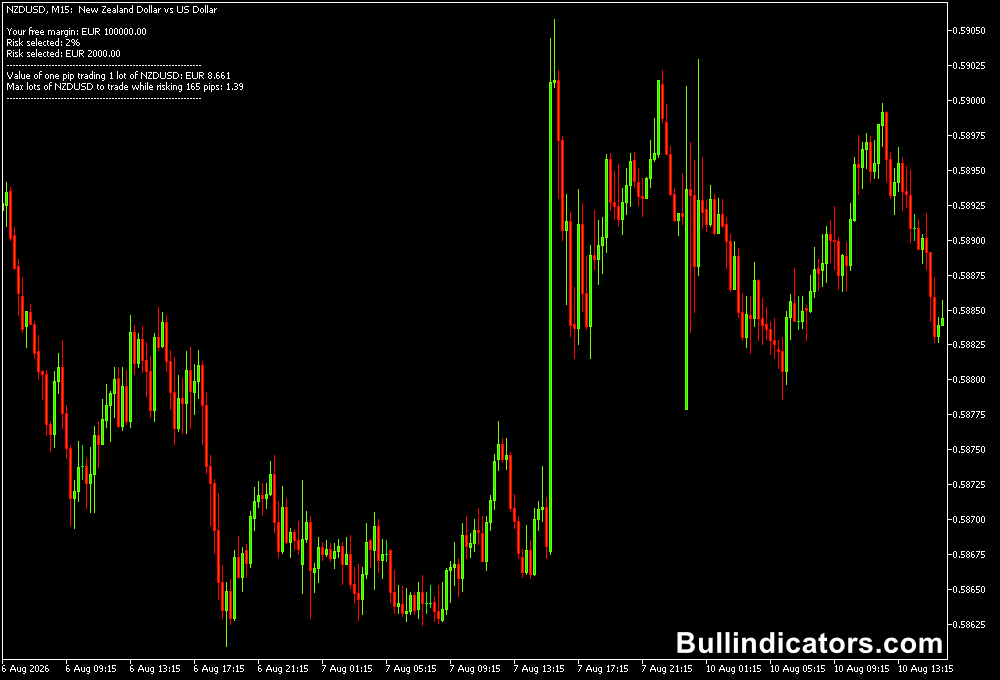
The Lot Calculator displays account and risk information directly on the MT5 chart.
Depending on the selected settings, the information can include the account balance, free margin, leverage, floating values, percentage exposure and total risk associated with the current trading situation.
The tool is intended to be read alongside your normal trading analysis.
For example, a technical strategy may identify a potential EURUSD BUY, while the Lot Calculator helps determine whether the planned position represents an acceptable level of account exposure.
Core Features
- Displays important account and margin information.
- Shows percentage-based trade risk.
- Monitors floating exposure as positions move.
- Accounts for leverage when assessing trading exposure.
- Can use the actual free margin of the trading account.
- Supports a simulated balance for planning hypothetical scenarios.
- Useful alongside virtually any technical trading strategy.
- Designed specifically for MT5 risk monitoring rather than directional signals.
Best for
- Checking account exposure before opening a position.
- Monitoring risk on existing trades.
- Planning position sizes according to a predefined risk percentage.
- Testing hypothetical account and risk scenarios.
- Keeping leveraged positions within controlled limits.
Best Markets
- EURUSD and other major Forex pairs where position sizing can be tightly controlled.
- GBPJPY and other volatile currency pairs where risk can increase quickly.
- Gold (XAUUSD), where large intraday movements make exposure management particularly important.
- US30 and NASDAQ for monitoring risk when trading index CFDs.
- Cryptocurrencies such as BTCUSD, where wider price swings require careful position management.
Trading Styles
- Scalping: M1 and M5 traders can use the calculator to ensure frequent positions do not create excessive cumulative exposure.
- Intraday trading: M15 and H1 strategies can maintain consistent risk across different setups.
- Swing trading: H4 and D1 positions can be monitored for floating exposure over larger market moves.
- Multi-position trading: Useful when several correlated Forex or CFD positions are open simultaneously.
- Strategy testing: A simulated balance can help evaluate how a trading system behaves with different account sizes.
How traders use it
The Lot Calculator should be combined with a separate entry strategy.
For example, an RSI-based system can identify a potential reversal while the Lot Calculator determines whether the resulting position would create acceptable account exposure.
For a bullish setup, an RSI reading below 30 can indicate an oversold market.
Practical use
Wait for price to confirm that bullish momentum is returning, then establish the stop-loss below the relevant swing low.
Before opening the trade, check the Lot Calculator and ensure the planned position does not exceed the predefined risk limit.
- Identify an oversold RSI condition.
- Wait for bullish price confirmation.
- Define the stop-loss below the recent swing low.
- Calculate the intended position exposure.
- Check the Lot Calculator before entering.
- Open the trade only when the planned risk fits the account’s rules.
For a bearish setup, an RSI reading above 70 can indicate an overbought market.
Wait for bearish confirmation, define the stop-loss above the relevant swing high and check the calculated exposure before opening the position.
- Identify an overbought RSI condition.
- Wait for bearish price confirmation.
- Define the stop-loss above the recent swing high.
- Review the calculated account exposure.
- Confirm that the planned position remains within the chosen risk limit.
- Open the short position only after the risk has been checked.
The same process can be applied to an EMA crossover, breakout system or price-action strategy.
The technical indicator determines whether a trade is attractive; the Lot Calculator helps determine whether the financial risk is acceptable.
Get Instant Free Access
Indicator Settings
- Free margin fraction you want to risk for the trade: Defines the proportion of available margin to use for the risk calculation. For example, 0.02 represents 2%.
- Check to read the actual free margin of your balance: When set to True, the indicator reads the actual available balance and calculates the corresponding values from the live account information.
- Specify here a simulated balance value: Allows a hypothetical account balance to be entered for planning or scenario analysis without relying on the current account balance.
Important Notes
- The Lot Calculator does not generate market-entry or exit signals.
- Risk calculations should be checked before opening new positions, particularly when leverage is high.
- Multiple simultaneous trades can create greater total exposure than a single position suggests.
- Floating profit or loss changes continuously as market prices move.
- A simulated balance is useful for planning but does not represent the actual funds available in the trading account.
- The tool should complement a defined risk-management plan rather than replace one.