The Power Trend indicator for MT5 is designed to show both the direction and strength of a market trend through a color-coded histogram.
Rather than relying only on price movement, the indicator helps identify whether a trend is weak, developing, moderate, or strongly established.
This makes it useful for identifying trade opportunities that align with the dominant market direction and for managing positions as momentum shifts.
Why traders use the Power Trend Indicator
Trend direction is one of the most important factors when planning a Forex trade.
The Power Trend indicator adds a visual strength component, making it easier to distinguish a developing move from a well-established trend.
The histogram changes color according to the current trend condition, giving a quick reference for potential entries, trade management, and exits.
The Power Trend indicator is also available for MT4!
The main trend direction is also easy to read: green bars indicate bullish conditions, while red bars indicate bearish conditions.
A practical approach is to focus on setups that agree with this primary direction rather than taking signals against it.
For additional confirmation, the Power Trend can be combined with the ADXVMA Histogram Indicator for MT5, which can provide another view of the prevailing trend.
Download This MT5 Indicator for Free
Indicator Chart Setup
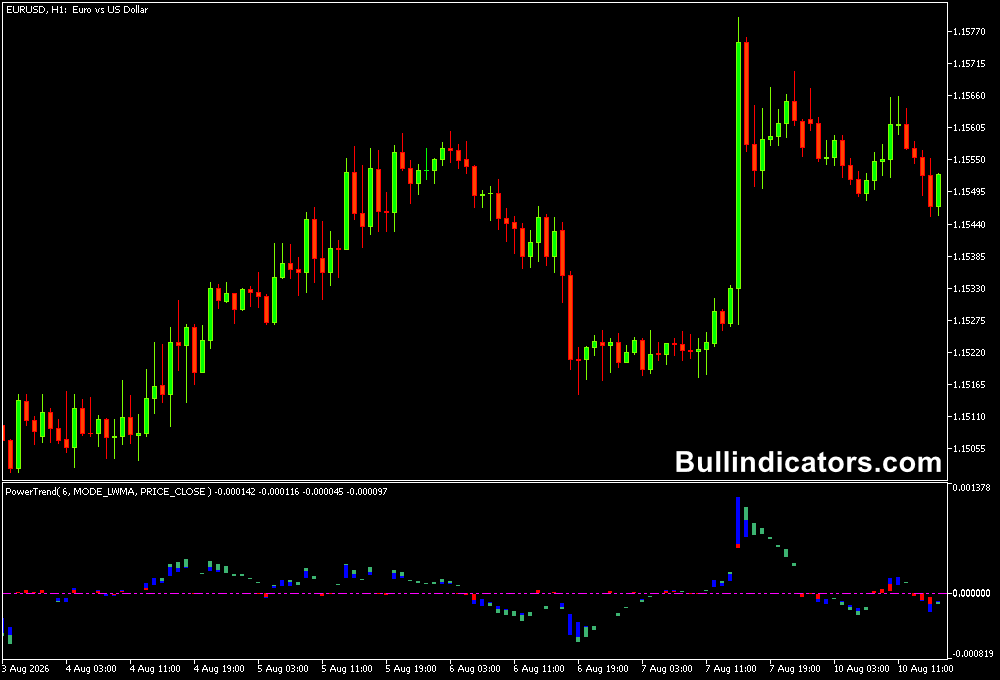
The Power Trend Indicator appears as a histogram below the main price chart.
Its position relative to the zero line helps identify the prevailing direction, while the histogram color provides information about trend development and strength.
Black bars represent a weak or absent trend, red bars can signal the beginning of a new trend, blue bars indicate moderate trend strength, and green bars represent a strong trend.
When the histogram remains above zero, the market is considered bullish; readings below zero indicate bearish conditions.
Core Features
- Visual identification of bullish and bearish trend direction.
- Four-color histogram for different stages of trend strength.
- Zero-line reference for determining the dominant direction.
- Useful confirmation for entries and position management.
- Adjustable trend analysis period.
- Multiple smoothing methods available.
Best for
- Following established market trends rather than trading against momentum.
- Identifying when a new directional move may be developing.
- Holding positions while trend strength remains favorable.
- Filtering weaker conditions before entering a trade.
- Confirming trend direction alongside another technical tool.
Best Markets
- EURUSD and GBPUSD for liquid intraday trend setups.
- GBPJPY and EURJPY when stronger directional movement is present.
- Gold for momentum-driven sessions where trend strength can change quickly.
- Major Forex pairs during active London and New York trading hours.
Trading Styles
- Scalping on EURUSD M5 when targeting short 10–20 pip moves.
- Intraday trading on M15 and H1 charts using the dominant trend direction.
- Trend-following setups on H1 and H4 during sustained market moves.
- Momentum trading when the histogram progresses from moderate to strong conditions.
How traders use it
A straightforward method is to first establish the main direction and then look for entries that agree with it.
For example, on a EURUSD 5-minute chart, green main-trend bars can be used as a bullish filter.
A trader can then wait for a suitable pullback and look for a continuation setup targeting around 10–20 pips.
When the main trend is red, the focus shifts toward bearish setups.
The color changes can also help with trade management.
A move from blue to green suggests strengthening bullish conditions, while a change toward black can warn that momentum is fading.
The same principle applies to bearish trends.
Combining the Power Trend with the ADXVMA Histogram Indicator for MT5 can provide an additional trend filter before an entry is considered.
Get Instant Free Access
Indicator Settings
- Indicator Period: Sets the period used for trend analysis.
- Smoothing Method: Select Simple, Exponential, Smoothed, or Linear Weighted smoothing.
- Color Parameters: Control the visual representation of the different trend conditions.
Important Notes
- For better results, prioritize setups that follow the main trend direction.
- Green main-trend bars indicate bullish conditions, while red main-trend bars indicate bearish conditions.
- Black histogram readings indicate weak or unclear conditions where waiting can be preferable.
- Use the indicator as part of a complete trading method rather than as a standalone signal generator.
- On EURUSD M5, combine the trend direction with a suitable entry trigger when targeting short 10–20 pip scalping moves.