
The Win Profit V2 Binary indicator for MT4 provides simple CALL and PUT arrow signals for binary options and short-term forex trading.
Green CALL arrows identify bullish conditions, while red PUT arrows highlight bearish setups.
A signal meter and previous trade results are also displayed on the chart, giving traders additional information when evaluating new entries.
The system is designed to remain easy to read, making it suitable for beginners while also giving experienced traders the option to combine its signals with other technical analysis tools.
It supports intraday timeframes from M1 through H1 and can be particularly interesting for fast scalping on the lower timeframes.
Why traders use the Win Profit V2 Binary Indicator
The main attraction is its straightforward visual presentation.
CALL and PUT signals appear directly on the chart, while several filter levels allow traders to control how selective the signal generation should be.
For binary options, the displayed expiration information can be used to manage the duration of an option trade.
Forex traders can use the same directional signals as potential buy and sell entries, adding their own stop-loss and profit-taking rules.
Download This MT4 Indicator for Free
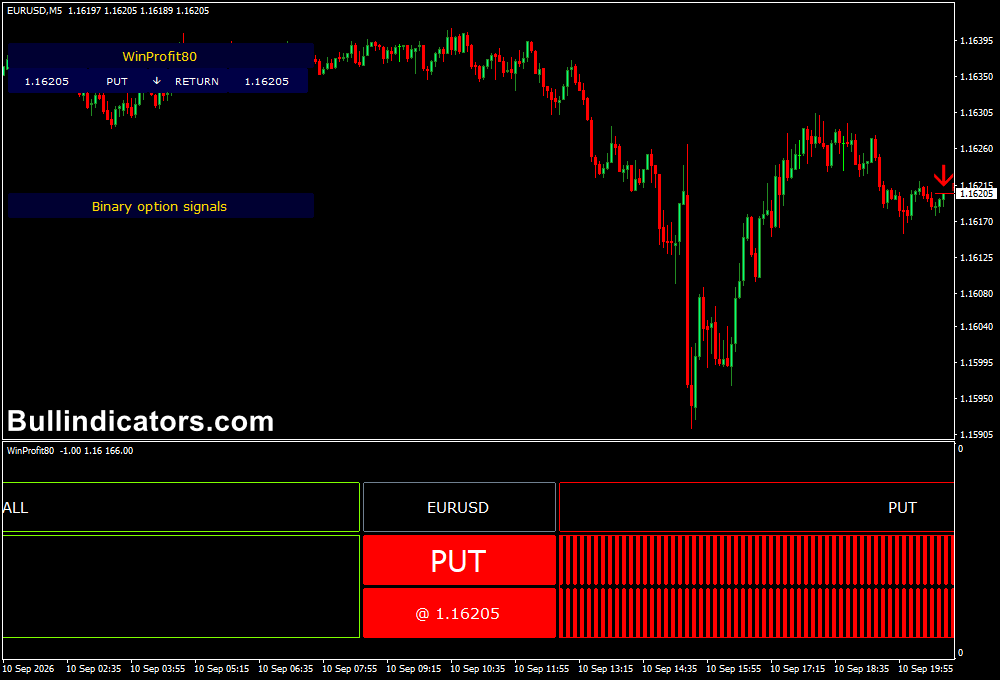
Indicator Chart Setup
Add the indicator to an intraday MT4 chart and enable the desired signal and filter settings.
Green CALL arrows represent bullish signals, while red PUT arrows represent bearish signals.
The meter provides an additional visual indication of developing bullish or bearish conditions.
The chart also records recent signal results, allowing you to review previous CALL and PUT outcomes while assessing the current market.
Core Features
- Green CALL arrows for bullish trading signals
- Red PUT arrows for bearish trading signals
- Signal meter showing developing bullish or bearish conditions
- Multiple filter levels for additional signal confirmation
- Previous signal results displayed on the chart
- Popup, mobile push and email alerts
- Suitable for M1 through H1 intraday charts
Best for
- Binary options CALL and PUT setups
- Fast M1 and M5 forex scalping
- Intraday directional trading
- Signal confirmation with other indicators
- Short-duration trading strategies
- Traders who prefer simple visual entry signals
Best Markets
- EURUSD: A popular choice for M1 and M5 scalping because of its liquidity and frequent intraday movement.
- GBPUSD: Suitable for short-term setups, particularly during the London and New York sessions.
- GBPJPY: Its higher volatility can create frequent opportunities for fast directional trades.
- EURJPY: Useful for intraday signal analysis during active European trading hours.
- USDJPY: Can be monitored during the Asian and London sessions for short-term opportunities.
- AUDUSD: Well suited to traders focusing on Asian-session activity and lower-timeframe setups.
- Other forex pairs and MT4 assets: The signals can also be tested on other currency pairs, indices, commodities and supported markets.
Trading Styles
- M1 fast scalping
- M5 short-term scalping
- M15 intraday trading
- M30 binary options trading
- H1 directional setups
- Price action confirmation strategies
How traders use it
For binary options, a green CALL arrow can be treated as a bullish signal, while a red PUT arrow indicates bearish conditions.
The expiration information shown by the system can be used to determine the intended option duration.
Because binary options do not use conventional stop-loss and take-profit orders, the result is generally determined at expiration.
Forex traders can use the signals differently by combining the arrow with price action and nearby support or resistance.
A bullish CALL signal can provide a potential buy entry, with a stop below the previous swing low. A bearish PUT signal can provide a potential sell entry, with protection above the previous swing high.
M1 EURUSD Scalping Example
For example, on EURUSD M1 during the London session, a green CALL signal appears after a short downward pullback. I
f price holds a nearby support level and the signal meter confirms bullish conditions, a scalper could enter a buy and target a quick 5–10 pip move.
The trade can be managed around the next resistance area or closed when the short-term momentum weakens.
M5 GBPUSD M5 Trading Example
On GBPUSD M5 during the London-New York overlap, a red PUT signal following rejection from resistance can be combined with bearish price action for a potential short trade.
A stop above the recent swing high and a target around the previous intraday low provide a simple framework for managing the position.
More experienced users can combine the signals with moving averages, RSI, MACD, support and resistance, or another trend filter to reduce the number of setups and focus on stronger market conditions.
Get Instant Free Access
Indicator Settings
- Main Signals: Enables the primary CALL and PUT signals.
- Basic Filter: Applies the basic filtering conditions to the main signals.
- Normal Filter: Adds further conditions to the signal calculation.
- Hard Filter: Applies multiple filtering conditions for more selective signals.
- Popup Window: Displays signal alerts through a popup window.
- Push-notification: Sends alerts to a connected mobile device.
- Email: Sends signal notifications by email.
Important Notes
- Signals should be evaluated together with market conditions and price action.
- Lower timeframes can produce more frequent signals but also more market noise.
- Higher timeframes such as M30 and H1 generally produce fewer signals.
- Test the selected filters and trading rules on a demo account before risking real money.
- Past signal results displayed on the chart do not guarantee future performance.









