The Exposure indicator for MT5 is a practical trading-management tool that keeps important information about your open positions visible directly on the chart.
It displays details such as the traded asset, number of open positions, order type, total lot size, entry price and current floating profit or loss.
The indicator reads the information from the MT5 trading terminal and presents it in a compact format on the chart.
This means you can monitor your overall exposure without repeatedly opening the terminal window, which can be particularly useful when several positions are active at the same time.
Why traders use the Exposure Indicator
Managing open positions becomes more difficult when multiple trades are running across different currency pairs or instruments.
The Exposure Indicator provides a quick overview of that activity, making it easier to see how much capital is currently committed and whether positions are moving into profit or loss.
It can also support better risk management.
Seeing the total lot size, number of positions and floating result together makes it easier to recognize when exposure is becoming larger than intended.
This is especially relevant for scalpers and day traders who may open several positions during an active session.
For example, if several EURUSD, GBPUSD and USDJPY positions are open simultaneously, the indicator provides a convenient overview without requiring constant switching between charts and the terminal.
Download This MT5 Indicator for Free
Indicator Chart Setup
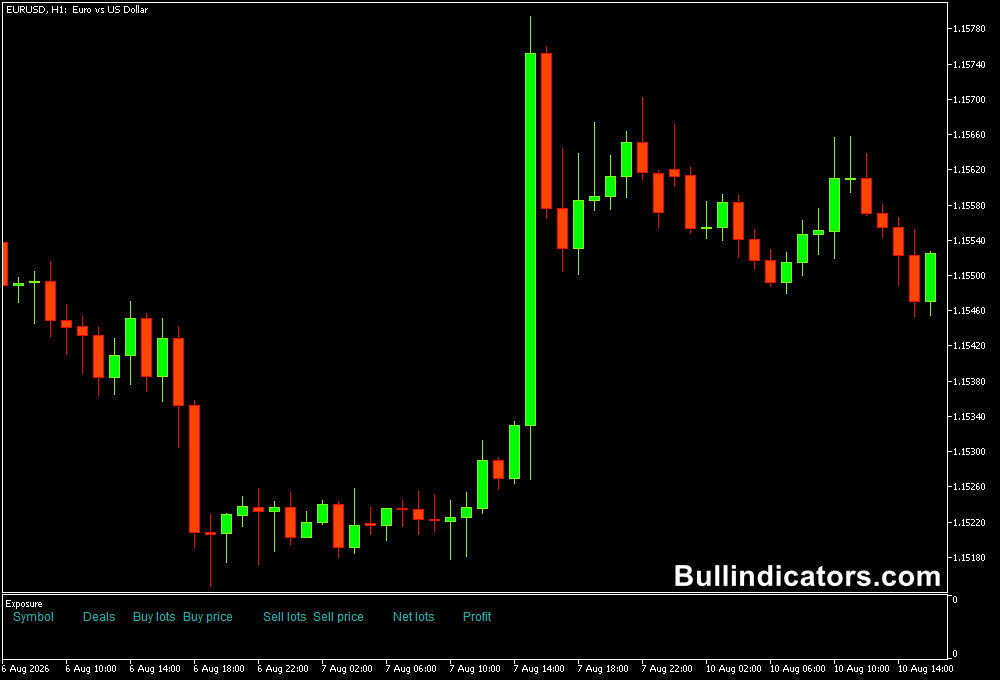
The Exposure MT5 indicator displays a text-based overview of the current open positions.
Information can include the symbol, number and type of positions, combined lot size, entry price and floating profit or loss.
The information updates according to the current trading exposure, giving you a convenient dashboard while monitoring the market.
The display can remain visible while analyzing price action or managing existing positions. At the moment, there are NO open positions!
Core Features
- Displays current open trading exposure directly on the chart.
- Shows the assets with active positions.
- Displays the number and type of open orders.
- Shows total lot size and entry price information.
- Provides current floating profit or loss.
- Helps monitor several open positions from one chart.
Best for
- Monitoring multiple open positions during active trading sessions.
- Keeping position size and exposure visible while trading.
- Identifying excessive exposure before adding another position.
- Reviewing floating profit and loss without repeatedly opening the terminal.
- Supporting disciplined risk management during short-term trading.
Best Markets
- EURUSD, GBPUSD and USDJPY when several intraday positions are active.
- EURJPY and GBPJPY for monitoring exposure during higher-volatility sessions.
- Major forex pairs when managing multiple correlated positions.
- It can also be useful for other MT5-traded assets supported by the account.
Trading Styles
- M1 and M5 scalping where several positions may be opened during one session.
- M15 and M30 day trading with multiple intraday setups.
- H1 trading where positions are held for longer periods.
- Multi-pair trading where exposure needs to be monitored across several instruments.
How traders use it
The Exposure Indicator is not designed to generate market-entry signals.
Its purpose is to make existing exposure easier to monitor and manage.
Before opening a new position, you can check the display to see how many trades are already active, their combined lot sizes and current floating results.
This can help minimize risk by making excessive position accumulation easier to spot.
For instance, opening several trades on highly correlated currency pairs can create greater effective exposure to the same market movement than the individual lot sizes may suggest.
Seeing those positions together can encourage a more careful assessment before adding another trade.
Example for a Scalper
- A scalper has open EURUSD, GBPUSD and USDJPY positions while trading the London session.
- The Exposure Indicator shows the number of positions and their combined lot sizes directly on the chart.
- Before taking another setup, the current exposure is checked rather than looking only at the new trade in isolation.
- If the existing positions already represent a significant portion of the intended risk, the trader can choose to reduce exposure or wait for an existing position to close.
- This helps prevent a series of small trades from developing into an unnecessarily large overall position.
Example for a Day Trader
- A day trader has positions open on EURUSD and GBPJPY.
- The indicator shows the current lot sizes and floating profit or loss for the open trades.
- A new setup appears on another pair, but the existing exposure is reviewed first.
- The trader can then decide whether the additional position fits the planned risk level.
Get Instant Free Access
Indicator Settings
- Text Color: Defines the color used for the indicator’s text displayed on the chart.
Important Notes
- The Exposure Indicator is a position-monitoring and risk-management tool, not a technical market-analysis indicator.
- Review total exposure before adding new positions, particularly when several trades involve correlated assets.
- Floating profit or loss changes as market prices move and should not be treated as realized results.
- Use sensible position sizing and predefined risk limits alongside the information displayed by the indicator.
- The tool is particularly useful when several trades are active and quick access to exposure information is important.