
The Best Scalping indicator for MT4 is a trend-following tool designed to identify short-term market momentum and potential trading opportunities.
It displays buy and sell arrows directly on the chart, helping traders recognize possible trend changes and continuation moves.
This indicator can be applied to all currency pairs and works across different timeframes.
Although it is designed for scalping, analysing the overall trend direction on the H1 chart before entering lower timeframe trades can improve signal quality and help avoid counter-trend setups.
Why traders use Best Scalping Indicator
The Best Scalping Indicator simplifies short-term market analysis by highlighting possible entry points when momentum increases.
The visual arrow signals allow traders to quickly identify potential bullish and bearish movements without manually analysing multiple technical indicators.
The indicator is especially useful during strong trending markets or clear range conditions where price movements are more predictable.
Many scalpers combine the signals with additional confirmation tools such as support and resistance levels, moving averages, or candlestick analysis.
For improved accuracy, traders can first analyse the main market trend on the H1 timeframe.
Trading only in the direction of the larger trend can reduce false signals and may significantly improve overall trading performance.
Download This MT4 Indicator for Free
Indicator Chart Setup
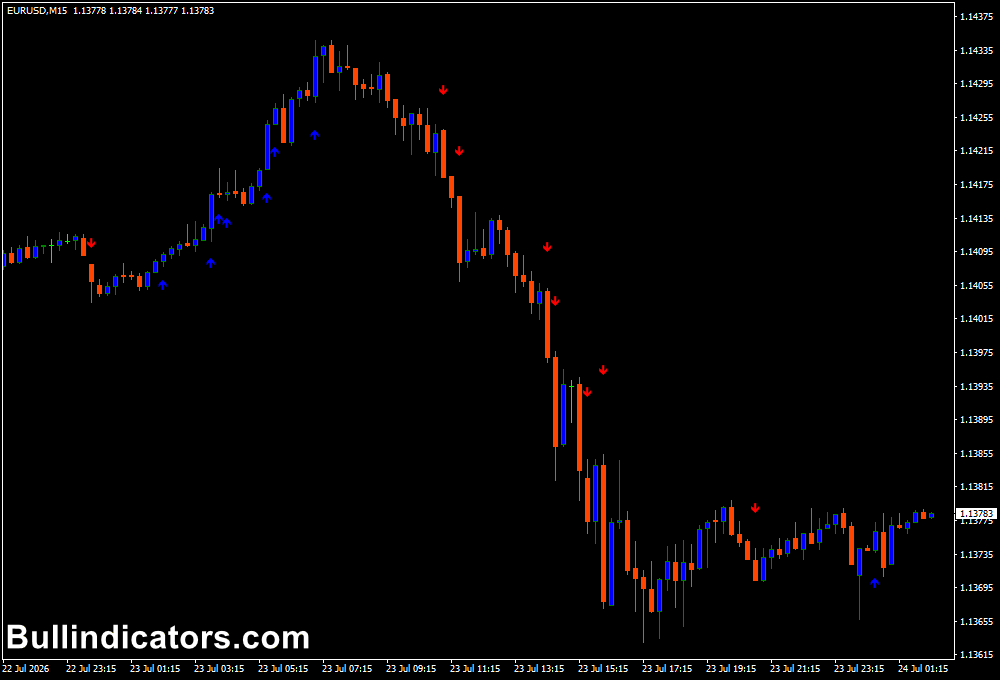
After attaching the Best Scalping Indicator to a MetaTrader 4 chart, traders will see coloured arrows appearing above and below price candles.
Blue arrows indicate potential buying opportunities, while red arrows highlight possible selling opportunities.
The indicator analyses market momentum and attempts to identify the beginning of a new move.
The signals can appear frequently on lower timeframes, so combining them with higher timeframe trend analysis can provide stronger trade confirmation.
Core Features
- Displays automatic buy and sell arrow signals.
- Identifies short-term momentum changes.
- Works with all currency pairs.
- Compatible with all MT4 timeframes.
- Suitable for scalping and intraday trading.
- Includes adjustable arrow filtering settings.
Best for
- Finding short-term trend continuation opportunities.
- Identifying possible market reversals.
- Scalping during active trading sessions.
- Supporting manual trading strategies.
- Quick analysis of market momentum.
Best Markets
- EUR/USD and GBP/USD for liquid scalping setups.
- GBP/JPY and EUR/JPY during strong momentum sessions.
- Gold (XAU/USD) for short-term price movements.
- Major indices such as NASDAQ and DAX during active market hours.
- Other highly liquid markets with clear directional moves.
Trading Styles
- Scalping on M5 and M15 charts using arrow confirmations.
- Intraday trading on M30 and H1 charts.
- Trend-following strategies after confirming direction on the H1 timeframe.
- Momentum trading on major Forex pairs during London and New York sessions.
- Short-term reversal setups combined with price action analysis.
How traders use it
The Best Scalping Indicator is mainly used to locate possible entry points when a new momentum move develops.
A buy setup occurs when a blue arrow appears and price confirms bullish movement.
A sell setup develops when a red arrow appears with bearish confirmation.
For better results, traders should avoid taking every signal blindly.
Checking the H1 trend direction first can help filter weaker signals.
For example, when the H1 chart shows a bullish trend, traders can focus mainly on blue arrow signals from lower timeframes.
Buy Setup
- Identify the overall trend direction on the H1 chart.
- Wait for a blue buy arrow to appear.
- Confirm bullish price movement.
- Enter the trade after confirmation.
- Place a stop-loss approximately 15 to 20 pips below the entry area.
- Exit when an opposite red signal appears or when the trading target is reached.
Sell Setup
- Confirm bearish direction on the H1 timeframe.
- Wait for a red sell arrow.
- Confirm bearish candle movement.
- Enter after the signal confirmation.
- Place a stop-loss approximately 15 to 20 pips above the entry area.
- Close the trade when a blue arrow appears or the target is reached.
Get Instant Free Access
Indicator Settings
- SmallFilterSpeed: Adjusts the speed and calculation sensitivity of smaller arrows.
- SmallFilterSlow: Controls the slower arrow filtering calculation.
- Arrow colours: Customize the appearance of buy and sell signals.
- Arrow style: Change the visual style of displayed signals.
- Display options: Adjust how signals appear on the MT4 chart.
Important Notes
- The indicator should be combined with trend analysis and proper risk management.
- Signals on very low timeframes can produce more false entries.
- Checking the H1 trend direction before scalping can improve signal accuracy.
- The indicator performs best during strong trends or clear market conditions.
- Always test the settings on a demo account before applying them to live trading.









