The CCI Woodies indicator for MT5 is a momentum-based trading tool built around the Commodity Channel Index (CCI).
It is designed for traders who use Woodies CCI patterns, zero-line movements and momentum changes to identify potential market entries and exits.
The indicator combines the standard CCI concept with additional visual elements, including color changes, arrows, Turbo CCI, LSMA and EMA trend information.
With the CCI calculation period set to 14 by default, the indicator can be adapted to different market conditions and timeframes.
Its separate oscillator window makes momentum shifts easier to monitor while keeping price action clearly visible on the main chart.
Why traders use CCI Woodies
CCI Woodies helps simplify the interpretation of CCI-based trading patterns by presenting momentum information visually.
Changes in oscillator color and movement around the zero line can provide an early indication that bullish or bearish momentum is developing.
The additional Turbo CCI, LSMA and EMA trend components give users more information for confirming directional conditions.
This can be useful when combining CCI signals with support and resistance, price action or an established trend-following method.
Download This MT5 Indicator for Free
Indicator Chart Setup
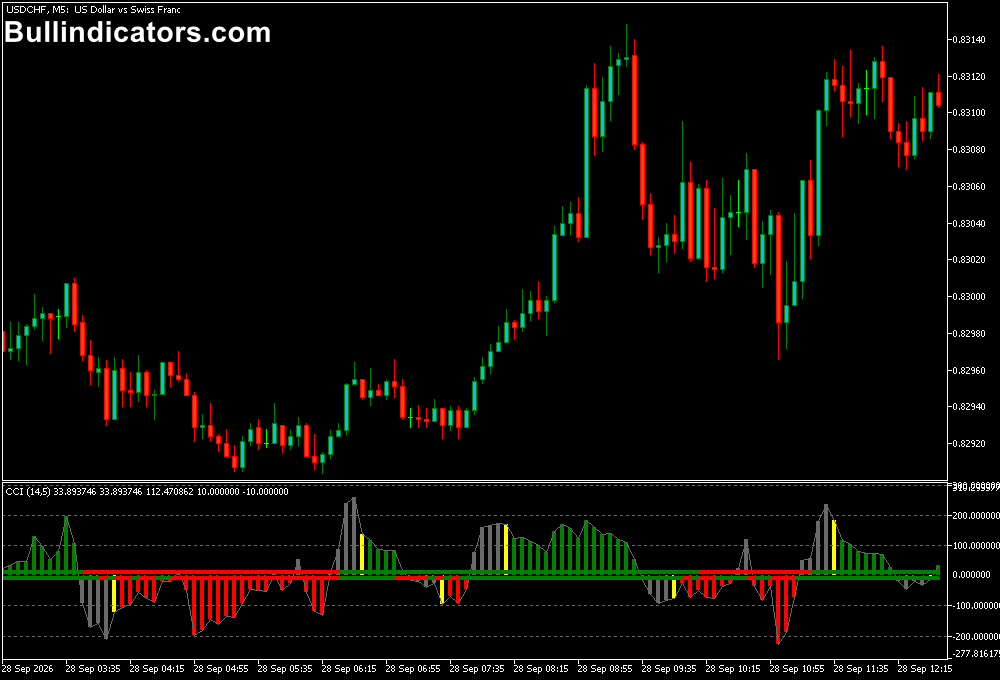
CCI Woodies appears in a separate window below the main MT5 price chart.
The oscillator displays CCI momentum and uses different colors to highlight changes in its direction.
The zero line is particularly important because movement above or below this level can be used to assess bullish and bearish momentum.
Depending on the selected settings, the window can also display Turbo CCI, LSMA trend information and EMA trend information.
These components can be used together to filter signals and determine whether a setup has sufficient momentum.
Core Features
- 14-period CCI-based momentum analysis
- Visual color changes for momentum direction
- CCI Woodies pattern analysis
- Optional Turbo CCI display
- Optional LSMA trend component
- Optional EMA trend component
- Adjustable calculation periods and applied price
- Suitable for trend and counter-trend analysis
Best for
- Identifying CCI momentum shifts around the zero line
- Woodies CCI pattern analysis
- Confirming short-term directional moves
- Filtering entries with additional trend information
- Combining momentum signals with price action and support or resistance
Best Markets
- EURUSD for clean intraday momentum movements during London and New York sessions.
- GBPJPY for faster momentum setups on lower timeframes.
- GBPUSD for short-term CCI signals around major session opens.
- XAUUSD can be considered when momentum expands during active market periods, although its larger price swings require appropriate risk control.
Trading Styles
- Scalping on M1 and M5 using momentum changes for short 5–15 pip objectives on liquid currency pairs.
- Intraday trading on M5 and M15 with zero-line crosses confirmed by the broader trend.
- Trend trading on M30 and H1 using CCI direction together with LSMA or EMA confirmation.
- Short-term counter-trend setups when CCI reaches extended levels and price action provides reversal confirmation.
How traders use it
A simple scalping approach can be built around the M5 chart.
For example, a trader can monitor EURUSD during the London or New York session and wait for CCI Woodies to move through the zero line with a supportive color change.
A long setup can be considered when momentum moves above zero and the broader price structure is bullish.
A short setup can be considered when momentum moves below zero while price structure is bearish.
For a 5–15 pip trading objective, the setup should be combined with nearby support or resistance, current volatility and spread conditions.
The opposite CCI signal can also be used as an exit reference. No indicator guarantees a profitable trade, so position size and stop-loss placement remain important.
Get Instant Free Access
Indicator Settings
- CCI calculation period: Sets the period used to calculate the CCI.
- Number of bars determining trend: Defines how many bars are used for trend determination.
- Show Turbo CCI: Enables or disables the Turbo CCI.
- Turbo CCI calculation period: Controls the Turbo CCI calculation period.
- Show LSMA trend: Enables or disables the LSMA trend display.
- LSMA period: Sets the LSMA calculation period.
- LSMA applied price: Selects the price used for LSMA calculations.
- LSMA drawing position: Controls the LSMA position within the oscillator window.
- Show EMA trend: Enables or disables the EMA trend display.
Important Notes
- CCI Woodies is a technical analysis tool and should be combined with price structure and market context.
- Zero-line crosses can occur frequently during sideways markets and may require additional confirmation.
- Lower timeframes can produce more signals but are also more sensitive to short-term market noise.
- For scalping, account for spread, execution speed and current volatility before entering a position.
- Test the settings on the chosen market and timeframe before using the indicator in live trading.