The Jebatfx Breakout Trendline indicator for MT5 automatically identifies and draws trendlines based on recent market structure.
It is designed to help locate potential breakout points without requiring trendlines to be drawn manually.
When price breaks through a plotted trendline, the indicator also provides a suggested profit target for the setup.
Trendline breakouts can be particularly interesting when price has repeatedly respected the same diagonal boundary.
The indicator provides a clear visual reference for these situations and can be used on intraday charts as well as higher timeframes where trend structures tend to develop more clearly.
Why traders use the Jebatfx Breakout Trendline Indicator
Drawing reliable trendlines manually requires identifying meaningful highs and lows and deciding which points should be connected.
The Jebatfx indicator automates this process, allowing the chart to focus on the most relevant trendline structure rather than being filled with manually drawn lines.
A trendline becomes more significant when price has reacted to it several times.
The indicator can therefore be useful for monitoring a market that is compressing toward a diagonal boundary.
A confirmed break can then be evaluated as a potential continuation or reversal setup depending on the surrounding price action.
The suggested target also gives the setup a clearly defined reference point.
It should be treated as a technical objective rather than a guaranteed profit level, with the stop-loss decision remaining part of the individual trading plan.
Download This MT5 Indicator for Free
Indicator Chart Setup
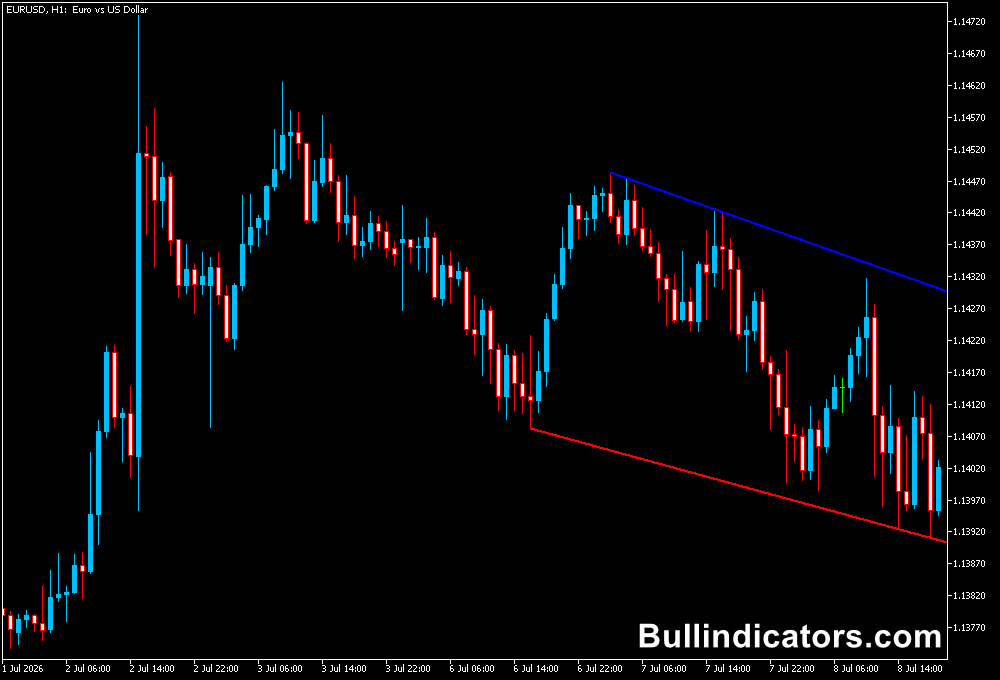
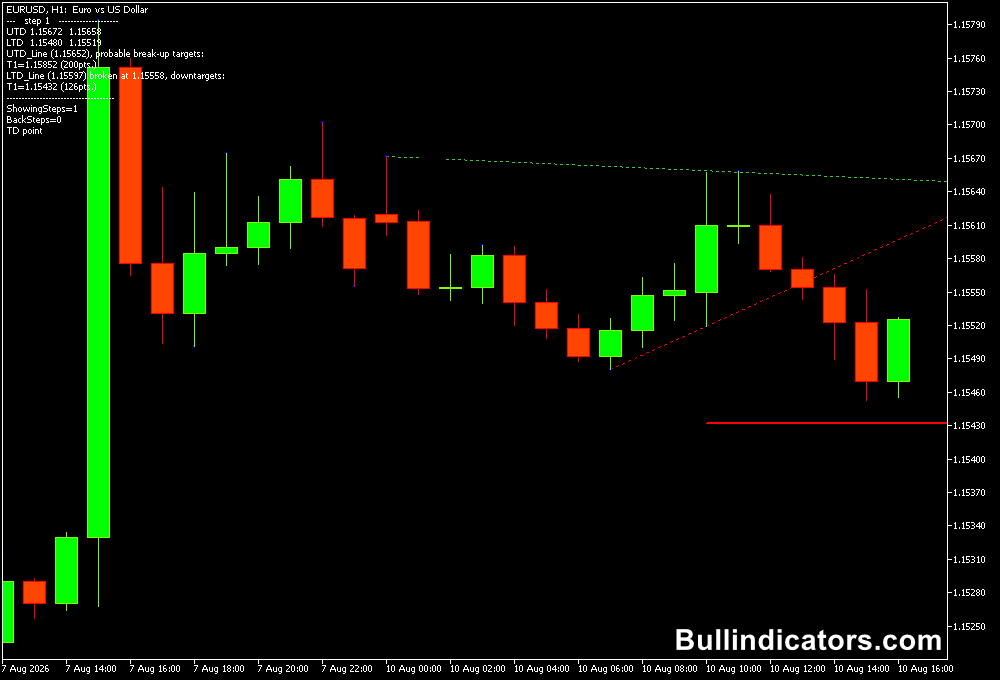
The indicator displays an automatically generated trendline on the MT5 chart together with a suggested take-profit target.
The trendline provides the boundary that price needs to break before a potential trade is considered.
A valid breakout should be evaluated after price has interacted with the trendline multiple times.
The basic approach is to look for at least three reactions before treating the line as an established breakout boundary.
Once price closes beyond the trendline, the direction of the breakout determines whether the setup is considered for a buy or sell.
Core Features
- Automatically identifies and draws trendlines.
- Highlights potential trendline breakout opportunities.
- Displays a suggested profit target for breakout setups.
- Reduces the need for manual trendline drawing.
- Includes customizable trendline appearance.
- Can provide alerts when relevant signals occur.
Best for
- Identifying established diagonal market boundaries.
- Monitoring price compression before a potential breakout.
- Finding breakout levels during directional markets.
- Planning intraday entries around confirmed trendline breaks.
- Combining breakout signals with additional price-action confirmation.
Best Markets
- EURUSD and GBPUSD for liquid breakout setups during major trading sessions.
- GBPJPY and EURJPY when stronger intraday movement creates well-defined trend structures.
- XAUUSD for larger breakout moves around established diagonal boundaries.
- Major currency pairs during London and New York when breakout activity can increase.
Trading Styles
- Day trading on M15 and H1 for established intraday trendline breaks.
- Breakout trading on H1 and H4 where trendlines have more time to develop.
- Short-term momentum trading after a confirmed candle closes beyond the trendline.
- Scalping on M1 and M5 when a clearly established trendline has multiple prior reactions.
How traders use it
The basic method is to wait for price to test the trendline several times before considering the breakout valid.
Once the market closes beyond the line, the direction of the break provides the initial trade bias.
A stop loss can then be positioned beyond a recent swing point or another logical invalidation level.
The suggested target can be used as a reference for managing the position.
Some setups may reach the target quickly, while others can reverse before reaching it.
For that reason, the target should be incorporated into a complete risk-management plan rather than viewed as a guaranteed outcome.
Scalping Trendline Breakouts
The indicator can also be adapted to M1 and M5 scalping when the market is forming a clear short-term trend structure.
The key is to avoid treating every small line break as a trade.
A stronger scalp setup comes from a trendline that price has respected repeatedly before the breakout.
Buy Breakout Scalp
- Use M1 or M5 on an active pair such as EURUSD, GBPUSD, or GBPJPY.
- Identify a descending trendline created by a sequence of lower highs.
- Wait for price to test the trendline at least three times.
- Monitor the market for increasing bullish momentum as price approaches the line.
- Wait for a candle to close above the trendline rather than reacting to a temporary intrabar spike.
- Consider the close above the line as the potential buy trigger.
- Place the stop below the most recent short-term swing low or another clearly defined invalidation point.
- Use the indicator’s suggested target as a reference for profit management.
Sell Breakout Scalp
- Move to an M1 or M5 chart during a liquid trading period.
- Look for an ascending trendline connecting a sequence of higher lows.
- Wait for several reactions to establish the diagonal boundary.
- Monitor price as it approaches the trendline from above.
- Wait for a candle to close below the trendline before considering a short entry.
- Use the confirmed break as the potential sell trigger.
- Place the stop above the latest swing high or another logical resistance point.
- Monitor the suggested target while managing the position according to the chosen risk parameters.
Get Instant Free Access
Indicator Settings
- Alerts On: Turns the indicator’s alerts on or off.
- Comments: Controls whether the indicator’s chart comments are displayed.
- Trendline: Provides access to the trendline properties.
- Trendline Style: Controls the visual style of the plotted trendline.
- Trendline Width: Adjusts the thickness of the trendline.
- Colors: Allows the available indicator colors to be customized.
Important Notes
- Higher timeframes generally provide more developed trendline structures, while M1 and M5 setups require additional filtering because short-term price noise can create weaker breaks.
- For scalping, focus on trendlines that have produced several clear reactions rather than trading every minor break.
- Wait for candle confirmation where possible because temporary price spikes can produce false breakouts.
- False breakouts are a normal feature of market behavior, so additional confirmation can be useful.
- The suggested profit target is a reference level and does not guarantee that price will reach it.
- Always define the stop-loss and position size before entering a breakout trade.