
The Currency Pair Correlation indicator for MT4 is designed to show how closely two currency pairs are moving relative to each other.
Rather than relying on a separate correlation table or calculator, the relationship is displayed directly in the indicator window as a color-coded histogram.
This makes it easier to compare markets and recognize periods when two pairs are moving together, moving in opposite directions, or showing little meaningful relationship.
Correlation can be particularly useful when selecting trades, confirming market movements and managing exposure.
For example, EURUSD and USDCHF often display an inverse relationship, while EURUSD and NZDUSD can show periods of positive correlation.
Understanding these relationships can help prevent taking multiple positions that are effectively exposed to the same underlying currency movement.
Why traders use the Currency Pair Correlation Indicator
Currency correlation provides another layer of market analysis.
A positive relationship means the two selected pairs generally move in the same direction, while a negative relationship means their price movements tend to oppose each other.
When the relationship becomes weak or inconsistent, the histogram can help highlight that the two markets are no longer moving closely together.
The visual histogram is useful when monitoring several instruments because the correlation reading can be assessed without repeatedly switching between charts.
It can also support confirmation strategies, pair selection and portfolio risk management.
Download This MT4 Indicator for Free
Indicator Chart Setup
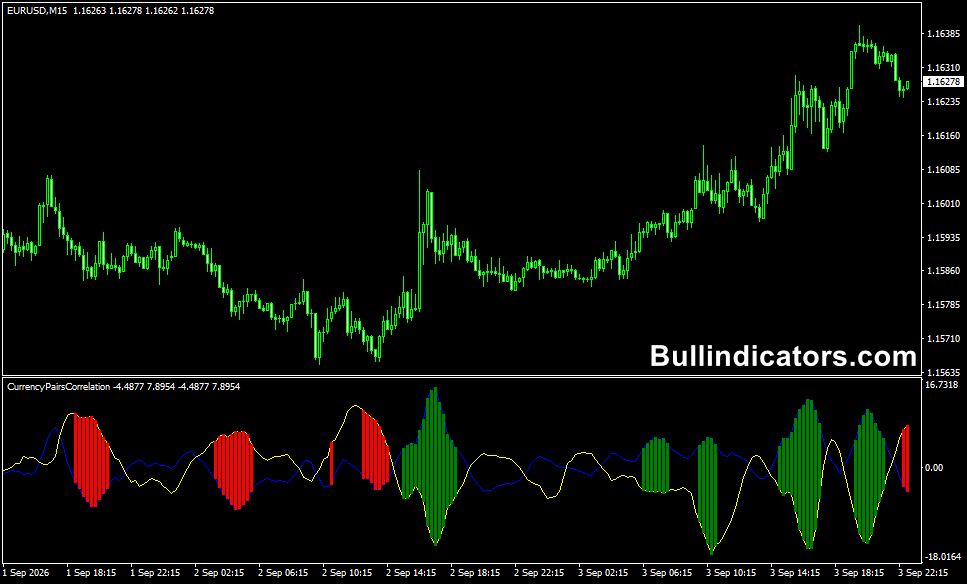
Once running on an MT4 chart, the Currency Pair Correlation indicator displays the calculated relationship between the selected chart and a second currency pair in a separate window.
The histogram changes color as the correlation changes, allowing the relationship between the two markets to be monitored over time.
For example, when comparing EURUSD with USDCHF, a strong inverse relationship can be useful when EURUSD is rising while USDCHF is falling.
A change in histogram behavior may indicate that the relationship is weakening or changing and deserves closer attention.
Core Features
- Compares the price movement of two selected currency pairs.
- Displays correlation through a color-coded histogram.
- Helps identify positive, negative and weak correlation.
- Allows the second currency pair to be selected manually.
- Uses moving-average calculations as part of the analysis.
- Suitable for short-term and higher-timeframe market analysis.
Best for
- Comparing related currency pairs before entering a position.
- Confirming whether two markets are moving together.
- Identifying potential inverse relationships for hedging analysis.
- Reducing duplicated exposure across several forex positions.
- Building multi-pair confirmation strategies.
Best Markets
- EURUSD and USDCHF for monitoring an often inverse relationship.
- GBPUSD and GBPJPY when comparing movements involving GBP.
- EURUSD and NZDUSD for positive-correlation analysis.
- USDJPY and EURJPY for comparing yen-related market movements.
- AUDUSD and XAUUSD when assessing periods of similar directional behavior.
- Major forex pairs generally provide the most practical combinations because of their liquidity.
Trading Styles
- Scalping when rapid correlation changes are relevant on M1 to M15 charts.
- Intraday trading for confirmation between related pairs.
- Swing trading on H4 and Daily charts.
- Hedging strategies involving negatively correlated instruments.
- Multi-pair portfolio management and exposure control.
How traders use it
A practical method is to combine correlation with the existing trend on the main trading chart.
When two positively correlated pairs are moving in the same direction, the second pair can provide additional confirmation.
With negatively correlated pairs, opposite price movements can help confirm whether the underlying currency pressure is consistent.
Correlation can also prevent a common mistake: opening several positions that appear different but are actually heavily exposed to the same market factor.
For example, buying EURUSD while simultaneously selling USDCHF may create similar directional exposure because both trades can benefit from USD weakness.
The correlation reading helps identify this relationship before adding another position.
For hedging, traders may monitor pairs with a negative relationship and use the correlation information alongside position sizing and risk controls.
Correlation should not be treated as fixed, however.
Relationships can weaken or reverse during economic releases, changes in monetary policy and unusual market conditions.
Get Instant Free Access
Indicator Settings
- MAPeriod1: Sets the moving-average period used in the calculation.
- MAMethod1: Selects the moving-average calculation method.
- MAPrice1: Determines the price type used for the moving-average calculation.
- MaAvg1: Sets the period for the second moving-average calculation.
- MAMet1: Selects the method used for the second moving average.
- symbol2: Defines the second currency pair used for the correlation comparison.
- Colors: Controls the colors used to distinguish the correlation readings.
- Style: Controls the visual presentation of the histogram.
Important Notes
- Correlation is not permanent and can change significantly during different market conditions.
- A high correlation does not guarantee that both pairs will continue moving together.
- Always consider economic news and major fundamental events when comparing currency pairs.
- Check correlation before opening several positions involving the same base or quote currency.
- Use position sizing and stop-loss management alongside correlation analysis.
- The histogram is best used as a confirmation and exposure-management tool rather than as a standalone entry system.









