
The Forex Prediction indicator for MT4 is designed to help beginners interpret short-term market direction by comparing buying and selling pressure.
This trading tool provides a practical reading of which side currently has more strength.
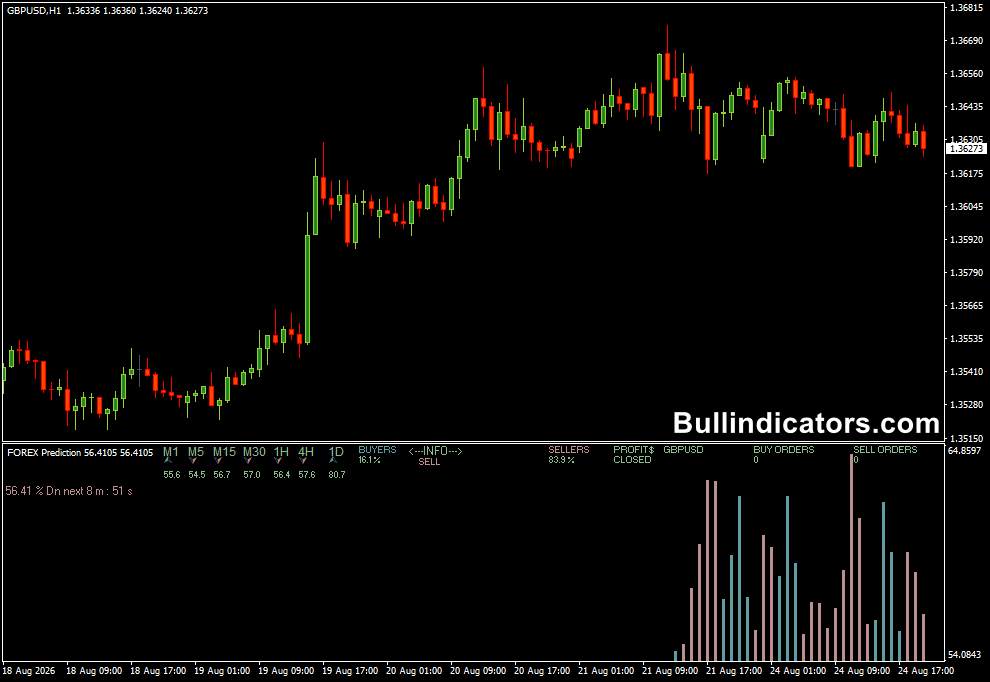
The calculations are displayed in a separate window beneath the price chart.
Blue bars represent bullish pressure, while brown bars indicate bearish pressure.
Arrows on the main chart provide an additional directional signal, making the setup relatively easy to understand for someone who is still learning how market momentum develops.
Why traders use the Forex Prediction Indicator
One of the biggest challenges for new Forex traders is knowing when the market is actually moving with conviction.
A price candle may look bullish, but if selling pressure is increasing at the same time, entering immediately can produce a poor trade.
This tool gives beginners additional information before committing capital.
Strong blue readings combined with an upward arrow can support a long setup, while dominant brown readings and a downward arrow can support a short setup.
It is particularly useful when combined with basic technical concepts such as support and resistance, swing highs and lows, and the general market trend.
Used this way, the prediction reading becomes part of a trading decision rather than a standalone forecasting system.
Download This MT4 Indicator for Free
Indicator Chart Setup
The Forex Prediction indicator uses a separate panel underneath the main MT4 chart.
Blue histogram bars show increasing bullish pressure, whereas brown bars represent stronger bearish activity.
An arrow is also displayed on the price chart when the calculated direction changes.
The combination makes it possible to compare the signal with what price is actually doing.
For example, an upward arrow accompanied by expanding blue bars is more interesting when price is also breaking above a nearby resistance area.
Core Features
- Measures the relative strength of buyers and sellers.
- Displays bullish and bearish pressure in a separate chart window.
- Uses directional arrows to highlight potential market moves.
- Can be used from M1 through Daily charts.
- Suitable for short-term setups and intraday analysis.
- Can be combined with price action and support/resistance analysis.
Best for
- Identifying the current side of market pressure.
- Filtering potential entries before opening a position.
- Short-term directional trades.
- Learning how momentum and price direction interact.
- Confirming breakouts and continuation setups.
Best Markets
- EURUSD and GBPUSD for liquid intraday setups.
- GBPJPY when strong directional moves develop.
- USDJPY for momentum-based sessions.
- XAUUSD when gold is showing sustained buying or selling pressure.
- Major currency pairs during active London and New York hours.
Trading Styles
- Scalping on M1 and M5 charts.
- Intraday trading on M15 and M30.
- Short-term momentum trading on H1.
- Breakout confirmation after important price levels are breached.
How traders use it
A simple approach is to begin with the higher-timeframe direction and then use the prediction reading to time an entry.
Suppose EURUSD is making higher highs and higher lows on H1.
On M5, wait for bearish pressure to fade and for blue bars to strengthen alongside an upward arrow.
A long entry can then be considered, preferably after a bullish candle confirms the move.
For a bearish setup, reverse the process.
If the broader market is declining, wait for selling pressure to return on the trading timeframe.
A downward arrow with expanding brown bars provides a more convincing short setup than an isolated arrow against the prevailing trend.
For beginners, risk management matters more than finding every signal.
A stop loss can be placed beyond the recent swing point, while the profit target can be based on the next support or resistance area.
Keeping risk small on each position gives losing trades less impact on the account.
Get Instant Free Access
Indicator Settings
- TriggerLevel – Separates major signals from minor market noise.
Important Notes
- The prediction reading does not guarantee that price will move in the indicated direction.
- Check the general trend before taking a signal; setups aligned with the dominant direction are generally easier to manage.
- On lower timeframes, avoid entering during extremely quiet conditions or immediately around major news releases.
- Support and resistance can help identify more logical entry and exit locations.
- Beginners should focus on consistent risk management rather than attempting to trade every arrow.









