
The Position Size Calculator indicator for MT4 is a professional risk management tool designed to help traders calculate the correct lot size before entering a trade.
Instead of manually working out position size, stop loss distance, and account exposure, this tool displays the required information directly on the chart.
Successful trading is not only about finding good entries.
Protecting trading capital through proper position sizing is equally important.
This indicator helps determine how much volume should be used based on account balance, risk percentage, and stop loss placement.
By combining automatic calculations with a simple chart panel, the Position Size Calculator makes it easier to maintain consistent risk across different forex pairs and financial markets.
Why traders use the Position Size Calculator Indicator
Many trading mistakes happen because positions are opened with incorrect lot sizes.
A setup may look attractive, but using too much volume can create unnecessary losses when the market moves against the position.
The Position Size Calculator helps solve this issue by calculating the appropriate trade size before execution.
It considers important factors such as account balance, selected risk level, entry price, and stop loss distance.
During fast-moving sessions, especially when scalping or day trading, there is often little time to perform manual calculations.
Having risk information displayed directly on the chart allows for quicker and more disciplined decisions.
Download This MT4 Indicator for Free
Indicator Chart Setup
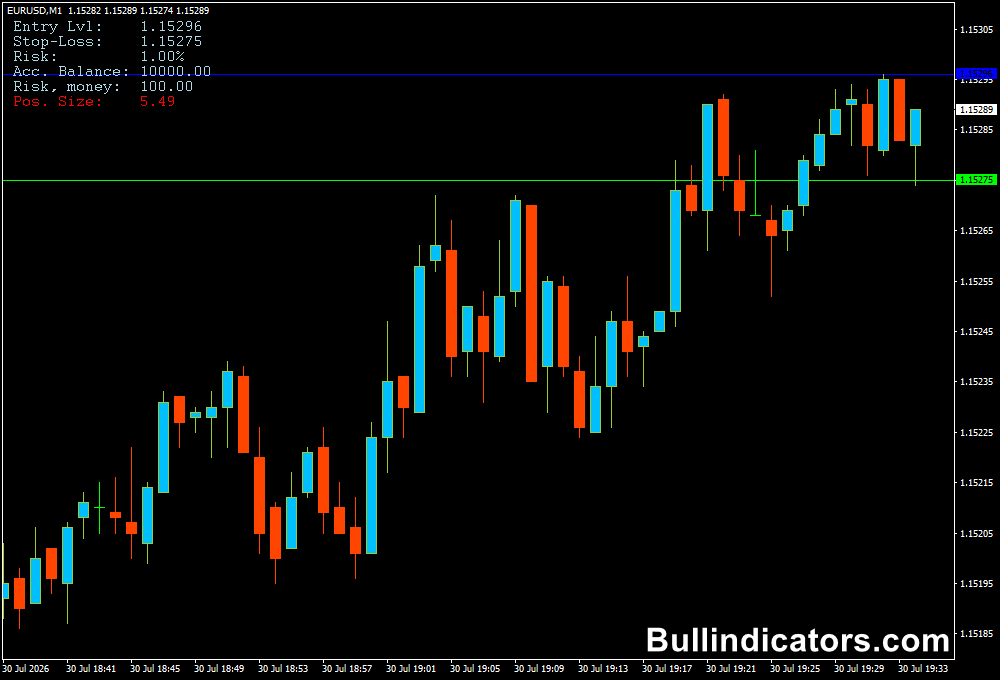
The chart display includes a calculation panel showing important trading information such as account balance, risk amount, position size, entry price, and stop loss level.
The indicator also places visual lines on the chart to show the planned entry point and the level where the trade will be closed if the setup fails.
This allows users to immediately see the relationship between potential risk and market movement.
For example, a trader preparing a EUR/USD BUY trade can see that a 40-pip stop loss with a selected risk percentage requires a specific lot size.
This prevents entering a position that exceeds the planned account exposure.
Core Features
- Automatically calculates suitable position size
- Displays risk amount directly on the MT4 chart
- Shows entry and stop loss levels visually
- Supports percentage-based and fixed money risk
- Works with forex pairs and other financial instruments
- Helps maintain consistent money management
Best for
- Managing risk before opening trades
- Calculating lot sizes quickly
- Protecting trading capital
- Creating consistent position sizing rules
- Avoiding excessive exposure during volatile markets
Best Markets
- EUR/USD, GBP/USD, and other major forex pairs
- Gold (XAU/USD) where volatility requires careful sizing
- Indices such as NAS100 and US30 with larger price movements
- Cryptocurrency markets with strict risk requirements
- CFD instruments where position control is important
Trading Styles
- Scalping where fast calculations are required
- Intraday trading with defined stop loss levels
- Swing trading using wider risk parameters
- Manual trading strategies requiring precise lot sizing
- Professional risk-based portfolio management
How traders use it
The Position Size Calculator is used before placing a trade to determine the correct amount of capital exposure.
The process is simple: select the entry level, define the stop loss, choose the acceptable risk, and allow the indicator to calculate the appropriate position size.
An Example
A currency trader has a $5,000 account and follows a rule of risking 1% per trade.
This means the maximum acceptable loss is $50.
If a EUR/USD setup requires a 50-pip stop loss, the calculator determines the lot size that keeps the possible loss close to the $50 limit.
This approach prevents emotional decisions such as increasing lot size after a winning trade or opening oversized positions because of confidence in a setup.
By keeping risk consistent, traders can survive losing periods and protect their account balance.
The tool can also be used with different strategies.
A scalper may choose a smaller stop loss with a lower lot size, while a swing trader may use a wider stop loss and allow the calculator to adjust the position accordingly.
Get Instant Free Access
Indicator Settings
- Entry-Level: Defines the exact price where the trade is planned to open. This allows the calculator to measure the distance between entry and stop loss.
- Stop-Loss Level: Determines the price level where the position will automatically close if the market moves against the setup.
- Risk: Sets the maximum percentage of account balance that can be lost on the trade.
- Money Risk: Allows users to define a fixed amount of money they are willing to risk.
- Use Money Instead of Percentage: Displays risk calculations as a fixed currency amount rather than a percentage value.
- Use Equity Instead of Balance: Uses current account equity instead of balance when calculating position size.
- Font Color: Changes the appearance of the trading information displayed on the panel.
- PS Font Color: Adjusts the font style used for position size information.
- Entry Line Color: Controls the color of the line marking the planned entry price.
- Stop-Loss Line Color: Changes the visual appearance of the stop loss level line.
Important Notes
- The indicator helps calculate risk but does not determine whether a trade should be opened.
- Always define your maximum risk before entering the market.
- Increasing lot size after losses can quickly damage trading capital.
- Consistent position sizing is important for long-term trading discipline.
- Combine risk management with technical and fundamental analysis for better decisions.









