The Symbol Changer indicator for MT5 is a practical trading utility designed to make chart navigation faster and more efficient.
It allows traders to switch between different currency pairs and financial instruments directly from the active chart with a single click.
Instead of opening multiple charts and manually searching through the Market Watch window, this indicator creates convenient buttons that display available trading symbols.
This saves time and keeps the MetaTrader 5 workspace organized, especially for traders who analyze many markets every day.
This simple tool is especially useful for currency traders who use a top-down analysis approach.
By quickly switching between Daily, H4, H1, and lower timeframe charts, traders can study the overall market direction before searching for entry opportunities.
Why Traders Use the Symbol Changer Indicator
Professional technical analysis often requires monitoring multiple currency pairs and timeframes.
Opening dozens of charts can make the trading platform difficult to manage and slow down the analysis process.
The Symbol Changer Indicator solves this problem by allowing instant access to different instruments from one chart window.
Traders can quickly review markets, compare setups, and move through different pairs without interrupting their workflow.
This tool is not a signal indicator and does not generate buy or sell alerts.
Its purpose is to improve efficiency by making market exploration faster.
It helps users spend more time analyzing price action, trends, and trading opportunities rather than managing charts.
Download This MT5 Indicator for Free
Indicator Chart Setup
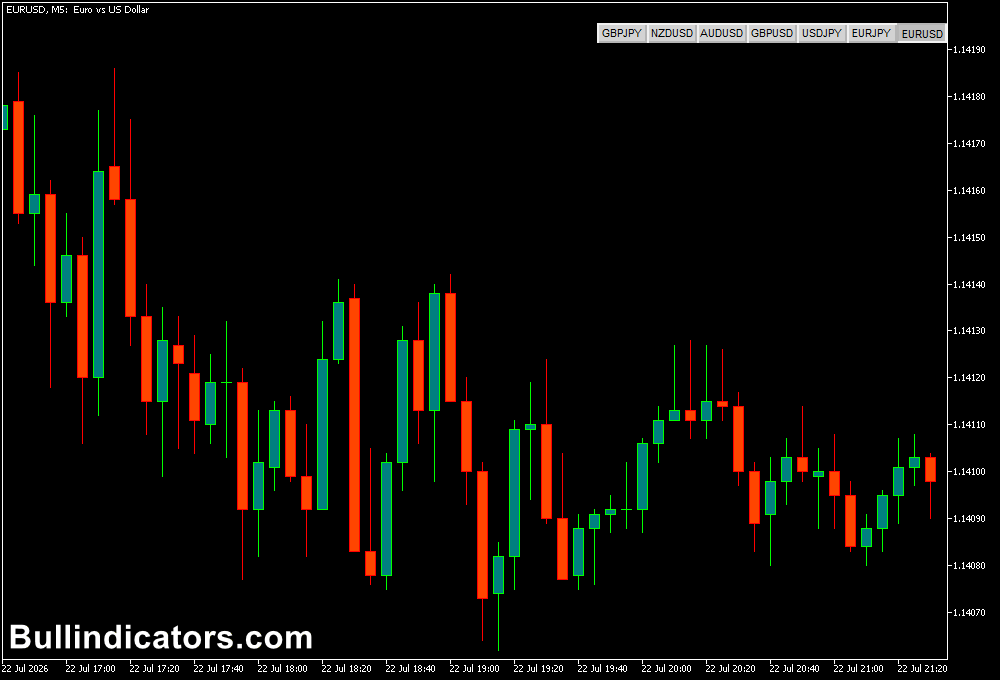
After installing the Symbol Changer indicator on a MetaTrader 5 chart, a selection panel appears with buttons representing available trading symbols.
By clicking a symbol button, the indicator instantly changes the current chart to the selected instrument.
This allows traders to quickly switch between forex pairs, indices, commodities, and other available assets.
The indicator works on any timeframe, making it suitable for traders who perform detailed multi-timeframe analysis.
Core Features
- Instantly switches between trading symbols.
- Displays currency pairs as clickable buttons.
- Reduces the need to open multiple charts.
- Keeps the MetaTrader workspace organized.
- Supports multi-timeframe analysis.
- Works with different financial instruments.
Best for
- Multi-pair forex traders.
- Top-down technical analysis.
- Trend-following strategies.
- Price action traders.
- Scalpers monitoring several markets.
- Professional chart organization.
Best Markets
- Major forex pairs such as EUR/USD, GBP/USD, and USD/JPY.
- Cross currency pairs like EUR/JPY and GBP/JPY.
- Gold and silver markets.
- Major stock indices.
- Cryptocurrency pairs.
- Commodity markets.
Trading Styles
- Scalping on M1 and M5 charts while monitoring multiple pairs.
- Intraday trading using M15 and H1 analysis.
- Swing trading with Daily and H4 timeframe reviews.
- Trend-following strategies.
- Multi-timeframe breakout strategies.
- Price action analysis.
How Traders Use It
The Symbol Changer Indicator is commonly used as part of a structured market analysis process.
For example, a trend trader can start by checking the Daily chart to determine the main market direction, move to the H4 chart for confirmation, and then switch to H1 or lower timeframes to search for an entry.
With the indicator, changing between these charts takes only one click.
This makes it easier to discover new opportunities without constantly opening and closing windows.
For example, a trader analyzing EUR/USD can quickly switch to GBP/USD, USD/JPY, or other pairs to compare market conditions.
This helps identify the strongest setups and prevents missing potential opportunities across different markets.
The indicator is also useful during active trading sessions when markets move quickly.
Fast chart switching allows traders to review several instruments without losing focus.
Get Instant Free Access
Indicator Settings
- Pairs: Selects the currency pairs and instruments displayed on the chart buttons.
- Color of Button With Trades: Changes the button color when active trades are present.
Important Notes
- The Symbol Changer Indicator does not create trading signals.
- It is designed to improve chart navigation and analysis speed.
- Useful for traders who analyze many instruments daily.
- Works best when combined with a structured trading plan.
- Helps discover potential setups without managing multiple chart windows.
- Suitable for both beginners and experienced MetaTrader 5 users.