
The Arrow Buy Sell Indicator for MT4 is a straightforward trend-following tool that marks potential buying and selling opportunities directly on the price chart.
It uses green and red arrows to show changes in market direction, making it easy to identify when bullish or bearish momentum is developing.
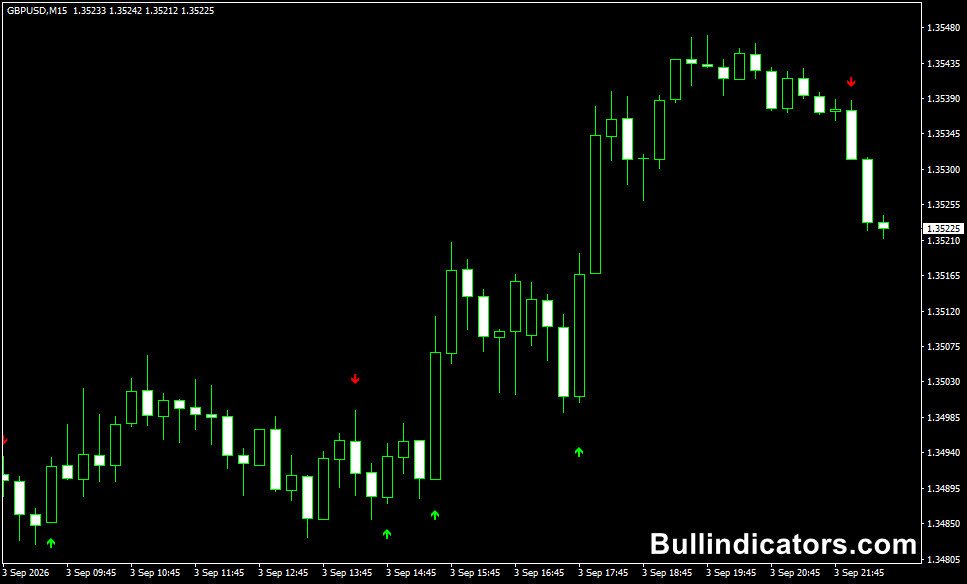
A green arrow indicates a potential BUY setup, while a red arrow signals a potential SELL setup.
The tool can be used across all MT4 timeframes, with the M1 and M5 charts particularly useful for short-term scalping.
On GBP/USD, for example, it can help identify quick directional moves where a scalp targeting around 5 to 15 pips may be considered, provided market conditions and risk management support the setup.
Why traders use the Arrow Buy Sell Indicator
The main advantage is its simple visual presentation.
There is no need to interpret complex subwindows or multiple calculations because the signals appear directly beside the relevant price action.
This makes it useful for both rapid decision-making and confirmation of an existing trading approach.
The arrows can also help identify possible changes in direction.
When a green signal changes to a red signal, it may indicate weakening bullish momentum and a potential bearish move.
A change from red to green can provide the opposite indication.
For additional confirmation, the signals can be combined with tools such as RSI, MACD, moving averages or support and resistance levels.
Download This MT4 Indicator for Free
Indicator Chart Setup
Once applied to an MT4 chart, the Arrow Buy Sell Indicator places colored arrows around the price candles.
Green arrows represent bullish signals and red arrows represent bearish signals.
The chart remains uncluttered because the primary information is presented through the arrows themselves.
The tool can be used on any timeframe, although M1 and M5 are particularly suitable for short-term setups.
On higher timeframes, the signals can be used to follow broader directional moves with fewer short-term fluctuations.
Core Features
- Green arrows for potential BUY signals.
- Red arrows for potential SELL signals.
- Works across all MT4 timeframes.
- Signals are displayed directly on the price chart.
- Can be used for trend direction and potential reversals.
- Optional sound alerts when a different color arrow appears.
- Can be combined with RSI, MACD and other confirmation tools.
Best for
- Identifying short-term changes in market direction.
- Finding potential entry points during directional moves.
- Monitoring possible trend reversals.
- Fast decision-making on M1 and M5 charts.
- Confirming setups built around price action or other technical tools.
Best Markets
- GBP/USD – well suited to M1 and M5 scalping during active sessions, with 5–15 pip targets possible on suitable moves.
- EUR/USD – useful for liquid intraday setups and short-term directional moves.
- GBP/JPY – suitable for faster markets where larger intraday swings can develop.
- Gold (XAU/USD) – can be tested for momentum-based setups, although volatility requires wider risk controls.
Trading Styles
- Scalping on M1 and M5 charts.
- Intraday trend trading.
- Momentum-based entries.
- Reversal confirmation.
- Signal confirmation alongside a separate trading strategy.
How traders use it
A common approach is to wait for the arrow to appear and then assess the surrounding price action before entering.
A green arrow can be used as a starting point for investigating a long setup, while a red arrow can prompt analysis of a short opportunity.
For example, on GBP/USD during an active London or New York session, a green arrow on the M1 or M5 chart may appear as price begins pushing higher.
A short-term setup could target approximately 5 to 15 pips when momentum, spread and nearby price levels are favorable.
A red arrow can be used in the same way for a bearish move.
The signals should not be treated as standalone guarantees.
Market conditions can change quickly, particularly on very low timeframes.
Many setups become stronger when the arrow agrees with the prevailing trend, support or resistance, momentum, or another technical confirmation.
Get Instant Free Access
Indicator Settings
- SoundOn: Set to true to receive an alert when a different color arrow appears.
- Colors: Controls the appearance of the bullish and bearish arrows on the chart.
- Style: Adjusts the visual presentation of the plotted signals.
- Extra: Additional visual parameters may be available depending on the version of the file.
For traders who want to compare this approach with a moving-average trend filter, see the Zero Lag Moving Average Indicator for MT4.
Important Notes
- The indicator can be used on all MT4 timeframes, but M1 and M5 are particularly useful for scalping applications.
- Low-timeframe signals can produce more noise, so confirmation is important.
- Green arrows indicate bullish direction, while red arrows indicate bearish direction.
- Use stop-loss and position sizing appropriate for the market and timeframe.
- For short-term GBP/USD scalping, account for spread and execution speed when targeting 5–15 pips.
- Test the settings and signal behavior on a demo account before using it with real funds.









